FORD : : | 2013-2014 C-MAX |
This article supersedes TSB 15-0089 to update the Service Procedure and Part List.
ISSUE:
Some 2013-2014 C-MAX Energi vehicles may exhibit a concern with a discharged 12 volt battery.
ACTION:
Follow the Service Procedure steps to correct the condition.
SERVICE PROCEDURE
- Disconnect the 12 volt battery. Refer to Workshop Manual (WSM), Section 414-01.
- Connect the Rotunda Midtronics GR1-190 or GRX-3590 Diagnostic Battery Charger to the vehicle’s battery terminal posts only. Battery cables must be removed and no other connections, such as body ground, can be in the circuit during testing.
- Select diagnostic fast charge.
- On GR1-190 only – select above 400 km (250 miles) or below 400 km (250 miles) based on vehicle mileage.
- Select battery type Lead Acid.
- Enter cold cranking amp (CCA) rating of 390 CCA.
- Did the battery pass the load test?
- Yes – allow battery to fully charge. After charging is complete, reconnect the 12 volt battery. Refer to WSM, Section 414-01. Proceed to Step 4.
- No – record the failure code. Replace the battery. Refer to WSM, Section 414-01. Make sure the new 12 volt battery is fully charged. Using Integrated Diagnostic System (IDS) service tool, perform the battery monitoring system (BMS) reset after the new battery is connected. Proceed to Step 4.
- Reprogram the powertrain control module (PCM), DC/DC converter (DCDC), instrument panel cluster (IPC), and gateway module (GWM) using IDS release 102.04 or higher. Make sure you are connected to the internet when entering module programming to guarantee you will receive the latest updates. Calibration files may also be obtained at www.motorcraftservice.com.
- Inspect vehicle communication module (VCM) and cables for any damage. Make sure scan tool connections are not interrupted during programming.
- Connect the VCM to the vehicle’s primary data link connector (DLC). Do not connect the VCM to the GWM data link connector.
- Turn off all accessories (radio, heated/cooled seats, headlamps, interior lamps, HVAC system) and close doors.
- Disconnect any aftermarket accessories.
- Disable sleep mode, screen saver and hibernation modes on the computer used for IDS.
- Create all IDS vehicle sessions key on engine off (KOEO). Starting the vehicle before creating a session will cause errors within the programming inhale process.
- Connect a battery charger to the 12 volt battery.
- Was the vehicle built on or before 12-Sep-2013?
- Yes – replace the telematics control unit (TCU)/embedded modem. When completing Programmable Module Installation (PMI) select automatic process for as-built data entry. Refer to WSM, Section 415-00. Proceed to Step 6.
- No – proceed to Step 6.
- Was the vehicle built on or before 3-Jun-2013?
- Yes – proceed to Step 7.
- No – proceed to Step 8.
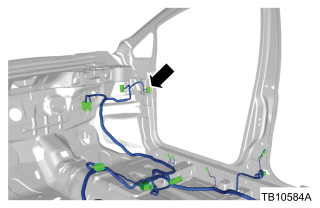
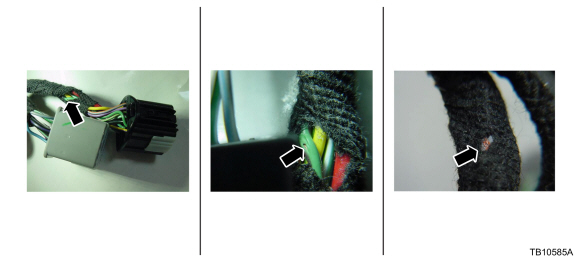
- Inspect the wiring for damage or chafing in the rear liftgate area, driver door connector wire harness C339 and front passenger door connector wire harness C340 (Figures 1, 2, 3 and 4). Is damage or chafing present?
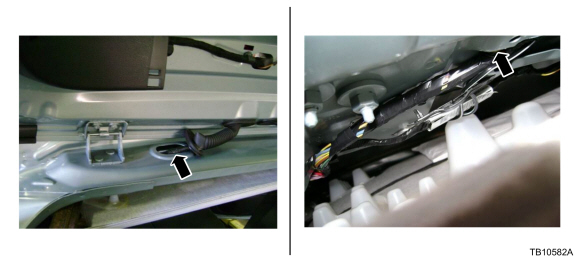
Figure 1 – 16-0157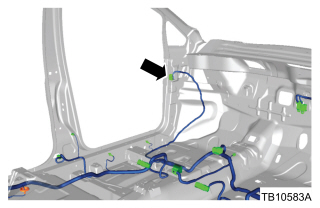
Figure 2 – 16-0157
Figure 3 – 16-0157
Figure 4 – 16-0157- Yes – repair the circuits as needed. Refer to Wiring Diagram (WD), Section 5-1. After repair, wrap the affected area with 3M Temflex Cotton Friction Tape or equivalent to prevent future concerns. Proceed to Step 8.
- No – wrap affected area with 3M Temflex Cotton Friction Tape or equivalent to prevent future concerns. Proceed to Step 8.
- Print the information sheet and provide to the customer. Communicate to the customer that Ford recommends disconnecting any devices attached to the auxiliary power port, USB port and OBDII port when the vehicle is turned off. (such as cell phone chargers, USB devices, insurance company snapshot devices). (Figure 5)
| Obtain Locally | |
| Part Number | Part Description |
1755

3M Temflex Cotton Friction Tape 1755, 3/4 in x 60 ft, Black, 1 Roll, Electrical Maintenance
Last update on 2026-06-19 / Affiliate links / Images from Amazon Product Advertising API | 3M Temflex Cotton Friction Tape |
| GM5Z-14G229-BD | TCU Module |
| BXT-67R | 12 Volt Battery |
| OPERATION | DESCRIPTION | TIME |
| 160157A | 2013-2014 C-MAX Energi: Diagnose And Charge Battery, Reprogram Modules, Inspect Wiring Pass (Do Not Use With Any Other Labor Operations) | 1.4 Hrs. |
| 160157B | 2013-2014 C-MAX Energi: Diagnose And Replace Battery, Reprogram Modules, Inspect Wiring Pass (Do Not Use With Any Other Labor Operations) | 1.7 Hrs. |
| 160157C | 2013-2014 C-MAX Energi: Diagnose And Charge Battery, Reprogram Modules, Inspect And Repair Wiring (Do Not Use With Any Other Labor Operations) | 2.1 Hrs. |
| 160157D | 2013-2014 C-MAX Energi: Diagnose And Replace Battery, Reprogram Modules, Inspect And Repair Wiring (Do Not Use With Any Other Labor Operations) | 2.3 Hrs. |
| 160157E | 2013-2014 C-MAX Energi: Diagnose And Charge Battery, Reprogram Modules, Replace The TCU Module, Inspect Wiring Pass (Do Not Use With Any Other Labor Operations) | 1.9 Hrs. |
| 160157F | 2013-2014 C-MAX Energi: Diagnose And Replace Battery, Reprogram Modules, Replace The TCU Module, Inspect Wiring Pass (Do Not Use With Any Other Labor Operations) | 2.1 Hrs. |
| 160157G | 2013-2014 C-MAX Energi: Diagnose And Charge Battery, Reprogram Modules, Replace The TCU Module, Inspect And Repair Wiring (Do Not Use With Any Other Labor Operations) | 2.6 Hrs. |
| 160157H | 2013-2014 C-MAX Energi: Diagnose And Replace Battery, Reprogram Modules, Replace The TCU Module, Inspect And Repair Wiring (Do Not Use With Any Other Labor Operations) | 2.8 Hrs. |
WARRANTY STATUS
Eligible Under Provisions Of New Vehicle Limited Warranty Coverage.
Warranty/ESP coverage limits/policies/prior approvals are not altered by a TSB. Warranty/ESP coverage limits are determined by the identified causal part and verified using the OASIS part coverage tool.
DEALER CODING
| BASIC PART NO. | CONDITION CODE |
| 19K350 | 01 |
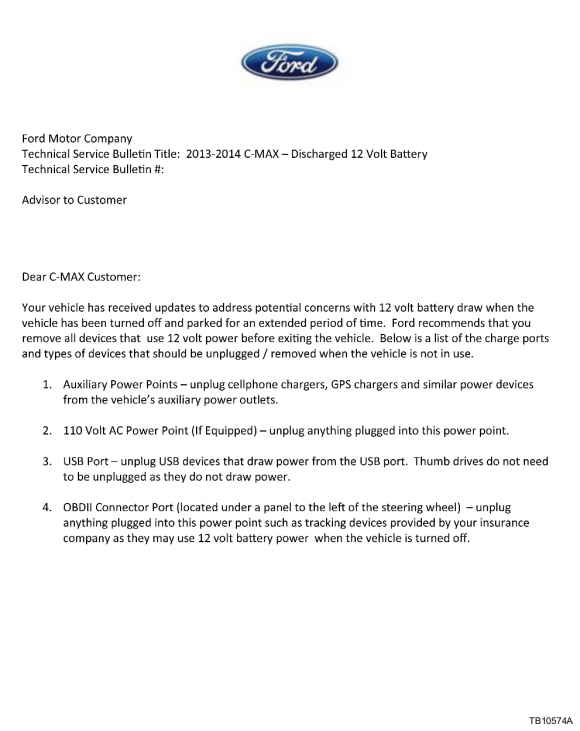
Figure 5 – 16-0157
Service Information & Reprogramming
Software necessary to program electronic modules to the latest calibration level, perform module initialization (PATS), and set Programmable Parameters on Ford, Lincoln and Mercury vehicles.
Ford Module Programming (FMP) is a software application that allows subscribers to program electronic modules on Ford, Lincoln and Mercury vehicles. It can be used for:
- Reprogramming emission-related (OBDII) modules on some vehicles manufactured in 1995 and all vehicles manufactured from 1996 to the present
- Reprogramming or reconfiguring non-emission-related modules on many vehicles (UBP and MS-CAN not supported)
In addition, module initialization (PATS) functions such as Keycode Erase/Reprogram and PCM Parameter Reset can be done using this application.
No products found.

Last update on 2026-06-10 / Affiliate links / Images from Amazon Product Advertising API

- ALL OF THE J2534 PROTOCOLS - This single unit has all of the protocols you need for your OEM J2534 reprogramming and diagnostics including the latest in DoIP and CanFD
- J2534 TECHNICAL SUPPORT - FREE for the life of the tool. Staffed by technicians who understand vehicle repair and J2534 Pass‑thru
- TOOLBOX WITH OEM APPLICATION DESCRIPTIONS - educational video tutorials and real-time news – Giving you the confidence and up-to-date knowledge to get the job done
- J2534 v05.00 API - The newest version of J2534 to give you the latest in pass-thru technology
- FUTURE PROOF WITH 4 CAN CHANNELS - Going beyond the 3 required by select Chrysler/FCA models, CarDAQ-Plus 3 also provides a 4th to meet the needs of future OEM applications
Last update on 2026-06-09 / Affiliate links / Images from Amazon Product Advertising API
No products found.
No products found.
using Ford Module Programming (FMP) can Reprogram and Configure most Modules.Latest Calibration Information
Module Build Data (As-Built)
Use VIN to obtain As-Built data
www.motorcraftservice.com

Last update on 2026-06-09 / Affiliate links / Images from Amazon Product Advertising API
No products found.

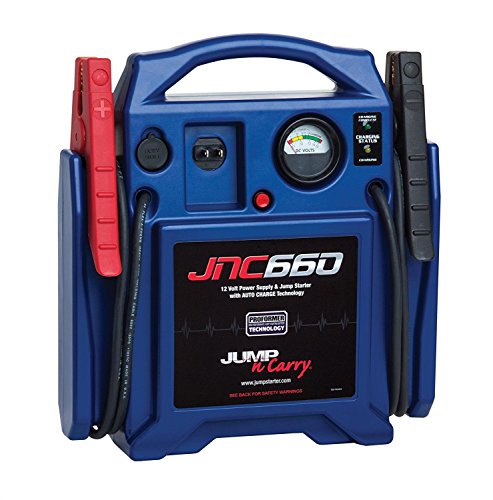
- Delivers serious jump-starting power with 1000 peak amps and 500 instant starting amps
- Reverse polarity alarm alerts when there is an improper connection; Connect the clamps to the battery, turn on the switch and start your vehicle. All Metal Powder Coated Clamps
- Features a 120 PSI air compressor to help inflate tires with low pressure; High-powered LED light rotates 270 degrees to help you work in the dark
- Built-in 12V DC outlet and USB port provide portable power for electronic devices; Includes a limited 1 year manufacturer warranty
- Jump starter should be charged every 30 days when not in use; Charges using a standard household extension cord (sold separately)
Last update on 2026-06-10 / Affiliate links / Images from Amazon Product Advertising API
This product presentation was made with AAWP plugin.