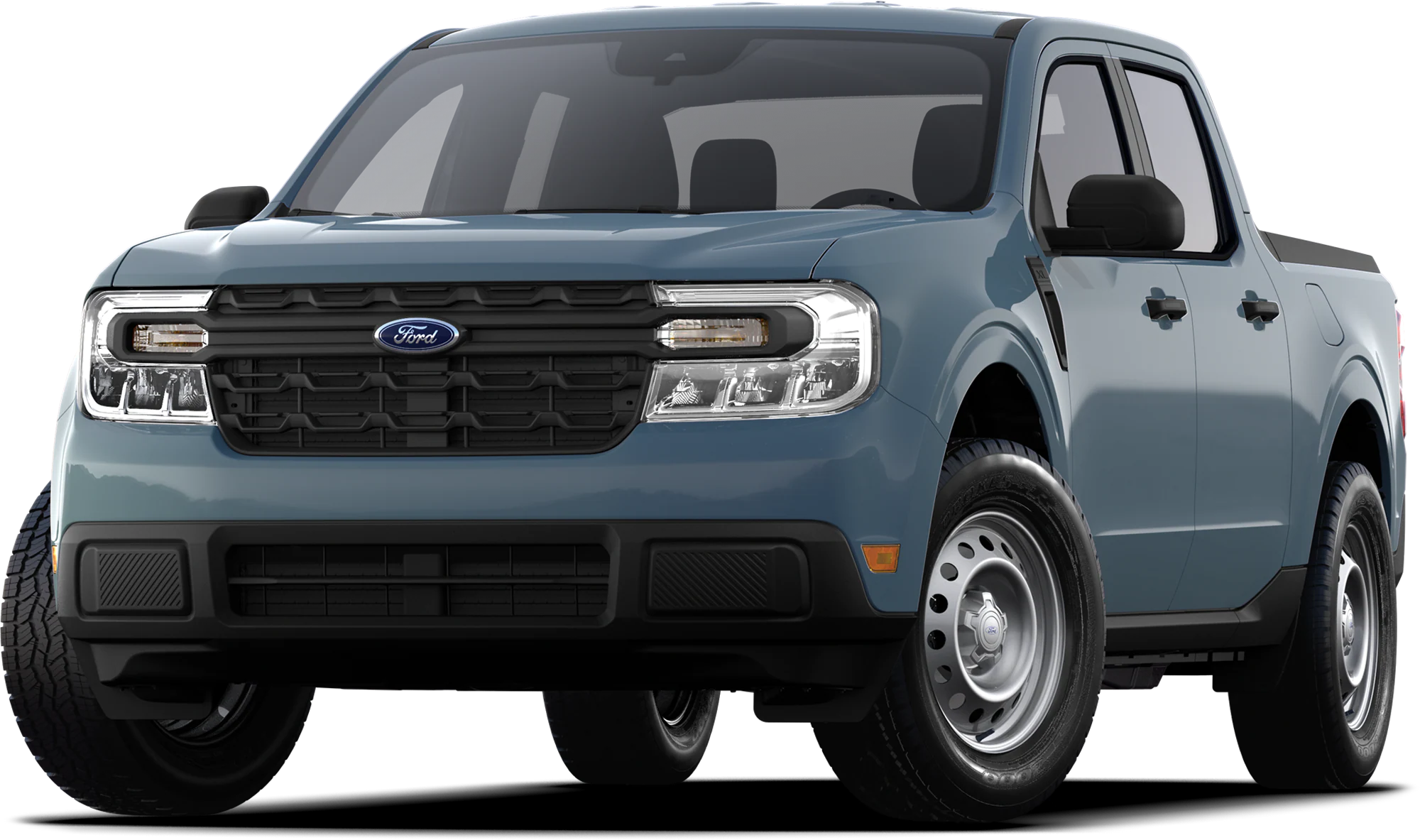
NHTSA ID Number: 10243427
Manufacturer Communication Number: 23P18
Summary
Certain 2023 Model Year Maverick Vehicles Equipped with a 2.5L Duratec – Hybrid Engine – Powertrain Control Module (PCM) Reprogramming
September 28, 2023
NEW VEHICLE RECOMMENDED DEMONSTRATION / DELIVERY HOLD
Customer Satisfaction Program 23P18
Certain 2023 Model Year Maverick Vehicles Equipped with a 2.5L Duratec – Hybrid Engine
Powertrain Control Module (PCM) Reprogramming
PROGRAM TERMS
This program will be in effect through September 28, 2031, for vehicles within the new vehicle emissions warranty coverage period (8 years / 80,000 miles, whichever occurs first).
AFFECTED VEHICLES
| Vehicle | Model Year | Assembly Plant | Build Dates |
| Maverick | 2023 | Hermosillo | April 11, 2023 through August 23, 2023 |
US population of affected vehicles: 18,063. Affected vehicles are identified in OASIS.
REASON FOR THIS PROGRAM
In the affected vehicles, Diagnostic Trouble Code (DTC) P2282 – Air Leak Between Throttle Body and Intake Valves may be inadvertently set, potentially causing the check engine light to illuminate during normal driving conditions while the vehicle is in motion.
SERVICE ACTION
Before demonstrating or delivering any new in-stock vehicles involved in this program, dealers are to reprogram the PCM software. This service must be performed on the affected vehicles at no charge to the vehicle owner. For new vehicle storage guidelines, refer to EFC13033.
OWNER NOTIFICATION MAILING SCHEDULE
Owner letters will not be mailed for this program.
MOBILE SERVICE REPAIR ASSESSMENT LEVEL
- All repairs in this program have the following assessment level:
– Mobile Reprogramming
MOBILE REPAIR RECOMMENDATIONS
- Confirm with the customer a mobile repair is feasible.
- Check OASIS before going to the customer’s home or business to confirm if any other outstanding FSA needs to be completed.
- Transportation – due to the simplicity of this repair, a specialty vehicle is not required.
MOBILE REPAIR ADDITIONAL INFORMATION
Please ensure the technician brings the following to the mobile repair destination:
- Printed Technical Instructions.
- Printed Repair/Work Order or any other necessary documentation as customer copy(s). o Documents could also be emailed to the customer.
- Shirt/uniform and vehicle graphic with the dealership or Ford
 logos are recommended.
 - Recommended specialty tools: Ford Diagnosis and Repair System (FDRS).
SOLD VEHICLES
- Correct affected vehicles identified in OASIS which are brought to your dealership within the applicable emissions warranty coverage period.
- Dealers are to prioritize repairs of customer vehicles over repairs of new and used vehicle inventory.
STOCK VEHICLES
- Correct all affected units in your new vehicle inventory before delivery.
- Use OASIS to identify any affected vehicles in your used vehicle inventory.
BRANDED / SALVAGED TITLE VEHICLES
Branded / salvaged title vehicles are eligible for this service action.
OWNER REFUNDS
Refunds are not approved for this program.
RENTAL VEHICLES
Rental vehicles are not approved for this program.
PICK-UP AND DELIVERY- Participating Dealers
Dealers participating in the Remote Experience Program:
- Refer to EFC12071, 2023 Remote Experience Program, Pickup & Delivery (PDL) Offset section for additional details.
PICK-UP AND DELIVERY- Non-participating Dealers
Dealers not participating in the 2023 Remote Experience Program for Pick-up & Delivery are authorized to claim unique services for completing this program.
- Dealers are authorized to claim one-half labor hour per repair for vehicle pick-up & delivery services. Refer to Labor Allowances for details.
- Dealers must retain a Vehicle Pick-up & Delivery Record with the repair order documentation.
PARTS REQUIREMENTS
Parts are not required to complete this repair.
CERTAIN 2023 MODEL YEAR MAVERICK VEHICLES EQUIPPED WITH A 2.5L DURATEC – HYBRID ENGINE – POWERTRAIN CONTROL MODULE (PCM) REPROGRAMMING
SERVICE PROCEDURE
Module Reprogramming
NOTE: Reprogram appropriate vehicle modules before performing diagnostics and clear all Diagnostic Trouble Codes (DTCs) after programming. For DTCs generated after reprogramming, follow normal diagnostic service procedures.
1. Connect a battery charger to the 12 Volt (V) battery.
NOTE: Verify the negative cable of the charger is installed on a chassis or engine ground and not the 12V battery negative terminal to prevent the battery saver mode from activating on the vehicle.
NOTE: If the diagnostic software does not load or if the vehicle cannot be identified properly, make sure there is a good internet connection and the Vehicle Communication Module (VCM) is properly connected to the Data Link Connector (DLC).
2. Log into Ford Diagnostic and Repair System (FDRS).
NOTE: Vehicle information is automatically retrieved by the diagnostic software and a Network Test is run. Vehicle identification data appears on the screen when this is complete.
NOTE: Follow the FDRS on-screen instructions to complete the reprogramming procedure.
3. Click Read VIN from Vehicle or manually enter the Vehicle Identification Number (VIN).
NOTE: Available modules are shown on the left hand (LH) side of the screen and available procedures are listed on the right hand (RH) side of the screen. Modules that are communicating are highlighted in green.
4. Select Toolbox tab.
5. From the list on the LH side of the screen, select the PCM.
6. From the list on the RH side of the screen, select PCM – Powertrain Control Module (PCM) Software Update.
7. Click RUN. Follow all on-screen instructions carefully.
NOTE: After the programming of the PCM, the FDRS will automatically prompt you to update the necessary modules based on the vehicles options and calibration levels. Follow the on-screen instructions to complete the update. You may be prompted to update one or more of the following modules.
• Secondary on-board diagnostic control module C (SOBDMC)
• Battery energy control module (BECM)
• Anti-lock brake system (ABS) module
8. From the list on the RH side of the screen, select Self-Test and click RUN.
9. Click the Run Selected Tests button in the lower right.
10. Click the Clear & Retest button at the top of the screen to clear DTCs in all modules.
11. Disconnect the battery charger from the 12V battery once the programming has completed.
NOTE: Advise the customer this vehicle is equipped with an adaptive transmission shift strategy which allows the vehicle’s computer to learn the transmission’s unique parameters and improve shift quality. When the adaptive strategy is reset, the computer will begin a re-learning process. This re-learning process may result in firmer than normal upshifts and downshifts for several days. Important Information for Module Programming
NOTE: When programming or reprogramming a module, use the following basic checks to ensure programming completes without errors.
• Make sure the 12V battery is fully charged before carrying out the programming steps and connect FDRS/scan tool to a power source.
NOTE: A good internet connection is necessary to identify the vehicle and to load the diagnostic software.
• Inspect the Vehicle Communication Module II (VCM II)/Vehicle Communication Module III (VCM III) or the Vehicle Communication and Measurement Module (VCMM) and the cables for any damage. Make sure scan tool connections are not interrupted during programming.
• A hardwired connection is strongly recommended.
• Turn off all unnecessary accessories (radio, heated/cooled seats, headlamps, interior lamps, HVAC system, etc.) and close doors.
• Disconnect/depower any aftermarket accessories (remote start, alarm, power inverter, CB radio,etc.).
• Follow all scan tool on-screen instructions carefully.
• Disable FDRS/scan tool sleep mode, screensaver, hibernation modes.
• Create all sessions Key ON Engine OFF (KOEO). Starting the vehicle before creating a session will cause errors within the programming inhale process.
Recovering a module when programming has resulted in a blank module
a. Disconnect the VCM II/VCM III or the VCMM from the data link connector (DLC) and your computer.
b. After ten seconds, reconnect the VCMII/VCMIII or the VCMM to the DLC and the PC. Launch FDRS.
The VCMII/VCMIII or the VCMM icon should turn green in the bottom right corner of the screen. If it does not, troubleshoot the FDRS to VCM connection.
c. If you are using the same FDRS as the initial programming attempt, select the appropriate VIN from the Vehicle Identification menu. If you are using a different FDRS, select “Read VIN from Vehicle” and proceed through the Network Test.
d. In the Toolbox menu, navigate to the failed module and Download/Run Programmable Module Installation (PMI). Follow the on-screen prompts. When asked if the original module is installed, select “No” and continue through the installation application.
e. Once programming has completed, a screen may list additional steps required to complete the programming process. Make sure all applicable steps are followed in order.
1 Affected Product
Vehicle
| MAKE | MODEL | YEAR |
| FORD | MAVERICK | 2023 |
1 Associated Document
Manufacturer Communications
September 28, 2023
Powertrain Control Module (PCM) Reprogramming
MC-10243427-0001.pdf 443.351KB
Reprogramming
Service Information & Reprogramming
Module Reprogramming
| Diagnostic Software | Interface Device | Complete Vehicle Diagnostics | Module Programming | ||
| 1996-2017 Model Year |
2018-Present Model Year |
1996-2017 Model Year |
2018-Present Model Year |
||
| IDS/FDRS | VCM, VCM II, VCMM |
X | X | X | X |
| FJDS/FDRS | Compatible J2534 Devices (Including VCM II and VCMM) |
X | X | X | |
Detailed system requirements, installation, and support information for each product is located under the diagnostics tool support tab for each product.
Integrated Diagnostic Software (IDS) / Ford Diagnosis & Repair System (FDRS)
For use with VCM I, VCM II, VMM and VCMM hardware devices only. The complete factory Ford Motor Company vehicle diagnostic tool that provides complete dealership level vehicle diagnostic coverage for all 1996 to present Ford, Lincoln and Mercury vehicles. The IDS software includes time based access to the IDS software, software updates and calibration files.
Ford J2534 Diagnostic Software (FJDS) / Ford Diagnosis & Repair System (FDRS)
For use with compatible J2534 hardware devices. FJDS software provides Ford Module Programming functionality that covers 1996 to present Ford, Lincoln and Mercury module reprogramming functions, plus complete dealership level vehicle diagnostic software for all 2018 to present Ford and Lincoln vehicles. The FJDS software license includes time based access to the FJDS software, software updates and calibration files.
Latest Calibration Information
Module Build Data (As-Built)
Use VIN to obtain As-Built data

- J2534 Pass-Thru Programmer: TOPDON RLink J2534 is an advanced diagnostic and reprogramming tool that support all J2534 protocols, as well as D-PDU, CAN-FD and DoIP, ensuring compatibility with a wide range of modern vehicles. It offers extensive versatility with support for over 18 major automotive brands, including Chrysler, Ford, GM, Nissan, Toyota, Honda, Subaru, Land Rover/Jaguar, Volvo, Wuling, Volkswagen/Audi, Mercedes-Benz, and BMW. NOTE: Not compatible with Ford IDS diagnostic software
- All-in-One OEM Diagnostics: This J2534 ECU programming tool elevates your automotive repair capabilities to new heights by delivering complete OEM diagnosis. Boasting comprehensive full-system diagnostics, intuitive repair guides, advanced ECU programming and coding, common reset services, a vast library of repair information and more, this all-in-one solution empowers technicians to effortlessly tackle complex vehicle issues with ease. *Not compatible with 24V vehicles
- Proven Performance You Can Trust: Backed by over 10000 real vehicle tests and benefit from a wealth of practical experience, this OEM reprogramming tool guarantees stable and exceptional performance. Supported by TOPDON's dedicated technical experts with in-depth knowledge of both auto repair and J2534 Pass-Thru programming, the RLink J2534 provides prompt and professional assistance, ensuring a smooth setup and reliable compatibility
- Integrated Excellence, Always Up-to-Date: Featuring the exclusive RLink Platform to provide a streamlined experience with one-click driver installation and management, ensuring flawless integration with your OE software, maintaining the original performance quality. The built-in operation guide makes mastering OE software quick and easy, so you can get started right away. Plus, with lifetime free updates, your diagnostics will stay current with the latest drivers and innovations
- Efficiency Meets Versatility: Engineered to support three CAN channels simultaneously - CAN FD and CAN-CC included, giving you the edge in fast troubleshooting. To perfectly synchronized with the OE software, please diagnose with active subscriptions and make sure your computer system is running a compatible 64-bit Windows version (7, 8, 10 or later) to fully leverage the power of RLink J2534. *We don't provide extra OE software

- Advanced VCI Box, Industry-leading J2534 Pass-Thru Technology: This J2534 Pass-Thru Programmer is designed espically for technicians, independent shop owners, and DIY enthusiasts, enables fast, reliable computer-based programming. It supports all J2534 protocols—including the latest DoIP and CAN FD—ensuring full compatibility with both legacy and next-generation vehicles.
- High-Speed OEM-Level Diagnostics & Programming: Unlock true OEM functionality with comprehensive system diagnostics, guided troubleshooting, coding, adaptations, resets, and programming—all designed to slash repair time. This all-in-one tool eliminates the need for multiple OEM devices, boosting efficiency and cutting costs. Equipped with High-Speed USB, it delivers 10x more data per second than competing solutions
- Coverage for 17 Car Brands & Ultra Reliability: Works seamlessly for Chrysler, for Ford(Forscan), for GM, for Nissan, for Toyota, for Honda, for Subaru(SSM4), for Land Rover/Jaguar, for Volvo, for Wuling, for Volkswagen, for Mercedes-Benz, and for BMW. Backed by over 10000 real vehicle tests and benefit from a wealth of practical experience, this OEM reprogramming tool guarantees stable and exceptional performance
- User-Friendly RLink Platform & Expert Support: TOPDON’s proprietary driver management platform offers a clean interface and lifetime free updates. Access a rich library of real-world case studies to stay ahead of the curve. Backed by a support team with 10+ years of J2534 and automotive repair experience, we provide one-on-one assistance to resolve any technical issue.
- 6.6 ft USB-C Cable & Portable Storage Case: The RLink J2534 diagnostic tool features a 6.6ft USB 2.0 Cable and a 1.2 ft OBDII Extension Cable, allows to connection your computer easily outside the vehicle. The included handled carry case offers easy portability, storage, and hanging options—keeping your gear clean and ready to go, anywhere.

- [J2534 Pass-Thru Programmer] - TOPDON RLink J2534 is engineered for professional technicians, delivering OEM diagnostic and reprogramming capabilities. It supports all J2534 protocols, CAN-FD, DoIP, D-PDU. Compatible with 17 vehicle brands—such as Chrysler, Ford, GM, KIA, Hyundai, Nissan, Toyota, Honda, Subaru, Mitsubishi, MAZDA, Land Rover/Jaguar, Volvo, Volkswagen/Audi, Mercedes-Benz, and BMW. RLink J2534 can help reduce the cost of purchasing equipment from different brands.
- [All-in-One OEM Reprogramming and Diagnostics] - When seamlessly integrated with OEM diagnostic software, this dongle enables you to perform a wide range of functions, including ECU programming and coding, DTC reading and clearing, active tests, component matching, adaptations, rewriting, guided troubleshooting, and more. This all-in-one tool eliminates the need for multiple OEM devices, significantly boosting work efficiency.
- [Tested, Trusted, and Proven for Accuracy] - TOPDON RLink J2534 is renowned for its reliability, having successfully completed over 10,000 real-vehicle tests. The wealth of data and hands-on experience behind it ensures consistent performance and accurate results. You can trust this tool to deliver optimal performance.
- [One-Click Installation, Continuous Updates] - The exclusive TOPDON RLink platform streamlines installation with a one-click driver setup, allowing you to quickly access OEM software for diagnostic and reprogramming tasks. With lifetime free updates, your RLink J2534 stays current without any additional cost, ensuring reliable performance for the long term. *We don't provide extra OE software.
- [Works with Windows Compatibility and OEM Software Subscription] - The RLink J2534 supports three CAN channels - including CAN FD and CAN-CC, providing advantages in the process of rapid troubleshooting. Compatible with Windows 7, 8 and 10 (64-bit) and higher versions of the system. For full functionality, an active OEM software subscription is required for each supported vehicle brand. Please note that the dongle does not include OEM software, which must be purchased separately to access brand-specific diagnostic and reprogramming features.
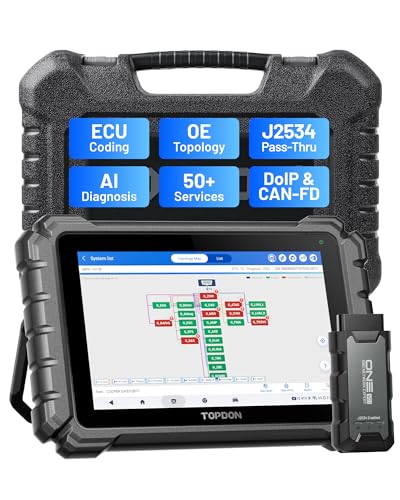
- Dual WiFi & 10.1" Touchscreen: Provides a stable, high-speed wireless link 3x faster than bluetooth, and a responsive, professional interface. Topdon ONE obd2 scanner diagnostic tool ensures smooth, non-lagging diagnostic scan, boosting mechanic efficiency
- J2534 Pass-Thru Support: The included ONE VCI supports the J2534 standard, allowing it to function as a pass-thru device when paired with OEM diagnostic software.Through TOPDON’s RLink platform, technicians can perform dealer-level coding, expanding in-house capabilities without investing in multiple factory automotive scan tools
- OE Topology Mapping: Visualize the vehicle’s ECU network exactly as it’s built.Zoom, pan, and highlight specific modules to pinpoint component issues with precision.Topology mapping displays real-time communication between modules
- 50+ Service Functions: Covers high-demand services like ADAS calibration, DPF regen, TPMS reset, ABS bleed, and throttle adaptation.Expands your service menu, allows you to charge premium rates, and turns away zero jobs due to lack of tooling. Vehicle-specific functionality may vary
- Advaned ECU Coding: 10 of the most serviced brands in North America, including full ECU coding and flash hidden support for BMW, VW, Au-di, Benz, Porsche, Toyota, Ni ssan and more. Enables module replacement, feature customization, and personal settings with automatic backup or restore.Lets your shop safely offer high-margin customization services, attracting more customers and boosting profit
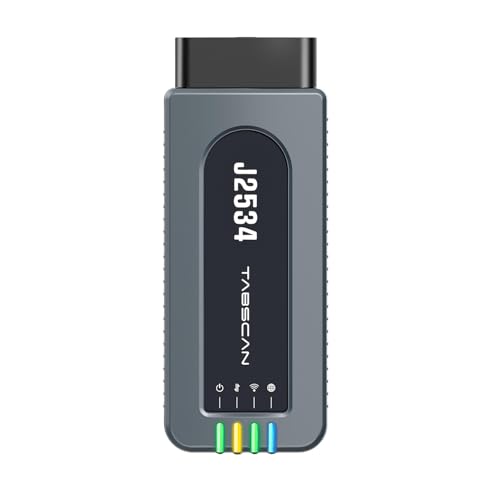
- 【J2534 Pass-Thru Device】 This budget-friendly J2534 pass-thru device delivers OEM diagnostics and reprogramming capabilities for dealerships, repair shops and automotive DIY enthuisasts, enables you diagnose, program and repair the vehicles more efficiently and precisely. Supporting J2534, D-PDU, CAN-FD and DoIP, this J2534 passthru tool ensures wide vehicle coverage. It's compatible with OE software application, ensuring seamless integration and original performance quality
- 【All-in-One Diagnostic Tool】 Simplify your workflow and tackle the complex diagnostics and repairs with confidence! This J2534 passthrough tool provides full system diagnosis, bi-directional control, maintenance reset services, ECU programming and ECU coding to run advanced diagnostics and programming. Equipped with the specialized platform, this J2534 pass-thru tool is fully compatible with OE software that helps technicians confidently handle complicated vehicle repair issues
- 【J2534 Diagnostic Tool】 The Tabscan J2534 pass-thru device is built with a dedicated platform, making it ideal for both professional and personal use. Simply download the driver for your ford vehicle within the platform—ensuring only one driver is installed at a time. Then connect the device to your vehicle’s OBD2 port and link it to your computer using the included USB A to USB C cable. Finally launch your OE software, select Tabscan J2534 VCI as interface, and begin diagnose and program
- 【Universal Compatibility】 Tabscan J2534 reprogramming tool is designed to be compatible with Ford vehicles for advanced diagnostics and programming. It supports J2534 protocols, along with D-PDU, CAN-FD and DoIP, ensuring seamless connectivity with older or modern vehicles. This J2534 diagnostic tool only works with computer running on windows 7/10/11. Vehicle compatibility varies by model or year, please confirm with us before purchase. Note: It's not compatible with 24V vehicles
- 【Professional Technical Support】 Tabscan J2534 pass-thru device provides a stable and seamless connection between your vehicle and computer for diagnostics, programming, and coding. But that's not all—we go beyond hardware. Our dedicated technical support team brings deep expertise in automotive diagnostics and programming. Whether you need help with setup, troubleshooting or latest diagnostic resources and upgrades, we provide fast, professional and reliable support every step of the way

- ALL OF THE J2534 PROTOCOLS - This single unit has all of the protocols you need for your OEM J2534 reprogramming and diagnostics including the latest in DoIP and CanFD
- J2534 TECHNICAL SUPPORT - FREE for the life of the tool. Staffed by technicians who understand vehicle repair and J2534 Pass‑thru
- TOOLBOX WITH OEM APPLICATION DESCRIPTIONS - educational video tutorials and real-time news – Giving you the confidence and up-to-date knowledge to get the job done
- J2534 v05.00 API - The newest version of J2534 to give you the latest in pass-thru technology
- FUTURE PROOF WITH 4 CAN CHANNELS - Going beyond the 3 required by select Chrysler/FCA models, CarDAQ-Plus 3 also provides a 4th to meet the needs of future OEM applications
SEOCONTENT-START
© Copyright 2023 Ford Motor Company
Stacy L. Balzer Ford Motor Company
Operating Director P. O. Box 1904
Service Engineering Operations Dearborn, Michigan 48121 Ford Customer Service Division September 28, 2023
TO: All U.S. Ford and Lincoln Dealers SUBJECT: NEW VEHICLE RECOMMENDED DEMONSTRATION / DELIVERY HOLD
Customer Satisfaction Program 23P18
Certain 2023 Model Year Maverick Vehicles Equipped with a 2.5L Duratec – Hybrid Engine
Powertrain Control Module (PCM) Reprogramming
PROGRAM TERMS
This program will be in effect through September 28, 2031, for vehicles within the new vehicle emissions warranty coverage period (8 years / 80,000 miles, whichever occurs first).
AFFECTED VEHICLES
Vehicle Model Year Assembly Plant Build Dates
Maverick 2023 Hermosillo April 11, 2023 through August 23, 2023 US population of affected vehicles: 18,063. Affected vehicles are identified in OASIS.
REASON FOR THIS PROGRAM
In the affected vehicles, Diagnostic Trouble Code (DTC) P2282 – Air Leak Between Throttle Body and Intake Valves may be inadvertently set, potentially causing the check engine light to illuminate during normal driving conditions while the vehicle is in motion.
SERVICE ACTION
Before demonstrating or delivering any new in-stock vehicles involved in this program, dealers are to reprogram the PCM software. This service must be performed on the affected vehicles at no charge to the vehicle owner. For new vehicle storage guidelines, refer to EFC13033.
OWNER NOTIFICATION MAILING SCHEDULE
Owner letters will not be mailed for this program.
ATTACHMENTS
• Administrative Information
• Labor Allowances and Parts Ordering Information
• Technical Information
• Mobile Service Repair Assessment
• Mobile Repair/Pick-Up and Delivery Record QUESTIONS & ASSISTANCE
For questions and assistance, contact the Special Service Support Center (SSSC) via the SSSC Web Contact Site. The SSSC Web Contact Site can be accessed through the Professional Technician System (PTS) website using the SSSC link listed at the bottom of the OASIS VIN report screen or listed under the SSSC tab. Sincerely, Stacy L. Balzer © Copyright 2023 Ford Motor Company Customer Satisfaction Program 23P18
Administrative Information
Page 1 of 3 MOBILE SERVICE REPAIR ASSESSMENT LEVEL
• All repairs in this program have the following assessment level:
– Mobile Reprogramming
MOBILE REPAIR RECOMMENDATIONS
• Confirm with the customer a mobile repair is feasible.
• Check OASIS before going to the customer’s home or business to confirm if any other outstanding FSA needs to be completed.
• Transportation – due to the simplicity of this repair, a specialty vehicle is not required.
MOBILE REPAIR ADDITIONAL INFORMATION
Please ensure the technician brings the following to the mobile repair destination:
• Printed Technical Instructions.
• Printed Repair/Work Order or any other necessary documentation as customer copy(s).
o Documents could also be emailed to the customer.
• Shirt/uniform and vehicle graphic with the dealership or Ford logos are recommended.
• Recommended specialty tools: Ford Diagnosis and Repair System (FDRS).
MOBILE REPAIR QUESTIONS AND ASSISTANCE
• For questions and assistance, contact the Special Service Support Center (SSSC) via the SSSC Web Contact Site. Work with Dealership warranty administrator to create a SSSC contact ID#.
• Once an SSSC agent responds to the new contact ID#, you may opt to call the SSSC hotline: (800) 325-5621.
MOBILE REPAIR CLAIMING QUESTIONS
Dealers participating in the Remote Experience Program:
• Refer to Electronic Field Communication – EFC12071 2023 Remote Experience Program.
Dealers NOT participating in the 2023 Remote Experience Program:
• For questions and assistance, contact the Special Service Support Center (SSSC) via the SSSC Web Contact Site. Work with the Dealership warranty administrator to create an SSSC contact ID#.
• Once an SSSC agent responds to the new contact ID#, you may opt to call the SSSC hotline: (800) 325-5621.
OASIS ACTIVATION
OASIS will be activated on September 28, 2023.
FSA VIN LISTS ACTIVATION
FSA VIN Lists will not be activated for this service action.
SOLD VEHICLES
• Correct affected vehicles identified in OASIS which are brought to your dealership within the applicable emissions warranty coverage period.
• Dealers are to prioritize repairs of customer vehicles over repairs of new and used vehicle inventory. © Copyright 2023 Ford Motor Company Customer Satisfaction Program 23P18
Administrative Information
Page 2 of 3 STOCK VEHICLES
• Correct all affected units in your new vehicle inventory before delivery.
• Use OASIS to identify any affected vehicles in your used vehicle inventory.
BRANDED / SALVAGED TITLE VEHICLES
Branded / salvaged title vehicles are eligible for this service action.
OWNER REFUNDS
Refunds are not approved for this program.
RENTAL VEHICLES
Rental vehicles are not approved for this program.
PICK-UP AND DELIVERY- Participating Dealers
Dealers participating in the Remote Experience Program:
• Refer to EFC12071, 2023 Remote Experience Program, Pickup & Delivery (PDL) Offset section for additional details.
PICK-UP AND DELIVERY- Non-participating Dealers
Dealers not participating in the 2023 Remote Experience Program for Pick-up & Delivery are authorized to claim unique services for completing this program.
• Dealers are authorized to claim one-half labor hour per repair for vehicle pick-up & delivery services. Refer to Labor Allowances for details.
• Dealers must retain a Vehicle Pick-up & Delivery Record with the repair order documentation.
ADDITIONAL REPAIR (LABOR TIME AND/OR PARTS)
Additional repairs identified as necessary to complete the FSA should be managed as follows:
• For related damage and access time requirements, refer to the Warranty and Policy Manual / Section 6 – Ford & Lincoln Program Policies / General Information & Special Circumstances for FSA’s / Related Damage.
• For vehicles within new vehicle bumper-to-bumper warranty coverage, no SSSC approval is required, although related damage must be on a separate repair line with the “Related Damage” radio button checked.
o Ford vehicles – 3 years or 36,000 miles
• For vehicles outside new vehicle bumper-to-bumper warranty coverage, submit an Approval Request to the SSSC Web Contact Site before completing the repair. © Copyright 2023 Ford Motor Company Customer Satisfaction Program 23P18
Administrative Information
Page 3 of 3 CLAIMS PREPARATION AND SUBMISSION
• Claim Entry: Enter claims using Dealer Management System (DMS) or One Warranty Solution (OWS) online.
o When entering claims:
▪ Claim type 31: Field Service Action
▪ Sub Code: 23P18
▪ Customer Concern Code (CCC): E29 – “Check engine” light troubles
▪ Condition Code (CC): 04 – Software Revision/Flash Module
▪ Causal Part Number: RECALEM, Quantity 0
o For additional claims preparation and submission information, refer to the Recall and Customer Satisfaction Program (CSP) Repairs in the OWS User Guide.
• Related Damage/Additional labor and/or parts: Must be claimed as Related Damage on a separate repair line from the FSA with the same claim type and subcode as described in Claim Entry above.
IMPORTANT: Click the Related Damage Indicator radio button.
• Pickup & Delivery:
o Dealers participating in the Remote Experience Program –
▪ Refer to EFC12071, 2023 Remote Experience Program, Pickup & Delivery (PDL) Offset section for additional details.
o Dealers NOT participating in the Remote Experience Program –
▪ Dealers are authorized to claim one-half labor hour per repair for vehicle pick- up and delivery services.
▪ Dealers must retain a Vehicle Pick-up and Delivery Record with the repair order documentation.
• Mobile Repair:
o Dealers participating in the Remote Experience Program –
▪ Refer to Electronic Field Communication – EFC12071 2023 Remote Experience Program.
o Dealers NOT participating in the Remote Experience Program –
▪ Mobile repair allowances can be claimed for dealer-performed mobile repairs. Dealers that are working with Ford-contracted mobile repair companies should refer to those companies for claiming instructions.
▪ For dealer-performed mobile repairs, retain a copy of the Service Management signed record with the repair order documentation.
▪ Claim the mobile repair allowance Labor Operation Code 23P18MM along with the applicable Labor Operation Code for the repair (refer to the Labor Allowances table in Labor Allowances and Parts Ordering Information). © Copyright 2023 Ford Motor Company Labor Allowances and Parts Ordering Information
Page 1 of 1 Customer Satisfaction Program 23P18 LABOR ALLOWANCES
Description Labor Operation Labor Time
Update the PCM Software MT23P18B Up to
0.8 Hour(s) Mobile Service:
This allowance is only for non-eligible 2023 Remote Experience Program Dealers.
Can be used when the repair takes place away from the dealership.
If Additional Time is Required Due to Travel, Please Submit an SSSC Approval Form.
Vehicle Pick-up and Delivery Allowance:
This allowance is only for non-eligible 2023 Remote Experience Program Dealers.
NOTE: This allowance is for dealer-performed vehicle pick- up/delivery for dealership repairs only. Can only be claimed once, regardless of outstanding FSAs repaired.
PARTS REQUIREMENTS / ORDERING INFORMATION
Parts are not required to complete this repair. 23P18MM 23P18PP 0.5 Hours 0.5 Hours © Copyright 2023 Ford Motor Company Mobile Repair/Pick-Up and Delivery Record
Page 1 of 1 Customer Satisfaction Program 23P18 MOBILE REPAIR / VEHICLE PICK-UP AND DELIVERY RECORD VIN received (check one):
☐ Mobile Repair
☐ Pick-up and/or delivery service
As outlined below for the 23P18 Field Service Action program. ☐ Mobile Repair – Date: OR
☐ Pick-up – Date: ☐ Delivery – Date: Repair Order # Repair Order Date Service Manager Signature Date Mobile Service Repair Assessment
Page 1 of 2 Customer Satisfaction Program 23P18 Mobile Service Repair Assessment Assessment levels have been identified to help determine the ease of performing eligible mobile service repairs for a Field Service Action (FSA) outside of the dealership service facility. Dealer Bulletin
Within Attachment I of the dealer bulletin a mobile service repair assessment level(s) will be provided. These assessment levels have been determined using the amount of time, equipment and labor identified to perform the intended service action. Assessment Levels
– Mobile Reprogramming
– Light Mobile Service
– Enhanced Mobile Service
– Advanced Mobile Service
– Wheel and Tire Mobile Service
– Not a Mobile Service Repair Description of each level that is used to determine the overall assessment.
– Mobile Reprogramming
• Module Programming or similar type services
• Minimum tools maybe required other than an IDS/FDRS setup
• FDRS programming that requires internet connection (wi-fi or mobile hotspot)
• Make sure vehicle has a charge port to ensure battery voltage is maintained during flashing of the module(s)
• Repairs not greater than 1 hour in length (including time to wait for programming)
Note: The location will need a charging station or wall box to maintain the 12-volt battery. – Light Mobile Service
• Interior repair procedures that do not require seat, dash, or headliner removal
• Under hood repairs that do not require large component removal
• Exterior repairs that do not require large component/panel removal
• Repairs may require standard hand tools (Access to a Technician starter kit or similar) Mobile Service Repair Assessment
Page 2 of 2 Customer Satisfaction Program 23P18 – Enhanced Mobile Service
• A two-person process is required anytime a procedure requires work under the vehicle
• Brake Inspection and Brake Repair/Replacement
• Limited Suspension Component replacement (no alignment)
• Under Vehicle access for limited repairs (no large component removal)
• Vehicle Check Up – VCU
• Pre-Delivery Inspection – PDI
• Used Car Inspection/Presale Inspection
• May require floor jack, jack stands, and impact tools
Note: Wheel lock may be required. – Advanced Mobile Service
• Fluid Exchange/Oil Change
• Light Repairs
• Brake Hydraulic Repairs – Wheel and Tire Mobile Service
• Tire Removal from Wheel
• Tire Balancing
• Tire Repair
Note: Specialized Mobile Service unit and equipment including Tire balancer and Tire Changer required. – Not a Mobile Service Repair
• Large component removal
• BEV Battery Replacement
• Requires a vehicle hoist – to complete the repair (more than inspection)
• Required vehicle alignment
• Requires significant vehicle disassembly
• Repairs greater than 2-3 hours
• Any repairs that require M-Time
• Includes a service procedure where the vehicle owner may be distressed about the state of their vehicle TECHNICAL INSTRUCTIONS
PAGE 1 OF 3 CUSTOMER SATISFACTION PROGRAM 23P18 CERTAIN 2023 MODEL YEAR MAVERICK VEHICLES EQUIPPED WITH A 2.5L DURATEC – HYBRID ENGINE – POWERTRAIN CONTROL MODULE (PCM)
REPROGRAMMING SERVICE PROCEDURE
Module Reprogramming NOTE: Reprogram appropriate vehicle modules before performing diagnostics and clear all Diagnostic Trouble Codes (DTCs) after programming. For DTCs generated after reprogramming, follow normal diagnostic service procedures. 1. Connect a battery charger to the 12 Volt (V) battery. NOTE: Verify the negative cable of the charger is installed on a chassis or engine ground and not the 12V battery negative terminal to prevent the battery saver mode from activating on the vehicle. NOTE: If the diagnostic software does not load or if the vehicle cannot be identified properly, make sure there is a good internet connection and the Vehicle Communication Module (VCM) is properly connected to the Data Link Connector (DLC). 2. Log into Ford Diagnostic and Repair System (FDRS). NOTE: Vehicle information is automatically retrieved by the diagnostic software and a Network Test is run. Vehicle identification data appears on the screen when this is complete. NOTE: Follow the FDRS on-screen instructions to complete the reprogramming procedure. 3. Click Read VIN from Vehicle or manually enter the Vehicle Identification Number (VIN). NOTE: Available modules are shown on the left hand (LH) side of the screen and available procedures are listed on the right hand (RH) side of the screen. Modules that are communicating are highlighted in green. 4. Select Toolbox tab. 5. From the list on the LH side of the screen, select the PCM. 6. From the list on the RH side of the screen, select PCM – Powertrain Control Module (PCM) Software Update. 7. Click RUN. Follow all on-screen instructions carefully. CPR © 2023 FORD MOTOR COMPANY DEARBORN, MICHIGAN 48121
09/2023 TECHNICAL INSTRUCTIONS
PAGE 2 OF 3 CUSTOMER SATISFACTION PROGRAM 23P18 NOTE: After the programming of the PCM, the FDRS will automatically prompt you to update the necessary modules based on the vehicles options and calibration levels. Follow the on-screen instructions to complete the update. You may be prompted to update one or more of the following modules. • Secondary on-board diagnostic control module C (SOBDMC)
• Battery energy control module (BECM)
• Anti-lock brake system (ABS) module 8. From the list on the RH side of the screen, select Self-Test and click RUN. 9. Click the Run Selected Tests button in the lower right. 10. Click the Clear & Retest button at the top of the screen to clear DTCs in all modules. 11. Disconnect the battery charger from the 12V battery once the programming has completed. NOTE: Advise the customer this vehicle is equipped with an adaptive transmission shift strategy
which allows the vehicle’s computer to learn the transmission’s unique parameters and improve shift quality. When the adaptive strategy is reset, the computer will begin a re-learning process. This re-learning process may result in firmer than normal upshifts and downshifts for several days. Important Information for Module Programming NOTE: When programming or reprogramming a module, use the following basic checks to ensure
programming completes without errors. • Make sure the 12V battery is fully charged before carrying out the programming steps and connect
FDRS/scan tool to a power source. NOTE: A good internet connection is necessary to identify the vehicle and to load the diagnostic software. • Inspect the Vehicle Communication Module II (VCM II)/Vehicle Communication Module III (VCM III) or the Vehicle Communication and Measurement Module (VCMM) and the cables for any damage. Make sure scan tool connections are not interrupted during programming.
• A hardwired connection is strongly recommended.
• Turn off all unnecessary accessories (radio, heated/cooled seats, headlamps, interior lamps, HVAC
system, etc.) and close doors.
• Disconnect/depower any aftermarket accessories (remote start, alarm, power inverter, CB radio,etc.).
• Follow all scan tool on-screen instructions carefully.
• Disable FDRS/scan tool sleep mode, screensaver, hibernation modes.
• Create all sessions Key ON Engine OFF (KOEO). Starting the vehicle before creating a session will cause errors within the programming inhale process. CPR © 2023 FORD MOTOR COMPANY DEARBORN, MICHIGAN 48121
09/2023 ECHNICAL INSTRUCTIONS
AGE 3 OF 3 CUSTOMER SATISFACTION PROGRAM 23P18
CPR © 2023 FORD MOTOR COMPANY DEARBORN, MICHIGAN 48121
09/2023
Recovering a module when programming has resulted in a blank module a. Disconnect the VCM II/VCM III or the VCMM from the data link connector (DLC) and your computer.
b. After ten seconds, reconnect the VCMII/VCMIII or the VCMM to the DLC and the PC. Launch FDRS. The VCMII/VCMIII or the VCMM icon should turn green in the bottom right corner of the screen. If it does not, troubleshoot the FDRS to VCM connection.
c. If you are using the same FDRS as the initial programming attempt, select the appropriate VIN from the Vehicle Identification menu. If you are using a different FDRS, select “Read VIN from Vehicle” and proceed through the Network Test.
d. In the Toolbox menu, navigate to the failed module and Download/Run Programmable Module Installation (PMI). Follow the on-screen prompts. When asked if the original module is installed, select “No” and continue through the installation application.
e. Once programming has completed, a screen may list additional steps required to complete the
programming process. Make sure all applicable steps are followed in order.
**************************************************************************************************************
**************************************************************************************************************
SEOCONTENT-END
This product presentation was made with AAWP plugin.