NHTSA ID Number: 10244707
Manufacturer Communication Number: TSB 23-2307
Summary
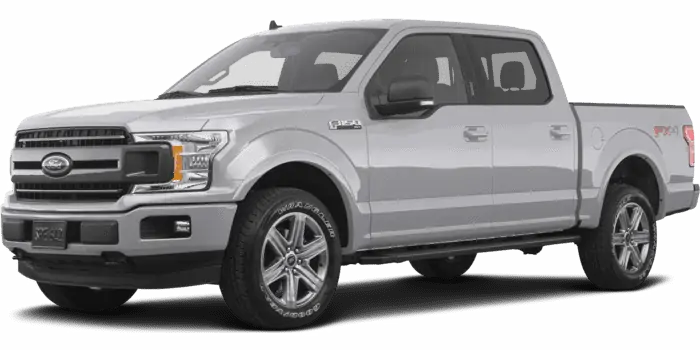
Some 2019-2020 Edge/F-150/Fusion/Continental/MKZ/Nautilus, 2019-2021 Mustang /Ranger/Transit Connect, 2020-2021 EcoSport/Escape/Expedition/Explorer/F-Super Duty/Aviator/Corsair/Navigator, 2021 Bronco Sport and 2020-2022 Explorer/Aviator vehicles with SYNC 3 may experience various SYNC performance related concerns. This may be due to the SYNC Software. To correct the condition, follow the Service Procedure to update the SYNC module (APIM) software.
This bulletin supersedes 22-2254. Reason for update: Incorrect Procedure
Model:
| Ford
2021-2023 Bronco Sport |
| 2020-2021 EcoSport |
| 2019-2020 Edge |
| 2020-2022 Escape |
| 2020-2021 Expedition |
| 2020-2023 Explorer |
| 2019-2020 F-150 |
| 2020-2022 F-Super Duty |
| 2019-2020 Fusion |
| 2022-2023 Maverick |
| 2019-2023 Mustang |
| 2019-2023 Ranger |
| 2019-2021 Transit Connect |
| Lincoln
2020-2023 Aviator |
| 2019-2020 Continental |
| 2020-2022 Corsair |
| 2019-2020 MKZ |
| 2019-2020 Nautilus |
| 2020-2021 Navigator |
Summary
This article supersedes TSB 22-2254 to update the Issue, Action and Service Procedure.
Issue: Some 2019-2020 Edge/F-150/Fusion/Continental/MKZ/Nautilus, 2019-2021 Transit Connect, 2019-2023 Mustang/Ranger, 2020-2021 EcoSport/Expedition/Navigator, 2020-2022 Escape/F-Super Duty/Corsair, 2020-2023 Explorer/Aviator, 2021-2023 Bronco Sport and 2022-2023 Maverick vehicles with SYNC 3 may experience various SYNC performance related concerns including but not limited to:
- Loss of BlueTooth pairing
- Loss of navigation destinations
- Slow/lag operation
- Sirius audio not functioning properly after a key cycle with active subscription
- Presets not responding or indicating properly
- Intermittent audio echo/robotic voice heard during a Bluetooth phone call
- Wi-Fi connection message pop-up every key cycle
- Frozen unresponsive touchscreen
- Solid blue screen when moving forward at speeds above 16 km/h (10 mph) (2019 vehicles only)
- Rear parking aid camera remains on the screen at speeds below 16 km/h (10 mph) (2019 vehicles only)
- Inoperative infotainment applications
- Poor/no AppLink function
- Apple CarPlay not launching on connection or a black screen when connected
- Voice prompts that skip or have short pauses while directions are being provided
- Sirius Travel Link™ not working properly with active subscription
- Remote start not able to be scheduled from FordPass or Lincoln Way (2020 vehicles only)
- Blank or frozen center display screen
- System states In Michigan when trying to select a Point Of Interest (POI) on the navigation system
- System scrolls through FM presets on screen when listening to Bluetooth or when on Android Auto/CarPlay
- Climate control features missing after previous update
- Temperature not displayed in pop up screen when increasing or decreasing temperature (2020-2021 Aviator/Navigator only)
- Center display screen flicker (2020-2022 Explorer/Aviator and 2020-2021 Navigator) This may be due to the SYNC Software.
To correct the condition, follow the Service Procedure to update the SYNC module (APIM) software.
Action: Follow the Service Procedure steps to correct the condition on vehicles that meet all of the following criteria:
- One of the following vehicle lines:
- 2019-2020 Edge/F-150/Fusion/Continental/MKZ/Nautilus
- 2019-2021 Transit Connect
- 2019-2023 Mustang/Ranger
- 2020-2021 EcoSport/Expedition/Navigator
- 2020-2022 Escape/F-Super Duty/Corsair
- 2020-2023 Explorer/Aviator
- 2021-2023 Bronco Sport
- 2022-2023 Maverick
- Equipped with SYNC 3
- At least one of the following infotainment concerns:
- Loss of BlueTooth pairing
- Loss of navigation destinations
- Slow/lag operation
- Sirius audio not functioning properly after a key cycle with active subscription
- Presets not responding or indicating properly
- Intermittent audio echo/robotic voice heard during a Bluetooth phone call
- Wi-Fi connection message pop-up every key cycle
- Frozen unresponsive touchscreen
- Solid blue screen when moving forward at speeds above 16 km/h (10 mph) (2019 vehicles only)
- Rear parking aid camera remains on the screen at speeds below 16 km/h (10 mph) (2019 vehicles only)
- Inoperative infotainment applications
- Poor/no AppLink function
- Apple CarPlay not launching on connection or a black screen when connected
- Voice prompts that skip or have short pauses while directions are being provided
- Sirius Travel Link™ not working properly with active subscription
- Remote start not able to be scheduled from FordPass or Lincoln Way (2020 vehicles only)
- Blank or frozen center display screen
- System states In Michigan when trying to select a point of interest (POI) on the navigation system
- System scrolls through FM presets on screen when listening to Bluetooth or when on Android Auto/CarPlay
- Climate control features missing after previous update
- Temperature not displayed in pop up screen when increasing or decreasing temperature (2020-2021 Aviator/Navigator only)
- Center display screen flicker (2020-2022 Explorer/Aviator and 2020-2021 Navigator)
Service Procedure
NOTE: For vehicles that are not currently at the dealership, the customer can also update their vehicle’s SYNC 3 software via Wi-Fi or follow the instructions on https://www.owner.Ford.com or https://www.owner.Lincoln.com to update the SYNC 3 software.
1. Reprogram the APIM using the latest software level of the Ford Diagnosis and Repair System (FDRS) diagnostic scan tool.
(1). When FDRS asks Do You Have A SYNC3 Universal Device, select No.
70 Affected Products
Vehicles
| MAKE | MODEL | YEAR |
| FORD | BRONCO SPORT | 2021-2023 |
| FORD | ECOSPORT | 2020-2021 |
| FORD | EDGE | 2019-2020 |
| FORD | ESCAPE | 2020-2022 |
| FORD | EXPEDITION | 2020-2021 |
| FORD | EXPLORER | 2020-2023 |
| FORD | F-150 | 2019-2020 |
| FORD | F-250 SD | 2020-2022 |
| FORD | F-350 SD | 2020-2022 |
| FORD | F-450 SD | 2020-2022 |
| FORD | F-550 SD | 2020-2022 |
| FORD | FUSION | 2019-2020 |
| FORD | FUSION ENERGI | 2019-2020 |
| FORD | FUSION HYBRID | 2019-2020 |
| FORD | MAVERICK | 2022-2023 |
| FORD | MUSTANG | 2019-2023 |
| FORD | RANGER | 2019-2023 |
| FORD | TRANSIT CONNECT | 2019-2021 |
| LINCOLN | AVIATOR | 2020-2023 |
| LINCOLN | CONTINENTAL | 2019-2020 |
| LINCOLN | CORSAIR | 2020-2022 |
| LINCOLN | MKX | 2019-2020 |
| LINCOLN | MKZ | 2019-2020 |
| LINCOLN | MKZ HYBRID | 2019-2020 |
| LINCOLN | NAUTILUS | 2019-2020 |
| LINCOLN | NAVIGATOR | 2020-2021 |
1 Associated Document
Manufacturer Communications
23-2307
10 October 2023
NHTSA ID Number: 10214878
Manufacturer Communication Number: TSB 22-2254
Summary
Some 2019-2020 Edge/F-150/Fusion/Continental/MKZ/Nautilus, 2019-2021 Mustang/Ranger/Transit Connect, 2020-2021 EcoSport/Escape/Expedition/Explorer/F-Super Duty/Aviator/Corsair/Navigator, 2021 Bronco Sport and 2020-2022 Explorer/Aviator vehicles with SYNC 3 may experience various SYNC performance related concerns. This may be due to the SYNC Software. To correct the condition, follow the Service Procedure to update the accessory protocol interface module (APIM) software.
1 Associated Document
Manufacturer Communications
22-2254
28 June 2022
NHTSA ID Number: 10214125
Manufacturer Communication Number: TSB 22-2225
Summary
Some 2019-2020 Edge/F-150/Fusion/Continental/MKZ/Nautilus, 2019-2021 Mustang/Ranger/Transit Connect, 2020-2021 EcoSport/Escape/Expedition/Explorer/F-Super Duty/Aviator/Corsair/Navigator, 2021 Bronco Sport and 2020-2022 Explorer/Aviator vehicles with SYNC 3 may experience various SYNC performance related concerns. This may be due to the SYNC Software. To correct the condition, follow the Service Procedure to update the accessory protocol interface module (APIM) software.
1 Associated Document
Manufacturer Communications
22-2225
08 June 2022
NHTSA ID Number: 10203656
Manufacturer Communication Number: TSB 21-2411
Summary
This article supersedes TSB 21-2342 to update the Issue, Action, and Service Procedure. Some 2019-2020 Edge/F-150/Fusion/Continental/MKZ/Nautilus, 2019-2021 Mustang/Ranger/Transit Connect, 2020-2021 EcoSport/Escape/Expedition/Explorer/F-Super Duty/Aviator/Corsair/Navigator and 2021 Bronco Sport vehicles with SYNC 3 may experience various SYNC performance related concerns including but not limited to: Sirius audio not functioning properly after a key cycle with active subscription Presets not responding or indicating properly Intermittent audio echo/robotic voice heard during a Bluetooth phone call Wi-Fi connection message pop-up every key cycle Frozen unresponsive touchscreen Solid blue screen when moving forward at speeds above 16 km/h (10 mph) (2019 vehicles only) Rear parking aid camera remains on the screen at speeds below 16 km/h (10 mph) (2019 vehicles only) Inoperative infotainment applications Poor/no AppLink function Apple CarPlay not launching on connection or a black screen when connected Voice prompts that skip or have short pauses while directions are being provided
1 Associated Document
Manufacturer Communications
21-2411
18 November 2021
MC-10203656-0001.pdf 143.281KB
NHTSA ID Number: 10202705
Manufacturer Communication Number: TSB 21-2342
Summary
Some 2019-2020 Edge/F-150/Fusion/Continental/MKZ/Nautilus, 2019-2021 Mustang/Ranger/Transit Connect, 2020-2021 EcoSport/Escape/Expedition/Explorer/F-Super Duty/Aviator/Corsair/Navigator and 2021 Bronco Sport vehicles with SYNC 3 may experience various SYNC performance related concerns. To correct the condition, follow the Service Procedure to update the accessory protocol interface module (APIM) software.
1 Associated Document
Manufacturer Communications
21-2342
07 October 2021
NHTSA ID Number: 10201620
Manufacturer Communication Number: TSB 21-2294
Summary
Some 2019-2020 Edge/F-150/Fusion/Continental/MKZ/Nautilus, 2019-2021 Mustang/Ranger/Transit Connect, 2020-2021 EcoSport/Escape/Expedition/Explorer/F-Super Duty/Aviator/Corsair/Navigator and 2021 Bronco Sport vehicles with SYNC 3 may experience various SYNC performance related concerns To correct the condition, follow the Service Procedure to update the accessory protocol interface module (APIM) software.
1 Associated Document
Manufacturer Communications
21-2294
07 September 2021
NHTSA ID Number: 10200743
Manufacturer Communication Number: TSB 21-2263
Summary
Some 2019-2020 Edge/F-150/Fusion/Continental/MKZ/Nautilus, 2019-2021 Mustang/Ranger/Transit Connect, 2020-2021 EcoSport/Escape/Expedition/Explorer/F-Super Duty/Aviator/Corsair/Navigator and 2021 Bronco Sport vehicles with SYNC 3 may experience various SYNC performance related concerns. To correct the condition, follow the Service Procedure.
1 Associated Document
Manufacturer Communications
21-2263
09 August 2021
NHTSA ID Number: 10194433
Manufacturer Communication Number: TSB 21-2150
Summary
Some 2019-2020 Edge/F-150/Fusion/Continental/MKZ/Nautilus, 2019-2021 Mustang/Ranger/Transit Connect, 2020-2021 EcoSport/Escape/Expedition/Explorer/F-Super Duty/Aviator/Corsair/Navigator and 2021 Bronco Sport vehicles with SYNC 3 may experience various SYNC performance related concerns. To correct the condition, follow the Service Procedure.
1 Associated Document
Manufacturer Communications
21-2150
12 May 2021
NHTSA ID Number: 10181924
Manufacturer Communication Number: TSB 20-2363
Summary
Some 2019 MKZ, 2019-2020 EcoSport/Mustang/Continental/Fusion/F-150/Transit Connect/Ranger/Edge/Nautilus and 2020 Escape/Corsair/Aviator/Explorer/Expedition/Navigator/F-Super Duty vehicles with SYNC 3 may experience various SYNC performance related concerns. To correct the condition, follow the Service Procedure.
1 Associated Document
Manufacturer Communications
20-2363
19 October 2020
MC-10181924-0001.pdf 154.349KB
NHTSA ID Number: 10180340
Manufacturer Communication Number: TSB 20-2301
Summary
Some 2019 MKZ, 2019-2020 Mustang/Continental/Fusion/F-150/Transit Connect/ Ranger/Edge/Nautilus and 2020 Escape/Corsair/Aviator/Explorer/Expedition/ Navigator/F-Super Duty vehicles with SYNC 3 may experience various SYNC performance related concerns. To correct the condition, follow the Service Procedure.
1 Associated Document
Manufacturer Communications
20-2301
08 September 2020
NHTSA ID Number: 10165705
Manufacturer Communication Number: TSB 19-2282
Summary
Some 2019 Mustang, Continental, Fusion, MKZ, F150, Transit Connect, Ranger, Edge or Nautilus with SYNC 3 may have the following intermittent symptoms: a solid blue screen when moving forward at speeds above 16 kph (10 mph), the rear view camera remains on the screen at speeds below 16 kph (10 mph), or inoperative infotainment applications. This may be due to the SYNC 3 software version installed on the vehicle. To correct the condition, follow the Service Procedure steps to reprogram the accessory protocol interface module (APIM).
1 Associated Document
Manufacturer Communications
19-2282
16 September 2019
MC-10165705-0001.pdf 112.724KB
NHTSA ID Number: 10179121
Manufacturer Communication Number: TSB 20-2259
Summary
Some 2019 MKZ, 2019-2020 Mustang/Continental/Fusion/F-150/Transit Connect/ Ranger/Edge/Nautilus and 2020 Escape/Corsair/Aviator/Explorer/Expedition/ Navigator/F-Super Duty vehicles with SYNC 3 may experience various SYNC performance related concerns. To correct the condition, follow the Service Procedure
1 Associated Document
Manufacturer Communications
20-2259
10 August 2020
MC-10179121-0001.pdf 247.624KB
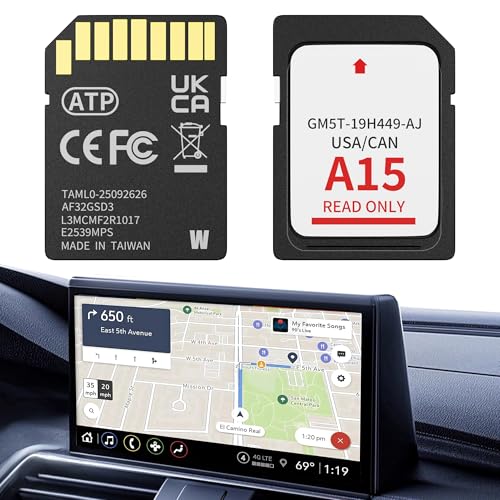
- 【LATEST A15 NAVIGATION SD CARD UPDATE】Stay ahead with the newest 2026 A15 navigation SD card that updates all previous versions including A14 and earlier, providing the most comprehensive map coverage for the entire United States and Canada with millions of updated points of interest such as gas stations, hotels, restaurants and newly added highways, ensuring reliable guidance for both city driving and cross-country adventures.
- 【WIDE COMPATIBILITY WITH FORD MODELS】This navigation SD card part number GM5T-19H449-AJ is designed to fit Ford
 vehicles including F-150 2013-2015, Explorer 2011-2016, Fusion 2013-2016, Expedition 2015, Escape 2013-2015, Edge 2011-2015, Focus 2012-2015, C-MAX 2013-2015, Escape Hybrid 2013-2015, Expedition XT 2015, Fiesta 2014-2015, Flex 2013-2015, Mustang 2015, Super Duty F-250/F-350/F-450 2013-2016, Taurus 2013-2015, Transit 2013-2015, Transit Connect 2014-2016.
 - 【WIDE COMPATIBILITY WITH LINCOLN MODELS】 This navigation SD card compatible with Lincoln Accessories Fits Lincoln MKZ (2013 - 2016), MKX (2011 - 2016), MKC (2015), MKS (2013 - 2015), MKT (2013 - 2015), NAVIGATOR (2015). Reliable Lincoln navigation accessories that update your vehicle’s SYNC 2 system for accurate routing across USA & Canada.
- 【EASY PLUG AND PLAY INSTALLATION】You need to check if the CCPU of Ford/Lincoln SYNC system is compatible or needs to be updated first, check the product image corresponding to the CCPU version. To install: 1. Turn engine OFF 20+ mins. 2. Locate the SD card slot and remove the old navigation card. 3. Insert the new Navigation SD Card untll it clicks. 4.Start the engine to ensure, the “Navigation” icon should appear in the top-right corner (Auto-updates in 10-20 mins Never interrupt the process!).
- 【RELIABLE OFFLINE GPS NAVIGATION】Unlike smartphone navigation apps that depend on cellular data signals this Lincoln/Ford navigation SD card stores all map data directly on the card providing uninterrupted turn-by-turn directions even in remote areas mountains or deserts with no internet connection, perfect for long road trips across the United States and Canada with no data usage no signal issues and no roaming charges ensuring you always find your way regardless of your location.

- 【Compatible with Ford models】F-150 2013-2015, Explorer 2011-2016, Fusion 2013-2016, Escape, Escape Hybrid 2013-2015, Super Duty (F-250/F-350/F-450) 2013-2016, Edge 2011-2015, Focus 2012-2015, Flex 2013-2015, Fiesta 2014-2015, C-Max 2013-2015, Mustang 2015, Taurus 2013-2015, Expedition 2015, Transit 2014-2015
- 【Compatible with Lincoln Models】MKC 2015, MKS 2013-2015, MKT 2013-2015, MKX 2011-2016, MKZ 2014-2016, Navigator 2015
- 【A15 Navigation SD Card】This SD card updates previous versions such as A14, A13, A12, and so on, providing expanded coverage of hundreds of cities, counties and metropolitan areas in all 50 U.S. states, Puerto Rico, and Canada. For Ford navigation SD card update ensures that users have access to the newest map data, allowing for accurate and up-to-date navigation information.
- 【Easy to Use】Before replacing the SD card, ensure the engine is OFF at least 10 mintes. Insert the new card (label side up), then turn ON the vehicle. The system will update automatically—DO NOT turn off the engine until it’s complete. The update takes about 10-20 minutes, with no additional programming required.
- 【Navigation SD Card Warning】Do not insert the A15 navigation SD card into non-vehicle devices, as this may damage the map data. Additionally, A15 Navigation SD cards are locked to the first vehicle once inserted and cannot be switched to another vehicle

- OEM Genuine Ford Parts only at Rod Baker Ford!
- Requires Updating Sync 3 to the Latest Compatible Version!
- Required for Upgrading Sync 3 to unlock Carplay Feature
- SEE Description for Compatible Models!!!
- If you are unsure about fitment, please contact us with your VIN to confirm!
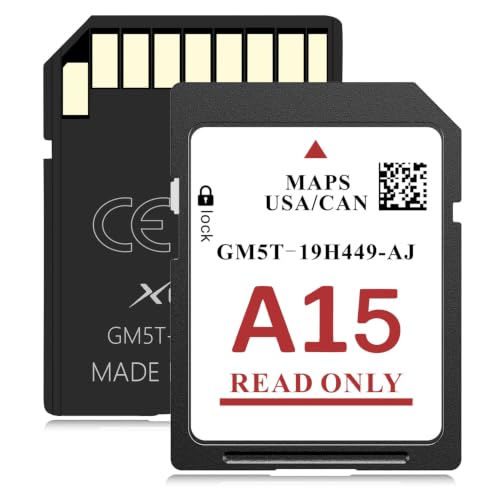
- SYNC 2 Navigation System Map Update: Get directions to wherever you travel with this map update that identifies roads, subdivisions, business and points of interest for the United States and Canada. Drive confidently through unfamiliar or recently changed areas and arrive at your destination quickly and efficiently
- Upgrade to 2026 XGEEK A15 SD Card: Replaces A14 and older versions with full updated US and Canada maps, fresh POIs and new highways for reliable daily and long-distance navigation
- Compatible Ford Navigation Models: Edge (2011-2015), Expedition XT (2015), Expedition (2015), Explorer (2011-2016), Escape / Escape Hybrid (2013-2015), Taurus (2013-2015), Transit (2014-2015), Transit Connect (2014-2015), F-150 (2013-2015), Flex (2013-2015), Fiesta (2014-2015), Focus (2012-2015), Fusion (2013-2016), Mustang (2015), C-Max (2013-2015), Super Duty F250 / F350 / F450 (2013-2016)
- Compatible Lincoln Navigation Models: MKC (2015), MKS (2013-2015), MKT (2013-2015), MKX (2011-2016), MKZ (2014-2016), Navigator (2015)
- Installation Instructions: Before installation, check whether the Ford/Lincoln SYNC system's central processor (CCPU) is compatible or requires an upgrade; for detailed steps, refer to main image 7. Turn off the vehicle and remove the old navigation card. Insert the new Navigation SD Card and start the engine, the Navigation icon should appear in the top-right corner

- OEM Genuine Ford Parts only at Rod Baker Ford!
- SEE LISTING DESCRIPTION FOR COMPATIBLE MODELS!!!
- Upgrade for Sync 3 Carplay and AndroidAuto
- Installing This Item DOES NOT Unlock Carplay, proper Sync 3 Software is Needed!
- If you are unsure about fitment, please contact us with your VIN to confirm!
SEOCONTENT-START
TECHNICAL SERVICE BULLETIN
SYNC 3 – Various SYNC Symptoms, SYNC Screen Flicker, Echo/Robotic Voice Concerns, Slow/Lag Operation, BlueTooth Pairing Loss
23-2307
10 October
2023
This bulletin supersedes 22-2254. Reason for update: Incorrect Procedure
Model:
Ford
2021-2023 Bronco Sport
2020-2021 EcoSport
2019-2020 Edge
2020-2022 Escape
2020-2021 Expedition
2020-2023 Explorer
2019-2020 F-150
2020-2022 F-Super Duty
2019-2020 Fusion
2022-2023 Maverick
2019-2023 Mustang
2019-2023 Ranger
2019-2021 Transit Connect
Lincoln
2020-2023 Aviator
2019-2020 Continental
2020-2022 Corsair
2019-2020 MKZ
2019-2020 Nautilus
2020-2021 Navigator
Summary
This article supersedes TSB 22-2254 to update the Issue, Action and Service Procedure.
Issue: Some 2019-2020 Edge/F-150/Fusion/Continental/MKZ/Nautilus, 2019-2021 Transit Connect, 2019-2023
Mustang/Ranger, 2020-2021 EcoSport/Expedition/Navigator, 2020-2022 Escape/F-Super Duty/Corsair, 2020-2023 Explorer/Aviator, 2021-2023 Bronco Sport and 2022-2023 Maverick vehicles with SYNC 3 may experience various SYNC performance related concerns including but not limited to:
• Loss of BlueTooth pairing
• Loss of navigation destinations
• Slow/lag operation
• Sirius audio not functioning properly after a key cycle with active subscription
• Presets not responding or indicating properly
• Intermittent audio echo/robotic voice heard during a Bluetooth phone call
• Wi-Fi connection message pop-up every key cycle
• Frozen unresponsive touchscreen • Solid blue screen when moving forward at speeds above 16 km/h (10 mph) (2019 vehicles only)
• Rear parking aid camera remains on the screen at speeds below 16 km/h (10 mph) (2019 vehicles only)
• Inoperative infotainment applications
• Poor/no AppLink function
• Apple CarPlay not launching on connection or a black screen when connected
• Voice prompts that skip or have short pauses while directions are being provided
• Sirius Travel Link™ not working properly with active subscription
• Remote start not able to be scheduled from FordPass or Lincoln Way (2020 vehicles only)
• Blank or frozen center display screen
• System states In Michigan when trying to select a Point Of Interest (POI) on the navigation system
• System scrolls through FM presets on screen when listening to Bluetooth or when on Android Auto/CarPlay
• Climate control features missing after previous update
• Temperature not displayed in pop up screen when increasing or decreasing temperature (2020-2021 Aviator/Navigator only)
• Center display screen flicker (2020-2022 Explorer/Aviator and 2020-2021 Navigator) This may be due to the SYNC Software.
To correct the condition, follow the Service Procedure to update the SYNC module (APIM) software.
Action: Follow the Service Procedure steps to correct the condition on vehicles that meet all of the following criteria: • One of the following vehicle lines:
– 2019-2020 Edge/F-150/Fusion/Continental/MKZ/Nautilus
– 2019-2021 Transit Connect
– 2019-2023 Mustang/Ranger
– 2020-2021 EcoSport/Expedition/Navigator
– 2020-2022 Escape/F-Super Duty/Corsair
– 2020-2023 Explorer/Aviator
– 2021-2023 Bronco Sport
– 2022-2023 Maverick
• Equipped with SYNC 3
• At least one of the following infotainment concerns:
– Loss of BlueTooth pairing
– Loss of navigation destinations
– Slow/lag operation
– Sirius audio not functioning properly after a key cycle with active subscription
– Presets not responding or indicating properly
– Intermittent audio echo/robotic voice heard during a Bluetooth phone call
– Wi-Fi connection message pop-up every key cycle
– Frozen unresponsive touchscreen
– Solid blue screen when moving forward at speeds above 16 km/h (10 mph) (2019 vehicles only)
– Rear parking aid camera remains on the screen at speeds below 16 km/h (10 mph) (2019 vehicles only)
– Inoperative infotainment applications
– Poor/no AppLink function
– Apple CarPlay not launching on connection or a black screen when connected
– Voice prompts that skip or have short pauses while directions are being provided
– Sirius Travel Link™ not working properly with active subscription
– Remote start not able to be scheduled from FordPass or Lincoln Way (2020 vehicles only)
– Blank or frozen center display screen
– System states In Michigan when trying to select a point of interest (POI) on the navigation system
– System scrolls through FM presets on screen when listening to Bluetooth or when on Android Auto/CarPlay
– Climate control features missing after previous update – Temperature not displayed in pop up screen when increasing or decreasing temperature (2020- 2021 Aviator/Navigator only)
– Center display screen flicker (2020-2022 Explorer/Aviator and 2020-2021 Navigator)
Warranty Status: Eligible under provisions of New Vehicle Limited Warranty (NVLW)/Service Part Warranty (SPW)/Special Service Part (SSP)/Extended Service Plan (ESP) coverage. Limits/policies/prior approvals are not altered by a TSB. NVLW/SPW/SSP/ESP coverage limits are determined by the identified causal part and verified using the OASIS part coverage tool. Labor Times
Description Operation No. Time
Reprogram The APIM Using FDRS (Do Not Use With Any Other Labor Operations) 232307A 0.8 Hrs.
Repair/Claim Coding Causal Part: 14G371 Condition Code: 04 Service Procedure
NOTE: For vehicles that are not currently at the dealership, the customer can also update their vehicle’s SYNC 3 software via Wi-Fi or follow the instructions on https://www.owner.Ford.com or https://www.owner.Lincoln.com to update the SYNC 3 software.
1. Reprogram the APIM using the latest software level of the Ford Diagnosis and Repair System (FDRS) diagnostic scan tool.
(1). When FDRS asks Do You Have A SYNC3 Universal Device, select No. © 2023 Ford Motor Company All rights reserved.
NOTE: The information in Technical Service Bulletins is intended for use by trained, professional technicians with the knowledge, tools, and equipment to do the job properly and safely. It informs these technicians of conditions that may occur on some vehicles, or provides information that could assist in proper vehicle service. The procedures should not be performed by “do-it-yourselfers”. Do not assume that a condition described affects your car or truck. Contact a Ford or Lincoln dealership to determine whether the Bulletin applies to your vehicle. Warranty Policy and Extended Service Plan documentation determine Warranty and/or Extended Service Plan coverage unless stated otherwise in the TSB article. The information in this Technical Service Bulletin (TSB) was current at the time of printing. Ford Motor Company reserves the right de this information with updates. The most recent information is available through Ford Motor Company’s on-line technical resources.
**************************************************************************************************************
SEOCONTENT-END
This product presentation was made with AAWP plugin.