
FORD :
:
2012-2014 Focus
This article supersedes TSB 15-0031 to add a production fix date, update the Title, Issue Statement, Service Procedure and Part List.
ISSUE:
Some 2012-2014 Focus Electric vehicles built on 15-Sep-2011 and through 15-Aug-2014 may exhibit a Stop Safely Now message with a red triangle indicator in the instrument cluster, followed by loss of motive power. The malfunction indicator lamp (MIL) may also illuminate with diagnostic trouble code (DTC) P0A0A present in the powertrain control module (PCM) memory.
ACTION:
Follow the Service Procedure steps to correct the condition.
SERVICE PROCEDURE
- Connect the Ford
 Integrated Diagnostic System (IDS) service tool or equivalent scan tool to the data link connector (DLC). Check for DTCs. Is P0A0A stored in the PCM memory?
- Yes – proceed to Step 2.
- No – this article does not apply. Refer to Workshop Manual (WSM), Section 303-14 for normal diagnostics.
- Use the online automotive service information system (OASIS) and review the warranty history. Make sure Field Service Action (FSA) 15B23 has been completed. Has FSA 15B23 been completed?
- Yes – typically when DTC P0A0A sets after FSA 15B23 has been performed it is caused by the interlock circuit shunt located at the transmission control module (TCM) connector C1822B. The shunt was replaced per the FSA and the shunt was not fully seated during the installation and/or the grease was left off the shunt. Proceed to Step 3.
- No – proceed to Step 6.
- Yes – typically when DTC P0A0A sets after FSA 15B23 has been performed it is caused by the interlock circuit shunt located at the transmission control module
- Inspect connector C1822B. Was the shunt installed correctly and coated with Motorcraft Electrical Grease?
- Yes – this article does not apply. Refer to WSM, Section 303-14 for normal diagnostics
- No – proceed to Step 4.
- Seat the shunt fully until an audible click is heard.
- Make sure clean latex gloves are worn to prevent contamination of the shunt.
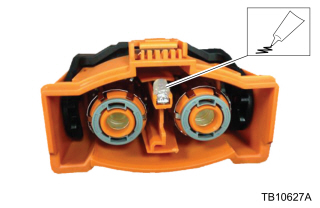
- Using a lint free cloth, lightly wipe all surfaces of the shunt after installation. Apply Motorcraft Electrical Grease to the new Powertrain High Voltage Inter-Lock (PT HVIL) terminal shunt. (Figure 7)
- The repair is complete.
- Check the vehicle build date. Was the vehicle built on or before 18-May-2014?
- Yes – go to Step 7.
- No – vehicles built on 19-May-2014 and through 15-Aug-2014 go to Step 9.
- Remove the two engine cover retainer pins and remove the engine cover.
- Inspect the high voltage (HV) wire harness. Are the HV wires individually wrapped in convolute? (Figure 1)
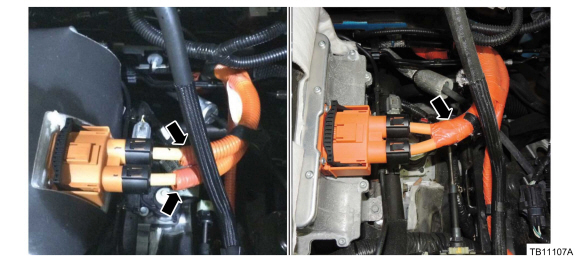
Figure 1 – 17-0045- Yes – HV wire harness update is not required. Proceed to Step 22.
- No – proceed to Step 9.
- Disconnect the HV battery service disconnect. Refer to WSM, Section 414-03.
- Disconnect the TCM connector. (Figure 1)
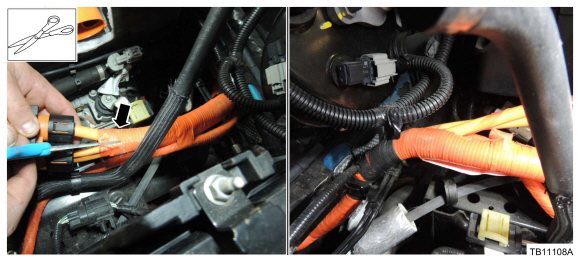
- Use a pair of round/blunt nose scissors to cut the single convolute between the wires down to the black tape at the dash bracket and discard the cut convolute. Peel back the convolute as you cut for better visibility. (Figure 2)

Figure 2 – 17-0045- To avoid damage to the HV wire harness, a razor blade, utility knife or similar tool should not be used for cutting the convolute and tape.
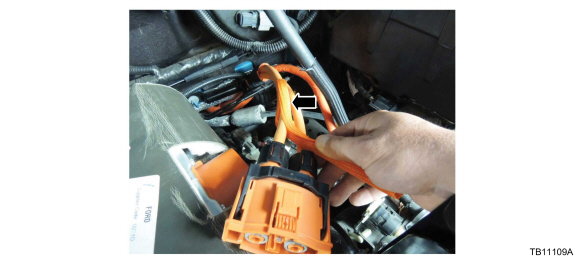
- Install the abrasion sleeves individually over each HV wire. (Figure 3)
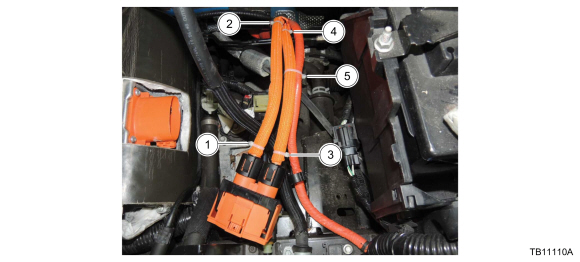
Figure 3 – 17-0045 - Install tie-straps to the HV wire harness in the sequence shown. Install the tie-straps so they are facing away from each other. Cut off excess length of the tie-straps. (Figure 4)
Figure 4 – 17-0045 - Replace the four TCM connector terminal springs using a terminal release tool, pick or bent paper clip. Do not scratch or damage the terminal surface or spring grooves. (Figure 5)
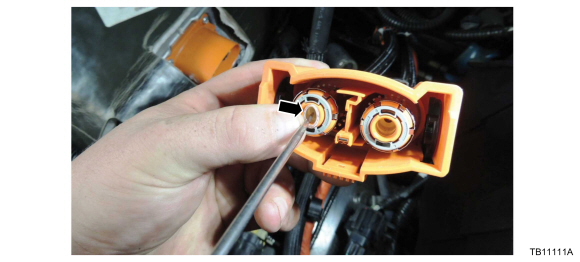
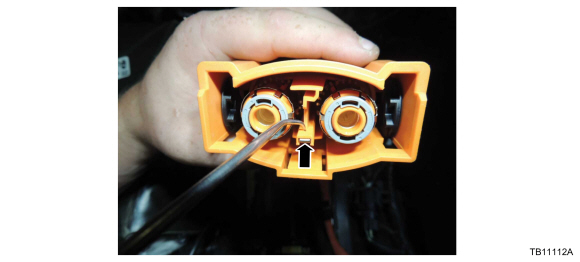
Figure 5 – 17-0045 - On the TCM connector, locate the PT HVIL terminal shunt locking tab access hole. Using an angled pick, press the tab while pulling the shunt out of the connector and discard the shunt. (Figure 6)
Figure 6 – 17-0045 - Install new shunt. The shunt is not fully seated during installation until an audible click is heard.
- Make sure clean latex gloves are worn to prevent contamination of the new shunt.
- Using a clean lint free cloth, lightly wipe all surfaces of the shunt after installation. Apply Motorcraft Electrical Grease to the new PT HVIL terminal shunt. (Figure 7)

Figure 7 – 17-0045 - Connect and disconnect the TCM connector.
- Verify all components remain in the correct position.
- Reconnect the TCM connector.
- Install the engine cover and the two engine cover retainer pins.
- Connect the HV battery service disconnect. Follow the WSM procedures in Section 414-03A.
- Reprogram the PCM to the latest calibration using IDS release 105.01 or higher. Make sure you are connected to the internet when entering module programming to obtain the latest updates. Calibration files may also be obtained at www.motorcraftservice.com.
| PART NUMBER | PART NAME |
XG-12

Electrical Grease
| Motorcraft Electrical Grease |
| CM5Z-15K607-A | High Voltage Harness Kit |
OTHER APPLICABLE ARTICLES
TSB 17-0045
NHTSA ID Number: 10057882
Manufacturer Communication Number: 15-0031
Summary
FORD 2012-2014 FOCUS : CERTAIN FOCUS ELECTRIC VEHICLE ARE EXPERIENCING A MESSAGE “STOP SAFELY NOW” DIAGNOSTIC TROUBLE CODE PRESENT IN THE PCM. *LJ
1 Associated Document
Service Bulletin Document
TSB 15-0031
Reprogramming
Service Information & Reprogramming
Module Reprogramming
| Diagnostic Software | Interface Device | Complete Vehicle Diagnostics | Module Programming | ||
| 1996-2017 Model Year |
2018-Present Model Year |
1996-2017 Model Year |
2018-Present Model Year |
||
| IDS/FDRS | VCM, VCM II, VCMM |
X | X | X | X |
| FJDS/FDRS | Compatible J2534 Devices (Including VCM II and VCMM) |
X | X | X | |
Detailed system requirements, installation, and support information for each product is located under the diagnostics tool support tab for each product.
Integrated Diagnostic Software (IDS) / Ford Diagnosis & Repair System (FDRS)
For use with VCM I, VCM II, VMM and VCMM hardware devices only. The complete factory Ford Motor Company vehicle diagnostic tool that provides complete dealership level vehicle diagnostic coverage for all 1996 to present Ford, Lincoln and Mercury vehicles. The IDS software includes time based access to the IDS software, software updates and calibration files.
Ford J2534 Diagnostic Software (FJDS) / Ford Diagnosis & Repair System (FDRS)
For use with compatible J2534 hardware devices. FJDS software provides Ford Module Programming functionality that covers 1996 to present Ford, Lincoln and Mercury module reprogramming functions, plus complete dealership level vehicle diagnostic software for all 2018 to present Ford and Lincoln vehicles. The FJDS software license includes time based access to the FJDS software, software updates and calibration files.
Latest Calibration Information
Module Build Data (As-Built)
Use VIN to obtain As-Built data

- J2534 Pass-Thru Programmer: TOPDON RLink J2534 is an advanced diagnostic and reprogramming tool that support all J2534 protocols, as well as D-PDU, CAN-FD and DoIP, ensuring compatibility with a wide range of modern vehicles. It offers extensive versatility with support for over 18 major automotive brands, including Chrysler, Ford, GM, Nissan, Toyota, Honda, Subaru, Land Rover/Jaguar, Volvo, Wuling, Volkswagen/Audi, Mercedes-Benz, and BMW. NOTE: Not compatible with Ford IDS diagnostic software
- All-in-One OEM Diagnostics: This J2534 ECU programming tool elevates your automotive repair capabilities to new heights by delivering complete OEM diagnosis. Boasting comprehensive full-system diagnostics, intuitive repair guides, advanced ECU programming and coding, common reset services, a vast library of repair information and more, this all-in-one solution empowers technicians to effortlessly tackle complex vehicle issues with ease. *Not compatible with 24V vehicles
- Proven Performance You Can Trust: Backed by over 10000 real vehicle tests and benefit from a wealth of practical experience, this OEM reprogramming tool guarantees stable and exceptional performance. Supported by TOPDON's dedicated technical experts with in-depth knowledge of both auto repair and J2534 Pass-Thru programming, the RLink J2534 provides prompt and professional assistance, ensuring a smooth setup and reliable compatibility
- Integrated Excellence, Always Up-to-Date: Featuring the exclusive RLink Platform to provide a streamlined experience with one-click driver installation and management, ensuring flawless integration with your OE software, maintaining the original performance quality. The built-in operation guide makes mastering OE software quick and easy, so you can get started right away. Plus, with lifetime free updates, your diagnostics will stay current with the latest drivers and innovations
- Efficiency Meets Versatility: Engineered to support three CAN channels simultaneously - CAN FD and CAN-CC included, giving you the edge in fast troubleshooting. To perfectly synchronized with the OE software, please diagnose with active subscriptions and make sure your computer system is running a compatible 64-bit Windows version (7, 8, 10 or later) to fully leverage the power of RLink J2534. *We don't provide extra OE software

- Advanced VCI Box, Industry-leading J2534 Pass-Thru Technology: This J2534 Pass-Thru Programmer is designed espically for technicians, independent shop owners, and DIY enthusiasts, enables fast, reliable computer-based programming. It supports all J2534 protocols—including the latest DoIP and CAN FD—ensuring full compatibility with both legacy and next-generation vehicles.
- High-Speed OEM-Level Diagnostics & Programming: Unlock true OEM functionality with comprehensive system diagnostics, guided troubleshooting, coding, adaptations, resets, and programming—all designed to slash repair time. This all-in-one tool eliminates the need for multiple OEM devices, boosting efficiency and cutting costs. Equipped with High-Speed USB, it delivers 10x more data per second than competing solutions
- Coverage for 17 Car Brands & Ultra Reliability: Works seamlessly for Chrysler, for Ford(Forscan), for GM, for Nissan, for Toyota, for Honda, for Subaru(SSM4), for Land Rover/Jaguar, for Volvo, for Wuling, for Volkswagen, for Mercedes-Benz, and for BMW. Backed by over 10000 real vehicle tests and benefit from a wealth of practical experience, this OEM reprogramming tool guarantees stable and exceptional performance
- User-Friendly RLink Platform & Expert Support: TOPDON’s proprietary driver management platform offers a clean interface and lifetime free updates. Access a rich library of real-world case studies to stay ahead of the curve. Backed by a support team with 10+ years of J2534 and automotive repair experience, we provide one-on-one assistance to resolve any technical issue.
- 6.6 ft USB-C Cable & Portable Storage Case: The RLink J2534 diagnostic tool features a 6.6ft USB 2.0 Cable and a 1.2 ft OBDII Extension Cable, allows to connection your computer easily outside the vehicle. The included handled carry case offers easy portability, storage, and hanging options—keeping your gear clean and ready to go, anywhere.

- [J2534 Pass-Thru Programmer] - TOPDON RLink J2534 is engineered for professional technicians, delivering OEM diagnostic and reprogramming capabilities. It supports all J2534 protocols, CAN-FD, DoIP, D-PDU. Compatible with 17 vehicle brands—such as Chrysler, Ford, GM, KIA, Hyundai, Nissan, Toyota, Honda, Subaru, Mitsubishi, MAZDA, Land Rover/Jaguar, Volvo, Volkswagen/Audi, Mercedes-Benz, and BMW. RLink J2534 can help reduce the cost of purchasing equipment from different brands.
- [All-in-One OEM Reprogramming and Diagnostics] - When seamlessly integrated with OEM diagnostic software, this dongle enables you to perform a wide range of functions, including ECU programming and coding, DTC reading and clearing, active tests, component matching, adaptations, rewriting, guided troubleshooting, and more. This all-in-one tool eliminates the need for multiple OEM devices, significantly boosting work efficiency.
- [Tested, Trusted, and Proven for Accuracy] - TOPDON RLink J2534 is renowned for its reliability, having successfully completed over 10,000 real-vehicle tests. The wealth of data and hands-on experience behind it ensures consistent performance and accurate results. You can trust this tool to deliver optimal performance.
- [One-Click Installation, Continuous Updates] - The exclusive TOPDON RLink platform streamlines installation with a one-click driver setup, allowing you to quickly access OEM software for diagnostic and reprogramming tasks. With lifetime free updates, your RLink J2534 stays current without any additional cost, ensuring reliable performance for the long term. *We don't provide extra OE software.
- [Works with Windows Compatibility and OEM Software Subscription] - The RLink J2534 supports three CAN channels - including CAN FD and CAN-CC, providing advantages in the process of rapid troubleshooting. Compatible with Windows 7, 8 and 10 (64-bit) and higher versions of the system. For full functionality, an active OEM software subscription is required for each supported vehicle brand. Please note that the dongle does not include OEM software, which must be purchased separately to access brand-specific diagnostic and reprogramming features.

- Dual WiFi & 10.1" Touchscreen: Provides a stable, high-speed wireless link 3x faster than bluetooth, and a responsive, professional interface. Topdon ONE obd2 scanner diagnostic tool ensures smooth, non-lagging diagnostic scan, boosting mechanic efficiency
- J2534 Pass-Thru Support: The included ONE VCI supports the J2534 standard, allowing it to function as a pass-thru device when paired with OEM diagnostic software.Through TOPDON’s RLink platform, technicians can perform dealer-level coding, expanding in-house capabilities without investing in multiple factory automotive scan tools
- OE Topology Mapping: Visualize the vehicle’s ECU network exactly as it’s built.Zoom, pan, and highlight specific modules to pinpoint component issues with precision.Topology mapping displays real-time communication between modules
- 50+ Service Functions: Covers high-demand services like ADAS calibration, DPF regen, TPMS reset, ABS bleed, and throttle adaptation.Expands your service menu, allows you to charge premium rates, and turns away zero jobs due to lack of tooling. Vehicle-specific functionality may vary
- Advaned ECU Coding: 10 of the most serviced brands in North America, including full ECU coding and flash hidden support for BMW, VW, Au-di, Benz, Porsche, Toyota, Ni ssan and more. Enables module replacement, feature customization, and personal settings with automatic backup or restore.Lets your shop safely offer high-margin customization services, attracting more customers and boosting profit
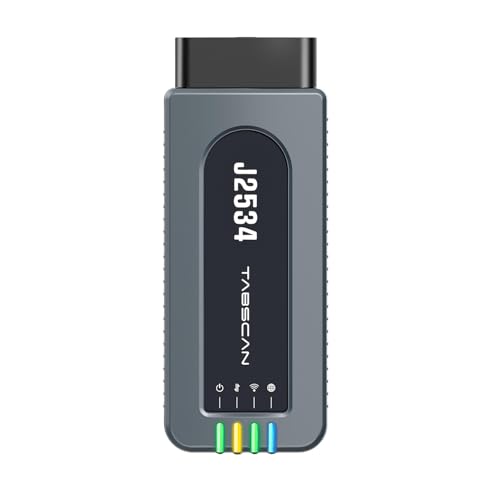
- 【J2534 Pass-Thru Device】 This budget-friendly J2534 pass-thru device delivers OEM diagnostics and reprogramming capabilities for dealerships, repair shops and automotive DIY enthuisasts, enables you diagnose, program and repair the vehicles more efficiently and precisely. Supporting J2534, D-PDU, CAN-FD and DoIP, this J2534 passthru tool ensures wide vehicle coverage. It's compatible with OE software application, ensuring seamless integration and original performance quality
- 【All-in-One Diagnostic Tool】 Simplify your workflow and tackle the complex diagnostics and repairs with confidence! This J2534 passthrough tool provides full system diagnosis, bi-directional control, maintenance reset services, ECU programming and ECU coding to run advanced diagnostics and programming. Equipped with the specialized platform, this J2534 pass-thru tool is fully compatible with OE software that helps technicians confidently handle complicated vehicle repair issues
- 【J2534 Diagnostic Tool】 The Tabscan J2534 pass-thru device is built with a dedicated platform, making it ideal for both professional and personal use. Simply download the driver for your ford vehicle within the platform—ensuring only one driver is installed at a time. Then connect the device to your vehicle’s OBD2 port and link it to your computer using the included USB A to USB C cable. Finally launch your OE software, select Tabscan J2534 VCI as interface, and begin diagnose and program
- 【Universal Compatibility】 Tabscan J2534 reprogramming tool is designed to be compatible with Ford vehicles for advanced diagnostics and programming. It supports J2534 protocols, along with D-PDU, CAN-FD and DoIP, ensuring seamless connectivity with older or modern vehicles. This J2534 diagnostic tool only works with computer running on windows 7/10/11. Vehicle compatibility varies by model or year, please confirm with us before purchase. Note: It's not compatible with 24V vehicles
- 【Professional Technical Support】 Tabscan J2534 pass-thru device provides a stable and seamless connection between your vehicle and computer for diagnostics, programming, and coding. But that's not all—we go beyond hardware. Our dedicated technical support team brings deep expertise in automotive diagnostics and programming. Whether you need help with setup, troubleshooting or latest diagnostic resources and upgrades, we provide fast, professional and reliable support every step of the way

- ALL OF THE J2534 PROTOCOLS - This single unit has all of the protocols you need for your OEM J2534 reprogramming and diagnostics including the latest in DoIP and CanFD
- J2534 TECHNICAL SUPPORT - FREE for the life of the tool. Staffed by technicians who understand vehicle repair and J2534 Pass‑thru
- TOOLBOX WITH OEM APPLICATION DESCRIPTIONS - educational video tutorials and real-time news – Giving you the confidence and up-to-date knowledge to get the job done
- J2534 v05.00 API - The newest version of J2534 to give you the latest in pass-thru technology
- FUTURE PROOF WITH 4 CAN CHANNELS - Going beyond the 3 required by select Chrysler/FCA models, CarDAQ-Plus 3 also provides a 4th to meet the needs of future OEM applications
SEOCONTENT-START**************************************************************************************************************FORD: 2012-2014 Focus This article supersedes TSB 15-0031 to add a production fix date, update the Title, Issue Statement, Service Procedure and Part List. ISSUE Some 2012-2014 Focus Electric vehicles built on 15-Sep-2011 and through 15-Aug-2014 may exhibit a Stop Safely Now message with a red triangle indicator in the instrument cluster, followed by loss of motive power. The malfunction indicator lamp (MIL) may also illuminate with diagnostic trouble code (DTC) P0A0A present in the powertrain control module (PCM) memory. ACTION Follow the Service Procedure steps to correct the condition. SERVICE PROCEDURE 1. Connect the Ford Integrated Diagnostic System (IDS) service tool or equivalent scan tool to the data link connector (DLC). Check for DTCs. Is P0A0A stored in the PCM memory? a. Yes – proceed to Step 2. b. No – this article does not apply. Refer to Workshop Manual (WSM), Section 303-14 for normal diagnostics. 2. Use the online automotive service information system (OASIS) and review the warranty history. Make sure Field Service Action (FSA) 15B23 has been completed. Has FSA 15B23 been completed? a. Yes – typically when DTC P0A0A sets after FSA 15B23 has been performed it is caused by the interlock circuit shunt located at the transmission control module (TCM) connector C1822B. The shunt was replaced per the FSA and the shunt was not fully seated during the installation and/or the grease was left off the shunt. Proceed to Step 3. b. No – proceed to Step 6. 3. Inspect connector C1822B. Was the shunt installed correctly and coated with Motorcraft® Electrical Grease? a. Yes – this article does not apply. Refer to WSM, Section 303-14 for normal diagnostics b. No – proceed to Step 4. 4. Seat the shunt fully until an audible click is heard. a. Make sure clean latex gloves are worn to prevent contamination of the shunt. 5. Using a lint free cloth, lightly wipe all surfaces of the shunt after installation. Apply Motorcraft® Electrical Grease to the new Powertrain High Voltage Inter-Lock (PT HVIL) terminal shunt. (Figure 7) a. The repair is complete. 6. Check the vehicle build date. Was the vehicle built on or before 18-May-2014? a. Yes – go to Step 7. b. No – vehicles built on 19-May-2014 and through 15-Aug-2014 go to Step 9. 7. Remove the two engine cover retainer pins and remove the engine cover. ELECTRIC – STOP SAFELY NOW MESSAGE WITH MIL AND DTC P0A0A – BUILT ON 15-SEP-2011 AND THROUGH 15-AUG-2014 TSB 17-0045 NOTE: The information contained in Technical Service Bulletins is intended for use by trained, professional technicians with the knowledge, tools, and equipment to do the job properly and safely. It informs these technicians of conditions that may occur on some vehicles, or provides information that could assist in proper vehicle service.The procedures should not be performed by “do-it-yourselfers”. Do not assume that a condition described affects your car or truck. Contact a Ford, Lincoln, or Mercury dealership to determine whether the bulletin applies to your vehicle. Warranty Policy and Extended Service Plan documentation determine Warranty and/or Extended Service Plan coverage unless stated otherwise in the TSB article.The information in this Technical Service Bulletin (TSB) was current at the time of printing. Ford Motor Company reserves the right to supercede this information with updates.The most recent information is available through Ford Motor Company’s on-line technical resources. Copyright © 2017 Ford Motor Company Online Publication Date May 26, 2017 PAGE1 8. Inspect the high voltage (HV) wire harness. Are the HV wires individually wrapped in convolute? (Figure 1) Figure 1 – Article 17-0045 a. Yes – HV wire harness update is not required. Proceed to Step 22. b. No – proceed to Step 9. 9. Disconnect the HV battery service disconnect. Refer to WSM, Section 414-03. 10. Disconnect the TCM connector. (Figure 1) 11. Use a pair of round/blunt nose scissors to cut the single convolute between the wires down to the black tape at the dash bracket and discard the cut convolute. Peel back the convolute as you cut for better visibility. (Figure 2) Figure 2 – Article 17-0045 a. To avoid damage to the HV wire harness, a razor blade, utility knife or similar tool should not be used for cutting the convolute and tape. 12. Install the abrasion sleeves individually over each HV wire. (Figure 3) TSB 17-0045 (Continued) PAGE2 Figure 3 – Article 17-0045 13. Install tie-straps to the HV wire harness in the sequence shown. Install the tie-straps so they are facing away from each other. Cut off excess length of the tie-straps. (Figure 4) Figure 4 – Article 17-0045 14. Replace the four TCM connector terminal springs using a terminal release tool, pick or bent paper clip. Do not scratch or damage the terminal surface or spring grooves. (Figure 5) TSB 17-0045 (Continued) PAGE3 Figure 5 – Article 17-0045 a. Each TCM terminal contains two springs. b. Place the springs into their correct position and seat in the grooves. 15. On the TCM connector, locate the PT HVIL terminal shunt locking tab access hole. Using an angled pick, press the tab while pulling the shunt out of the connector and discard the shunt. (Figure 6) Figure 6 – Article 17-0045 16. Install new shunt. The shunt is not fully seated during installation until an audible click is heard. a. Make sure clean latex gloves are worn to prevent contamination of the new shunt. 17. Using a clean lint free cloth, lightly wipe all surfaces of the shunt after installation. Apply Motorcraft® Electrical Grease to the new PT HVIL terminal shunt. (Figure 7) TSB 17-0045 (Continued) PAGE4 Figure 7 – Article 17-0045 18. Connect and disconnect the TCM connector. a. Verify all components remain in the correct position. 19. Reconnect the TCM connector. 20. Install the engine cover and the two engine cover retainer pins. 21. Connect the HV battery service disconnect. Follow the WSM procedures in Section 414-03A. 22. Reprogram the PCM to the latest calibration using IDS release 105.01 or higher. Make sure you are connected to the internet when entering module programming to obtain the latest updates. Calibration files may also be obtained at www.motorcraftservice.com. PART NUMBER PART NAME XG-12 Motorcraft® Electrical Grease CM5Z-15K607-A High Voltage Harness Kit OTHER APPLICABLE ARTICLES: 15B23 OPERATION DESCRIPTION TIME 170045A 2012-2014 Focus Electric: Retrieve DTCs, Inspect And Correct Shunt If Necessary Following The Service Procedure (Do Not Use With Any Other Labor Operations) 0.3 Hr. 170045B 2012-2014 Focus Electric: Retrieve DTCs, Inspect And Correct Shunt If Necessary Following The Service Procedure, Inspect The HV Wires Only And Reprogram The PCM (Do Not Use With Any Other Labor Operations) 0.6 Hr. 170045C 2012-2014 Focus Electric: Retrieve DTCs, Inspect And Update The HV Wires, Replace The Shunt And Reprogram The PCM (Do Not Use With Any Other Labor Operations) 1.1 Hrs. WARRANTY STATUS: Eligible Under Provisions Of New Vehicle Limited Warranty Coverage And Emissions Warranty Coverage Warranty/ESP coverage limits/policies/prior approvals are not altered by a TSB. Warranty/ESP coverage limits are determined by the identified causal part and verified using the OASIS part coverage tool. DEALER CODING BASIC PART NO. CONDITION CODE 14A318 12 TSB 17-0045 (Continued) PAGE5**************************************************************************************************************
SEOCONTENT-END
This product presentation was made with AAWP plugin.