
NHTSA ID Number: 10183751
Manufacturer Communication Number: 16L02
Summary
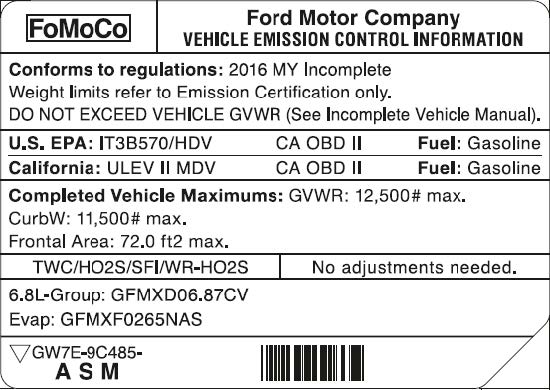
In all of the affected vehicles, the two VECI labels contain incorrect Frontal Area information.
1 Affected Product
Vehicle
| MAKE | MODEL | YEAR |
| FORD | E-350 | 2016 |
April 12, 2016
TO: All U.S. Ford and Lincoln Dealers
SUBJECT: DELIVERY HOLD – Special Field Action 16L02
Certain 2016 Model Year E-350 Cutaway Vehicles Equipped with a 6.8L 2V Gasoline
Engine and Motorhome Prep Package
Vehicle Emissions Control Information (VECI) Label Update
AFFECTED VEHICLES
| Vehicle | Model Year | Assembly Plant | Build Dates |
| E-350 Cutaway | 2016 | Ohio | January 21, 2016 through March 1, 2016 |
Affected vehicles are identified in OASIS and FSA VIN Lists.
REASON FOR THIS ACTION
In all of the affected vehicles, the two VECI labels contain incorrect Frontal Area information.
SERVICE ACTION
Dealers are to install the revised VECI labels directly over the original labels on the affected vehicles. This service will be performed on affected vehicles at no charge to the vehicle owner.
OWNER NOTIFICATION AND MAILING SCHEDULE
Owners of affected vehicles will be mailed both VECI labels and installation instructions the week of April 18, 2016. Owners will be given the option of installing the labels themselves, or they can have their dealer perform the service for them.
EXPIRATION DATE
This program has an expiration date of April 30, 2017. We encourage dealers to complete this service as soon as possible.
ADDITIONAL LABELS
To assist customers who prefer to have this service completed at the dealership and arrive without the labels, please contact the Special Service Support Center (SSSC) via the SSSC Web Contact Site.
ATTACHMENTS
Attachment I: Administrative Information
Attachment II: Labor Allowances and Parts Ordering Information
Attachment III: Technical Information
Owner Notification Letter
QUESTIONS & ASSISTANCE
For questions and assistance, contact the Special Service Support Center (SSSC) via the SSSC Web Contact Site. The SSSC Web Contact Site can be accessed through the Professional Technician Society (PTS) website using the SSSC link listed at the bottom of the OASIS VIN report screen or listed under the SSSC tab.
Sincerely,
Michael A. Berardi
ATTACHMENT I
OASIS ACTIVATION
OASIS will be activated on April 12, 2016. Although OASIS may indicate 16L02 as open, the revised labels may have already been installed by the owner or body builder.
FSA VIN LISTS ACTIVATION
FSA VIN Lists will be available through https://web.fsavinlists.dealerconnection.com on April 12, 2016. Owner names and addresses will be available by May 2, 2016.
NOTE: Your FSA VIN Lists may contain owner names and addresses obtained from motor vehicle registration records. The use of such motor vehicle registration data for any purpose other than in connection with this program is a violation of law in several states, provinces, and countries. Accordingly, you must limit the use of this listing to the follow-up necessary to complete this service action.
STOCK VEHICLES
- Correct all affected units in your new vehicle inventory before delivery. Labels for stock vehicles will be mailed to dealerships the week of April 18, 2016. To order more labels, contact the SSSC via the SSSC Web Contact Site.
SOLD VEHICLES
- Labels will be mailed to owners of affected vehicles. However, owners may choose to have the dealer install the labels.
- Correct other affected vehicles identified in OASIS which are brought to your dealership.
TITLE BRANDED / SALVAGED VEHICLES
Affected title branded and salvaged vehicles are eligible for this Field Service Action.
CLAIMS PREPARATION AND SUBMISSION
- Enter claims using Direct Warranty Entry (DWE) or One Warranty Solution (OWS).
- DWE: refer to ACESII manual for claims preparation and submission information.
- OWS: when entering claims in DMS software, select claim type 31: Field Service Action. The FSA number 16L02 is the sub code.
- EXPIRATION DATE: This program expires April 30, 2017.
ATTACHMENT II
LABOR ALLOWANCES
| Description | Labor Operation | Labor Time |
| Install two VECI Labels | 16L02B | 0.4 Hours |
PARTS REQUIREMENTS
Ordering Instructions for Additional Labels
Labels for this program will be mailed directly to customers of the affected vehicles. Additional labels for customers who prefer to have this label installed at the dealership and arrive without the labels may be ordered from the SSSC via the SSSC Web Contact Site:
- Ask for two labels for program 16L02.
- Provide your name, dealership P&A code, and mailing address. Provide vehicle model year and make of vehicle(s).
Stock Vehicles: Labels for stock vehicles will be mailed to dealerships the week of April 18, 2016.
The package will be sent to the attention of the service manager and contain a bright orange 16L02 Stickers on the envelope. To order more labels, contact the SSSC via the SSSC Web Contact Site. Sold Vehicles: Labels and installation instructions will be mailed directly to customers of affected vehicles.
Replacement labels are available at the SSSC in the event that labels are misplaced. A VIN number will be required for each set of replacement labels ordered. To order additional labels, contact SSSC via the SSSC Web Contact Site.
DEALER PRICE
Dealers will not be charged for labels ordered for this program.
ATTACHMENT III
TECHNICAL INFORMATION
The two revised labels are identical (see example below), and must be installed on each affected vehicle in the following locations:
- One label is located on the passenger side valve cover on the engine. The engine cover must be pulled back to gain access to the label.
- The other label is located on the underside of the hood.
- Clean the surface of the existing VECI labels with cleaner/degreaser, and wipe dry using a clean towel.
- Apply the new labels directly over the original labels. It is not necessary to remove the original labels.
April, 2016
Special Field Action 16L02
Aviso de Revisión de Seguridad 16L02
Mr. John Sample
123 Main Street
Anywhere, USA 12345
Your Vehicle Identification Number (VIN): 12345678901234567
It has come to our attention that both of the Vehicle Emissions Control Information (VECI) labels on your vehicle are incorrect. We apologize for this inconvenience and want to correct this condition. Our commitment, together with your dealer, is to provide you with the highest level of service and support.
| What is the issue? | On your vehicle, the Frontal Area stated on both VECI labels is incorrect and new labels are needed to meet the applicable label requirements. |
| What should you do? | Included with this letter are two revised VECI labels to be installed on your vehicle. Both labels are identical. To install the labels, clean the existing labels with cleaner/degreaser and wipe dry using a clean towel. Apply the new labels directly over the original labels. The locations of the VECI labels are as follows:
If you prefer to have your dealer install the labels for you, call your Ford dealer and ask for a service date for Special Field Action 16L02. Ford Motor Company has authorized your dealer to install both labels free of charge (parts and labor). This Special Field Action will be in effect until April 30, 2017 regardless of mileage.
Please remember to bring your VECI labels with you if you take your vehicle to the dealer. The time needed for this repair is less than one-half day. However, due to service scheduling requirements, your Ford dealer may need your vehicle for a longer period of time.
If you do not already have a Ford servicing dealer, you can access www.Fordowner.com for dealer addresses, maps, and driving instructions. |
| Can we assist you further? | If you have difficulties getting your vehicle repaired promptly and without charge, please contact your dealership’s Service Manager for assistance.
RETAIL OWNERS: If you have questions or concerns, please contact our Ford Customer Relationship Center at 1-866-436-7332 and one of our representatives will be happy to assist you. If you wish to contact us through the Internet, our address is: www.Fordowner.com. For the hearing impaired call 1-800-232-5952 (TDD). Representatives are available Monday through Friday: 8:00AM – 8:00PM(Eastern Time). FLEET OWNERS: If you have questions or concerns, please contact our Fleet Customer Information Center at 1-800-34-FLEET, choose Option #3, and one of our representatives will be happy to assist you. If you wish to contact us through the Internet, our address is: www.fleet.ford.com. Representatives are available Monday through Friday: 8:00AM – 8:00PM(Eastern Time). MOTORHOME OWNERS: If you have questions or concerns, please contact our Motorhome Customer Assistance Center toll free at 1-866-906-9811. Representatives are available 24 hours a day. |
| Para asistencia en Español | Visite nuestro sitio web para ver este anuncio en Español al siguiente dirección: https://es.owner.ford.com/tools/account/maintenance/recalls.html Si necesita ayuda o tiene alguna pregunta, por favor llame al Centro de Relación con Clientes al 1-866-436-7332 y presione 2 para Español. |
Thank you for your attention to this important matter.
Sincerely,
Ford Customer Service Division
1 Associated Document
Manufacturer Communications
Special Field Action 16L02
April 12, 2016

- [Easy to Use—Work Out of the Box] + [FOXWELL 2026 New Version] FOXWELL NT604 Elite scan tool is the 2026 new version from FOXWELL, designed for car owners who want to figure out the cause of issues before fixing car problems by scanning common systems like ABS, SRS, engine, and transmission. The NT604 Elite obd2 scanner diagnostic tool comes with the latest software—no need to waste time downloading software first. Plug the scanner into the OBDII port with OBDII cable to start the diagnosis.
- [Affordable] + [Reliable Car Health Monitor] Will you be confused what happens when the warning light of ABS/SRS/transmission/check engine flashes? Instead of taking your cars to dealership, this FOXWELL scanner will help you do a thorough scanning and detection for your cars and pinpoint the root cause. Note:The device is a diagnostic tool, not a repair tool. To turn off a warning light, you must first physically repair the issue causing it. Only then can the scanner be used to clear the corresponding fault code.
- [5 in 1 Car Diagnostic Scanner] Compared with obd scanners (50-100), NT604 Elite code scanner not only includes their OBDII diagnosis but also serves as ABS/SRS scanner, transmission and check engine code reader. When it’s an odb2 scanner, you can use it to check if your car is ready for annual test through I/M readiness menu. In addition, live data stream, built-in DTC library, data play back and print, all these features are a big plus for it. Note: doesn't support maintenance functions like reset or relearn. For the SRS system, NT604 Elite can read and clear common fault codes not caused by a crash, but crash/collision data cannot be cleared.
- [Fantastic AUTOVIN] + [No extra software fee] Through the AUTOVIN menu, this NT604 Elite car scanner allows you to get your V-IN and vehicle info rapidly, no need to take time to find your V-IN and input one by one. What's more, the NT604 Elite ABS SRS scanner supports 60+ car brands from worldwide (America/Asia/Europe). You don’t need to pay extra software fee. AUTOVIN may not work on some older vehicles or certain vehicle brands. If AUTOVIN fails, please input the vin code manually or go to the Diagnostic Menu to select your vehicle model.
- [Solid protective case KO plastic carrying bag] + [Lifetime update] Almost all same price-level car scanner diagnostic tool only offers plastic bag to hold the scanner.However, NT604 Elite automotive scanner is equipped with solid protective case, preventing your obd2 scanner from damage. Then you don’t need to pay extra money to buy a solid toolbox.

- 【Reset ABS/SRS/Transmission/Engine Lights】 More than an check engine code reader, OBDMATE OM901 obd2 scanner performs comprehensive diagnostics for the 4 most-used systems (ABS/SRS/Engine/Transmission). It quickly clears fault codes, turns off warning lights, read data stream and auto VIN.
- 【3.5" Handheld Scanner with 4 System Diagnose】 3.5" Super large TFT screen equipped displays an intuitive menu and clear readings of various sensors from ABS, SRS, ECM and TCM
 systems. It arrived with a silicone protective case and hard-shell carrying case, ensuring long-lived durability and drop resistance. The car diagnostic tool is plug-to-play designed, plug it and get diagnosis started without any batteries or updates required.
 - 【One-Click I/M Readines&Full OBD2 Functions】 Press F1 to get an intuitive corloured form about whether various emissions-related systems on the vehicle are operating properly. Help you get smog-check ready quickly. OM901 car scanner supports all essential OBD2 functions you need: read & clear codes, view freeze frame, read I/M readiness, retrieve VIN, live data stream (with graphing display), O2 sensor test, onboard monitoring mode, and EVAP leak test.
- 【Battery Voltage Check&DLC Pin Test】 It allows you to monitor battery health by testing current battery voltage. Plus, this obd2 diagnostic tool features DLC 16-PIN test to check current voltage of every pin.
- 【Automotive Scanner Diagnostic Kit】 The package comes with 1 car scanner, 1 USB-type c cable, 1 hard storage bag and 1 user manual(en). Free to update without any hidden fees. 5 languanges available in setting including English, French, Italian, German and Espanish. Valuable and Portable, making it a great tool kit for car owners, DIY enthusiasts, and professional mechanics.
 systems. It arrived with a silicone protective case and hard-shell carrying case, ensuring long-lived durability and drop resistance. The car diagnostic tool is plug-to-play designed, plug it and get diagnosis started without any batteries or updates required.
- [Diagnose Like a Pro] BlueDriver Pro is a professional OBD2 scanner and diagnostic tool that helps you scan, understand, and clear vehicle trouble codes with confidence. Turn your phone into a powerful car diagnostic scanner—no guesswork, no unnecessary repairs.
- [Read and Clear More Codes Than Ever] Read and clear more codes than basic car code readers. Access enhanced diagnostics for Check Engine, ABS, SRS, Airbag, TPMS, Transmission.
- [Verified Fixes and Real-Time Data] Get unlimited, technician-verified repair reports matched to your VIN, with definitions, causes, and confirmed fixes. Monitor live vehicle data as you drive, view freeze frames, check smog readiness, and analyze Mode 6 test results.
- [Wireless & Bluetooth Enabled] - Say goodbye to wires. BlueDriver connects with Bluetooth via your phone/tablet to a sensor that plugs into your car's OBDII port. Get all of the capabilities of an expensive code reader & scan tool without any annoying wires.
- [Broad Make & Model Coverage] Strong support for GM, Ford, Stellantis (RAM, Jeep, Chrysler), Toyota, Honda, Nissan, Mazda, Subaru, Hyundai, Mercedes-Benz, BMW, and VW.
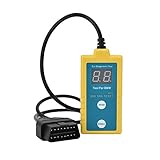
- ✔️【Professional SRS Reset for 1994-2003 BMW】 Designed specifically for classic BMW models (1994-2003). This B800 scanner reads & clears SRS airbag fault codes, turns off the warning light, and saves you a costly dealer visit. Confirmed compatible with: E36, E46 (EXCEPT 2001 330i), E34, E38, E39, Z3, and X5 (E53). NOT compatible with any BMW built before 1994 or after 2003.
- ✔️【Important: Two Different Connection Ports – Read Before Use】 To avoid “not working” issues, please note: For 1994–2000 BMWs (most E36, E34, Z3, early E39), the SRS diagnostic port is a round 20-pin connector under the hood. You MUST use the included 16-pin to 20-pin adapter cable. For 2000–2003 models (late E46, E39, X5), use the standard OBD-II port inside the cabin. Incorrect connection is the #1 reason for “incompatibility” reports.
- ✔️【Read & Clear Fault Codes in Minutes】 Quickly diagnose why your SRS light is on. The scanner accurately reads fault codes from airbag and seatbelt pretensioner systems. With one button press, clear the codes and reset the SRS warning light in seconds. No expensive dealer tools needed.
- ✔️【User-Friendly for DIYers – No Mechanic Required】 Easy operation with an intuitive button layout: ‘Enter’ to confirm, ‘Scroll’ to navigate. The clear LCD screen shows results instantly. Includes a step-by-step manual (revised for clarity) to guide you through the entire reset process.
- ✔️【Reliable Support with 1-Year Warranty】 We stand behind the quality of our B800 scanner. It comes with a 1-Year Hassle-Free Warranty. If you have any questions or need support, please contact us with your Order ID, and our dedicated team will assist you promptly.
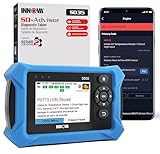
- OBD2 SCANNER FOR ALL SYSTEMS – The INNOVA SD35 is a tablet-based OBD2 scanner designed for advanced diagnostics. Read and clear check engine light, ABS, SRS, and TPMS codes, plus test your car battery and alternator to prevent unexpected failures. Vehicle coverage may vary. Please use Innova’s Coverage Checker to verify compatibility.
- ALL-SYSTEM DIAGNOSTICS & LIVE DATA – Unlike basic code readers, this OBD2 scanner for all vehicles scans engine, transmission, ABS, SRS, and more. Get real-time live data, including RPM, fuel trims, temperature readings, and oxygen sensor performance.
- OBD2 TABLET WITH USER-FRIENDLY INTERFACE – This automotive scan tool features a high-resolution display, making vehicle diagnostics faster and easier.
- ADVANCED TPMS, OIL RESET & SERVICE FUNCTIONS – Perform TPMS sensor checks, oil light reset, and other service resets with ease This professional diagnostic tool provides comprehensive vehicle maintenance capabilities in one device.
- WIDE VEHICLE COVERAGE (1996 & NEWER CARS & TRUCKS) – This OBD2 scanner Bluetooth tablet is compatible with Toyota, Ford, Honda, Chevrolet, Nissan, Dodge, and more. However, feature coverage may vary. Please use Innova's Coverage Checker to verify coverage.
This product presentation was made with AAWP plugin.