
NHTSA ID Number: 10172460
Manufacturer Communication Number: 2020-0044
Summary
To replace the disconnect to EP4 Board Power Cable.
2 Affected Products
Vehicles
| ELDORADO | AEROTECH | 2018 |
| FORD | FORD UNKNOWN | 9999 |
Date: February 24, 2020
Service Bulletin
Bulletin No.: 2020-0044
Product Models Affected:
Aerotech 240
Purpose:
To remove and install the Disconnect to EP4 Board Power Cable.
Warranty Status:
Standard warranty coverage for all product models.
Tool(s) / Equipment Required:
Chocks
Safety Glasses (PPE)
Hearing Protection (PPE)
Gloves, Cut Resistant (PPE)
Bump Cap (PPE)
Open/Closed End Wrench Set
Screwdriver, Phillips #2
Torque Wrench 3/8”
3/8” Drive Socket Set
Part(s) / Material Required:
| Description | Part Number | Quantity |
| Power Cable | 0030695-06 | 1 |
| Contactor, Solid State | 68059 | 1 |
| Rubber Boot | 68058 | 1 |
| Zip-ties | N/A | A/R |
| Expandable Foam, Fire Retardant | N/A | A/R |
| Dielectric Grease (or equivalent) | E54598 | A/R |
Estimate Time-To-Complete:
2 hours
General:
- Park the vehicle on a flat level surface.
- Chock wheels of the vehicle.
- Ensure that the product use date is not greater than one (1) year from the expiration/manufacturing date of adhesives and sealants. Ensure product handling and storage processes meet manufacturer requirements.
- Protect adjacent areas, from weld spatter and debris from grinding during hot work operations.
- Protect adjacent areas, from overspray of paints and adhesives during assembly/finish operations.
- Disconnect battery(ies), PCM/ECM/Modules, and other electrical device connections as described in the Ford Service Manual
 for welding, or performing other service work, on the chassis.
 - Reconnect battery(ies), PCM/ECM/Modules, and other electrical device connections as described in the Ford Service Manual
 for welding, or other service work on the chassis only after completing all process operations.
 - Wear appropriate PPE during rework process operations.
- Ensure a fire extinguisher or other fire control apparatus are available during hot work operations.
- Follow OEM instructions regarding the removal and re-installation, or protection of alternate fuel cells and/or components of the alternate fuel system installed on the vehicle when completing hot work operations.
- Move any hoses, electrical harnesses or wire, or other components from the immediate work area where hot work, or other service work, operations may be performed.
- Follow appropriate industry standards and best practices for welding operations.
- Follow manufacturer instructions for the handling and use of adhesives, sealants, and other materials used in sub-assembly and assembly processes.
Procedure:
- Disconnect positive terminal from all batteries installed in vehicle.
- Locate Disconnect in Battery Tray/Step Tray.
- Remove Power Cables from Disconnect. Reference Image 1.
- Locate the Fuse in the Battery Tray/Step Tray.
- Remove the Disconnect to EP4 Power Cable from the Fuse.
- Remove Disconnect from chassis and discard old Disconnect.
- Install new Disconnect by reversing tasks completed in Step 6.
- Pull EP4 Power Cable through back of battery box. Continue pulling Power Cable out of P-Clamps along bottom of chassis. Reference Images 2 – 5.
- Inside bus, remove screws from ABS behind and above driver to expose the electrical harness. Reference Images 6 – 8.
Note: ABS located above the driver may not need to be removed if the ABS behind the driver and above the driver are not one piece.
- Locate harness behind driver once ABS is removed. Free electrical harness from zip-ties and/or Pclamps. Continue pulling harness through the hole in the floor. Reference Image 9.
- Open electrical panel door above driver. Reference Image 10.
- Remove EP4 Board by removing the 4 screws securing the Board. Reference Image 11.
- Disconnect the L-shaped connector on back of the EP4 board. Reference Image 12.
- Pull the electrical harness out from behind the electrical panel and discard harness.
- Install new Power Cable reversing tasks completed in Steps 3 – 5 and 8.
Note: Ensure L-shaped connector is located behind the electrical panel above the driver.
Note: Ensure electrical harness is bundled using zip-ties and all P-clamps are installed and secured to prevent chafing of power cable.
Note: Ensure there is enough slack in power cable behind electrical panel to avoid pulling on Lshaped connector to Board connection during attachment.
- Connect L-shaped Connector to back of EP4 Board.
- Install EP4 Board by reversing tasks completed in Step 12.
- Place Power Cables back onto the Fuse mounting stud, and torque to 13 ft/lb. Reference Image 15 for proper placement of power cables on fuse block.
- Torque seal nut after completion of the torque operation.
- Inspect heat shrink on ring/eyelet to ensure heat shrink does not extend over the ring portion of the eyelet.
- Cut back the heat shrink, as necessary, allowing the nut to sit flat on the ring/eyelet and post. Reference Image 14.
- Place the Power Cables onto the new Disconnect mounting studs, and torque to 13 ft/lb. Reference Image 1.
Note: Ensure there is enough slack in the power cable to allow the Battery Tray to freely move, as applicable.
Note: Ensure the power cable is bundled and secured to avoid chafing of the cable during vehicle operation and/or Battery Tray open/close operations.
- Torque seal nut after completion of the torque operation.
- Apply dielectric grease to the Fuse and Disconnect mounting studs. Reference Image 15 and 1.
- Reconnect positive terminals to batteries installed in vehicle, reversing tasks completed in Step 1.
- Torque the post terminal clamps to 7 ft/lb.
- Close and latch/secure the Battery Tray/Step Tray.
- Turn ignition key to ignition on.
- Inspect EP4 Board for illumination of LED status light. Reference Image 16.
- Close Electrical Panel Door.
- Spray Expandable Foam in the pass-thru hole in the floor behind driver. Reference Image 9.
- Install ABS behind the driver, and above the driver as applicable, reversing tasks completed in Step 9.
Contact Information:
Contact ElDorado Customer Service, 1655 Wall Street, Salina, KS 67401; or by calling (785) 827-1033 / (800) 955-9086; or by Email: [email protected]; or by Fax: (785) 823-9471.
Bulletin No.: 2020-0044

- 【REPLACES PARTS】: The car hood positive battery cable with terminal clamp end replaces CV6Z14300A,CV6Z-14300-A
- 【COMPATIBLE WITH】: Replace that battery cable connector with wire accessories on your Ford Ford Escape 2013 2014 2015 2016 2017 2018 2019 13 14 15 16 17 18 19;Ford Focus 2012 2013 2014 2015 2016 2017 2018 12 13 14 15 16 17 18
- 【FEATURES】:The positive and negative(ground) cables work together in the hood to ensure all onboard electrical systems operate with stable voltage and current.However,excessive corrosion or amperage draw can necessitate the replacement of your battery wiring harness with lugs
- 【HIGH QUALITY】:The automotive starter cables wire to battery constructed with durable materials for long service life.Meets the original manufacturer's specifications and features,direct replacement of the old parts
- 【WARRANTY】: 1-Year Warranty. Please contact us by email if your battery positive cable connectors kit have any questions. We will reply within 24 hours and help solve the problem!
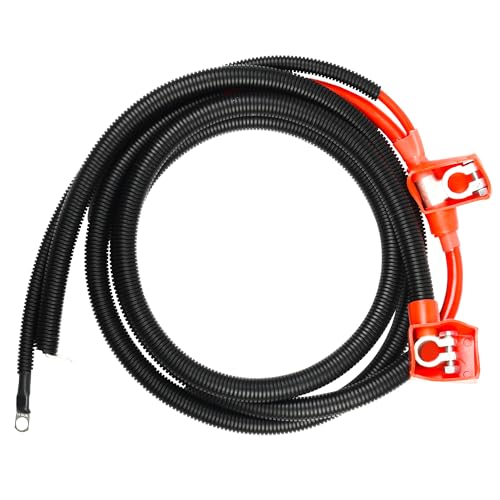
- 【Fit & Compatibility】:This 2/0 battery cable is specifically designed to replace original equipment part A12300HP for Ford 7.3L with Powerstroke Diesel trucks (for F250, F350, F Super Duty series) , ensuring seamless compatibility and performance.Packaging size: 3.61 inches (Height) x 10.75 inches (Length) x 6.52 inches (Width)
- 【High Conductivity Copper Core Material】: Battery cables are built with 2/0 AWG coppercore wire and durable diecast lead terminals to provide superior conductivity and prevent oxidation, ensuring reliable power transmission.99.9% pure copper strands minimize resistance for faster cold starts
- 【Heavy Duty Construction for Durability】:Battery cables with terminals is crafted with premium materials and a rugged synthetic rubber jacket that resists heat, oil, moisture, and corrosive elements
- 【Professional Grade Performance】: battery cable wire meets or exceeds OEM quality standards.Engineered to withstand the high demand electrical systems of diesel trucks, reducing the risk of voltage drop and starting issues. This heavy duty battery cable is resistant to corrosion, vibration, and extreme temperatures, tested for longterm durability in extreme operating conditions.Ideal for daily drivers
- 【Easy Plug and Play Installation】:Battery wire features a top mount design with one auxiliary lead for straight forward installation.Just simply swap out the old cable and install the new cable
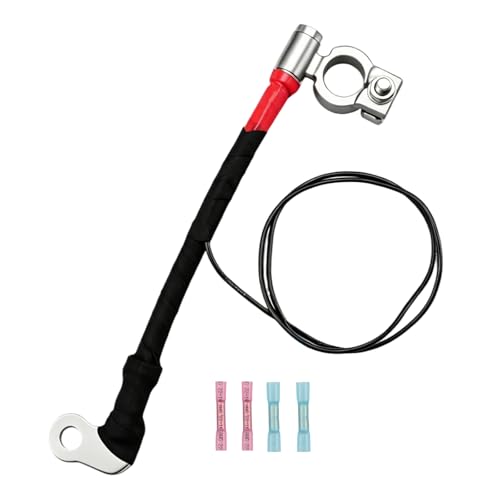
- 【Durable Materials】: Our positive battery cable is made from high-conductivity copper wire core, with one terminal made of durable zinc alloy and the other of copper, providing excellent electrical performance, corrosion resistance, and long-lasting reliability.
- 【Replace Part Number】: The replacement part number of this positive cable is CV6Z-14300-A.
- 【Compatible with】: This battery cable is compatible with Ford Escape 2013-2019, Ford Focus 2012-2018.
- 【Easy Installation】: Direct-fit design for easy installation—no modifications needed. Simply connect to the battery terminals for a secure, reliable connection. Saves time and effort while ensuring optimal power delivery for your vehicle.
- 【Package Included】: 1 × Positive Battery Cable, 4 × Heat Shrink Tubes.

- Package Dimensions: 3.81 H x 23.368 L x 9.144 W (centimeters)
- Part number: WC8751A
- Fit type: Vehicle Specific
- Package Weight: 0.44 pounds
- Direct OE-Style Replacement for Ford BT4Z-14450-BA: Engineered as an exact NEGATIVE battery terminal replacement for Ford part number BT4Z-14450-BA, featuring the correct wedge-lock clamp mechanism to maintain a secure ground connection to your vehicle’s battery post.
- Wide Compatibility Across Ford & Lincoln Vehicles: Fits a broad range of models including Edge (’11–’24), Explorer (’11–’19), F-150 (’10–’17), Flex (’16–’19), Fusion (’15–’19), Taurus (’16–’19), MKT (’16–’19), MKX (’11–’18), MKZ (’15–’19), Nautilus (’19–’23) and others. Compatible with wiring harness terminals like FL1Z-14300-B and similar.
- High-Quality C26000 Copper Alloy with Tin Plating: Constructed from durable C26000 copper alloy and tin-plated to deliver strong conductivity, enhanced corrosion resistance, and long-term reliability superior to low-grade or stainless alternatives that reduce current flow.
- Designed for 6mm Ground Cable Connections (16mm Negative Post): Purpose-built for vehicles using 6mm ring-terminal ground cables. Ideal as a direct OE replacement or as a universal 16mm negative battery terminal when upgrading or repairing existing connections.
- Tier-1 Manufacturing Quality (Made in Mexico): Produced at a Tier-1 automotive supplier in Mexico to meet OE specifications. Delivers the same fit, function, and durability as the original part installed at the factory.
This product presentation was made with AAWP plugin.