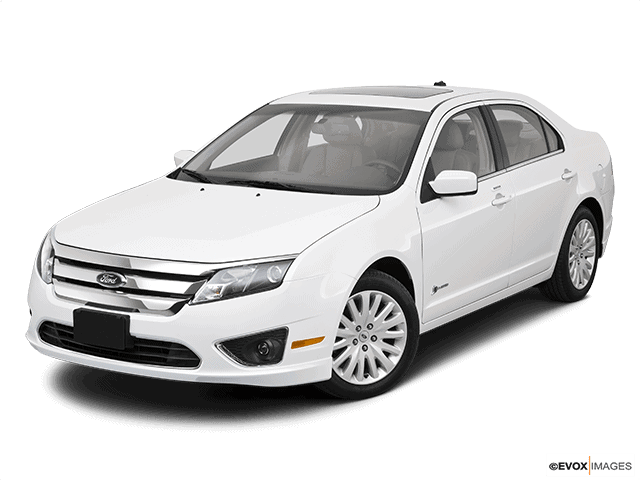
NHTSA Campaign Number: 18V775
Manufacturer Ford Motor Company
Components AIR BAGS
Potential Number of Units Affected 215
Air Bag may not Fully Inflate during Deployment
If the air bag does not inflate as intended, there is an increased risk of injury in the event of a crash.
Summary
Ford Motor Company (Ford) is recalling certain 2010 Ford Fusion, Mercury Milan and 2010-2012 Lincoln MKZ vehicles that previously received a replacement passenger air bag under recall 16V-384, 17V-024 or 18V-046. In the event of a crash requiring deployment of the passenger air bag, the bracket that secures the air bag inflator to the module housing may deform, allowing the gas that inflates the air bag to leak out.
Remedy
Ford will notify owners, and dealers will replace the passenger air bag module, free of charge. The recall is expected to begin in November 2018. Owners may contact Ford customer service at 1-866-436-7332. Ford’s number for this recall is 18S34.
Notes
Owners may also contact the National Highway Traffic Safety Administration Vehicle Safety Hotline at 1-888-327-4236 (TTY 1-800-424-9153), or go to www.safercar.gov.
Check if your Vehicle has a Recall
November 2, 2018
TO: All U.S. Ford and Lincoln Dealers
SUBJECT: Safety Recall 18S34
Certain 2010 Fusion and 2010-2012 MKZ Vehicles
Passenger Airbag Module Replacement
AFFECTED VEHICLES
| Vehicle | Model Year | Assembly Plant | Build Dates |
| MKZ | 2010-2012 | Hermosillo | March 10, 2009 through July 16, 2012 |
| Fusion | 2010 | Hermosillo | February 26, 2010 through June 21, 2010 |
This safety recall affects less than 250 vehicles listed above. Affected vehicles are identified in OASIS and FSA VIN Lists. Additional VINs may be added as vehicles are identified as having affected passenger airbag modules installed.
REASON FOR THIS SAFETY RECALL
In all of the affected vehicles, a passenger airbag module with a part number of AE5Z-54044A74-C or AH6Z-54044A74-C was previously installed while completing FSA 16S26, 17S01, or 18S01. The inflator in the passenger airbag module may not remain fully supported during airbag deployment in the event of a crash. This could result in incomplete airbag inflation and may increase the risk of an injury.
SERVICE ACTION
Dealers are to replace the passenger airbag module. This service must be performed on all affected vehicles at no charge to the vehicle owner.
NOTE: All replaced passenger airbag modules must be returned for analysis.
In addition, dealers are to identify any vehicles serviced at your dealership that had affected part number AE5Z-54044A74-C or AH6Z-54044A74-C installed as part of FSA 16S26, 17S01, or 18S01. It is important that all affected vehicles are identified and receive this service action. If dealership records indicate that an affected part was installed, and the vehicle is not identified in OASIS as being affected under this FSA, dealers should:
- Submit a VIN-specific web contact to the Special Service Support Center (SSSC) under 18S34 using contact type ‘Non-Involved’. Please provide repair order documentation showing the use of the part on the vehicle.
- Contact the owner and arrange a service date.
OWNER NOTIFICATION MAILING SCHEDULE
Owner letters are expected to be mailed the week of November 12, 2018. Dealers should repair any affected vehicles that arrive at their dealerships, whether or not the customer has received a letter.
PLEASE NOTE:
Federal law requires dealers to complete this recall service before a new vehicle is delivered to the buyer or lessee. Violation of this requirement by a dealer could result in a civil penalty of up to $21,000 per vehicle. Correct all vehicles in your new vehicle inventory before delivery.
ATTACHMENTS
Attachment I: Administrative Information
Attachment II: Labor Allowances and Parts Ordering Information
Attachment III: 2010 Fusion Technical Information
Attachment IV: 2010-2012 MKZ Technical Information
Attachment V: Airbag Module Core Return Process
QUESTIONS & ASSISTANCE
For questions and assistance, contact the Special Service Support Center (SSSC) via the SSSC Web Contact Site. The SSSC Web Contact Site can be accessed through the Professional Technician Society (PTS) website using the SSSC link listed at the bottom of the OASIS VIN report screen or listed under the SSSC tab.
Sincerely,
David J. Johnson
ATTACHMENT I
Safety Recall 18S34
Certain 2010 Fusion and 2010-2012 MKZ Vehicles
Passenger Airbag Module Replacement
OASIS ACTIVATION
OASIS will be activated on November 1, 2018.
FSA VIN LISTS ACTIVATION
FSA VIN Lists will be available through https://web.fsavinlists.dealerconnection.com by November 1, 2018. Owner names and addresses will be available by November 23, 2018.
NOTE: Your FSA VIN Lists may contain owner names and addresses obtained from motor vehicle registration records. The use of such motor vehicle registration data for any purpose other than in connection with this recall is a violation of law in several states, provinces, and countries. Accordingly, you must limit the use of this listing to the follow-up necessary to complete this recall.
SOLD VEHICLES
- Ford has not issued instructions to stop selling/delivering or driving used vehicles under this safety recall. Owners should contact their dealer for an appointment to have their vehicles remedied as soon as practicable. Owners can continue to safely drive their vehicles if they follow all instructions and warnings contained in the recall notice.
- Owners of affected vehicles will be directed to dealers for repairs.
- Immediately contact any of your affected customers whose vehicles are not on your VIN list but are identified in OASIS. Give the customer a copy of the Owner Notification Letter (when available) and schedule a service date.
- Correct other affected vehicles identified in OASIS which are brought to your dealership.
- Dealers are to prioritize repairs of customer vehicles over repairs of new and used vehicle inventory.
STOCK VEHICLES
- Use OASIS to identify any affected vehicles in your used vehicle inventory.
DEALER-OPERATED RENTAL VEHICLES
The Fixing America’s Surface Transportation (FAST) Act law effective June 2016 prohibits a rental company from selling, renting or leasing vehicles subject to a safety or compliance recall. Please consult your legal counsel for legal advice.
TITLE BRANDED / SALVAGED VEHICLES
Affected title branded and salvaged vehicles are eligible for this recall.
OWNER REFUNDS
Refunds are not approved for this program.
RENTAL VEHICLES
With proper dealer parts ordering and service appointment scheduling, rental vehicles should not be required. If a customer requests a rental vehicle while their vehicle is being repaired, dealers are preapproved for up to 4 days for a comparable rental vehicle. Rentals will be reimbursed at a dollar rate of up to $44 per day for Ford owners and $55 per day for Lincoln owners.
Approval for more than 4 rental days is required from the SSSC via the SSSC Web Contact Site. The SSSC must be provided total rental and repair costs, including parts and labor, to approve the full RO line amount.
ADDITIONAL REPAIR (LABOR TIME AND/OR PARTS)
Additional repairs identified as necessary to complete the FSA should be managed as follows:
- For related damage and access time requirements, refer to the Warranty and Policy Manual / Section 6 – Ford & Lincoln Program Policies / General Information & Special Circumstances for FSA’s / Related Damage.
- Submit an Approval Request to the SSSC Web Contact Site prior to completing the repair.
CLAIMS PREPARATION AND SUBMISSION
- Claim Entry: Enter claims using Dealer Management System (DMS) or One Warranty Solution (OWS) online.
- When entering claims, select claim type 31: Field Service Action. The FSA number (18S34) is the sub code.
- For additional claims preparation and submission information, refer to the Recall and Customer Satisfaction Program (CSP) Repairs in the OWS User Guide.
NOTE: The serial number of the new passenger airbag module must be provided to Ford for the claim to be processed. The Technical Information in this bulletin advises technicians to document the serial number from the new airbag Module on the repair order. The passenger airbag module serial number is 13 characters. Enter the serial number of the new airbag Module or module in the claim as follows:
- For claims submitted using DMS or OWS on-line, enter the serial numbers in the Test Results Section.
- Select DTC REQUIRED MEASUREMENT OR RESULTS from the drop down list. § Enter serial number in the CODE field without spaces or dashes.
- Related Damage/Additional labor and/or parts: Must be claimed as Related Damage on a separate repair line from the FSA with same claim type and sub code as described in Claim Entry above. IMPORTANT: Click the Related Damage Indicator radio button.
- Rental Vehicle Reimbursement o If the customer is already in a rental vehicle as part of FSA 16S26, 17S01, or 18S01, follow the rental claiming guidelines in that respective FSA Dealer Bulletin.
- If the customer is not already in a rental vehicle under another FSA, dealers are preapproved for up to 4 days of rental vehicle reimbursement. Approval for more than 4 rental days under FSA 18S34 is required from the Special Service Support Center (SSSC) and can be requested after repairs are completed. The SSSC must be provided total rental and repair costs, including parts and labor, to approve the full line amount.
- Rental expenses must be claimed on the same claim, and the same line as the repair. Enter the total amount of the rental expense under Misc. Expense Code “RENTAL”.
ATTACHMENT II
Safety Recall 18S34
Certain 2010 Fusion and 2010-2012 MKZ Vehicles
Passenger Airbag Module Replacement
LABOR ALLOWANCES
| Description | Labor Operation | Labor Time |
| Replace Passenger Airbag Module – Fusion vehicles | 18S34B | 2.8 Hours |
| Replace Passenger Airbag Module – MKZ vehicles | 18S34C | 3.0 Hours |
PARTS REQUIREMENTS / ORDERING INFORMATION
This safety recall affects less than 250 vehicles. To ensure an equitable distribution of service parts, the SSSC will proactively place part orders for affected vehicles to dealers that previously installed the affected passenger airbag module. These part orders will include all required parts and can be viewed in DOES II. These orders are expected to start shipping by November 12, 2018.
If your dealer is not included in the proactive part orders or additional parts are needed, submit a VIN-specific Part Order contact via the SSSC Web Contact Site.
| Description | Order Quantity | Claim Quantity | Part Number |
| Passenger Airbag Module – Fusion vehicles only | 1 | 1 | AE5Z-54044A74-D |
| Passenger Airbag Module – MKZ vehicles only | 1 | 1 | AH6Z-54044A74-D |
| A-Pillar Trim Clip | 1 | 2 | W711044-S403 |
| or | |||
| W711044-S439 | |||
| Steering Column Shaft-to-Steering Gear Bolt | 1 | 1 | W712961-S439 |
NOTE: Passenger airbag module part number AE5Z-54044A74-D includes a white airbag cushion sheet in the packaging. This sheet is not used during this service procedure and can be discarded.
Dealers will be notified via a DOES II communication if circumstances warrant a change in part supply strategy and when open ordering resumes.
DEALER PRICE PARTS RETENTION AND RETURN
For latest prices, refer to DOES II.
It is critical that all original passenger airbag inflators removed from vehicles are not allowed back into the market. Therefore, all passenger airbag inflators under this safety recall have been assigned a $100 core charge to ensure they will be properly returned.
The Regional Core Recover Center (RCRC), including dealers in Alaska and Hawaii, will pick up these airbag inflators along with all other core returns during your normal core retrieval visit.
For additional information, refer to the attachment: Airbag Module Core Return Process.
IMPORTANT: Any new stock of part numbers AE5Z-54044A74-C or AH6Z-54044A74-C previously utilized under FSA 16S26, 17S01, and 18S01 must no longer be installed in vehicles, and can be returned following the instructions in EFC06992, published October 18, 2018 on FMCDealer.
EXCESS STOCK RETURN
Excess stock returned for credit must have been purchased from Ford Customer Service Division in accordance with Policy Procedure Bulletin 4000.
ATTACHMENT III
CERTAIN 2010 FUSION VEHICLES — PASSENGER AIRBAG MODULE REPLACEMENT
OVERVIEW
In all of the affected vehicles, a passenger airbag module was previously installed while completing FSA 16S26, 17S01, or 18S01. The inflator in the passenger airbag module may not remain fully supported during airbag deployment in the event of a crash. This could result in incomplete airbag inflation and may increase the risk of an injury. Dealers are to replace the passenger airbag module.
SERVICE PROCEDURE
NOTE: The following repair instructions only apply to 2010 Fusion vehicles. Repair instructions are published in separate attachments for other vehicle lines included in this recall as parts become available for those vehicles.
NOTE: The parts used in this safety recall may physically appear to be identical, but they have differing operating characteristics. It is crucial that parts are not interchanged or substituted.
WARNING: Failure to follow the instructions and warnings in the Workshop Manual (WSM) may result in injury.
NOTE: If the Airbag Readiness light indicates no Supplemental Restraint System (SRS) faults are present, it is not necessary to follow the WSM SRS Depowering and Repowering steps. Turn the ignition to OFF and wait 1 minute, then it is safe to proceed with airbag inflator replacement.
NOTE: The ignition must remain OFF until this service procedure is completed.
- Record the 13 character serial number of the new airbag module on the repair order. See Figure 1.
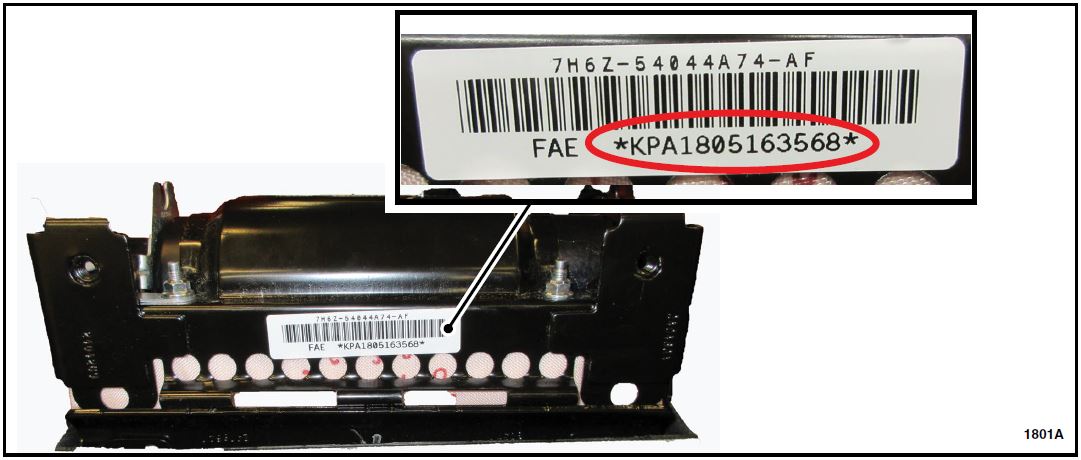
FIGURE 1
- Remove the left hand and right hand A-Pillar trim panels. Reuse the LH and RH trim panels for this repair. See Figure 2.
- To prevent damage to the trim panel, grasp the trim panel approximately 5 inches from the top and pull downward toward the door, then rotate the panel inward toward the windshield to slide it off of the a-pillar clip.
NOTE: Do not bend or flex the trim panels during removal to avoid stress marks from occurring.
NOTE: To view a video demonstration of this repair procedure, click the video icon. 
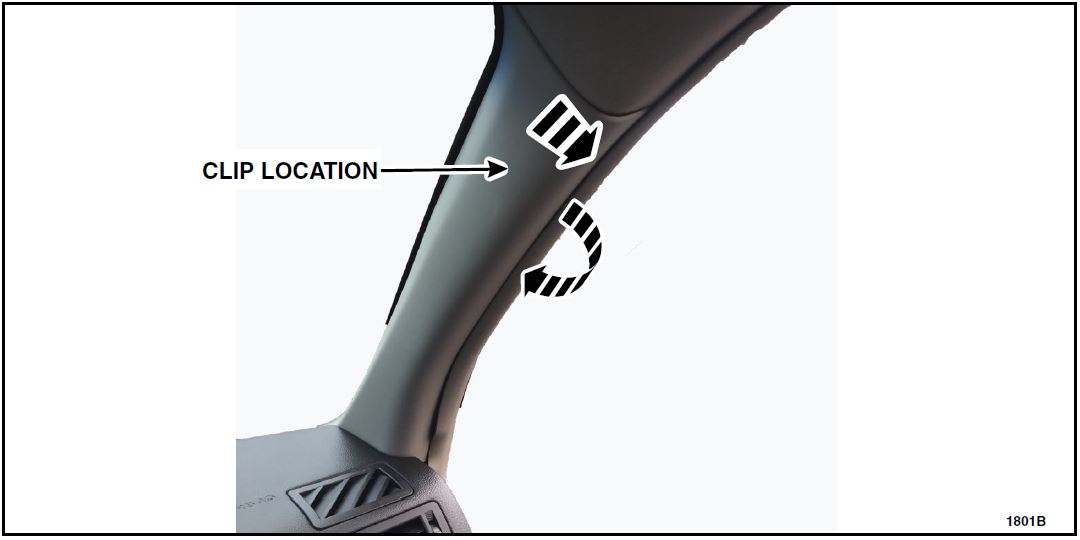
FIGURE 2
- Remove and discard the top A-Pillar clip from the body. Retain the screw for re-use. See Figure 3.
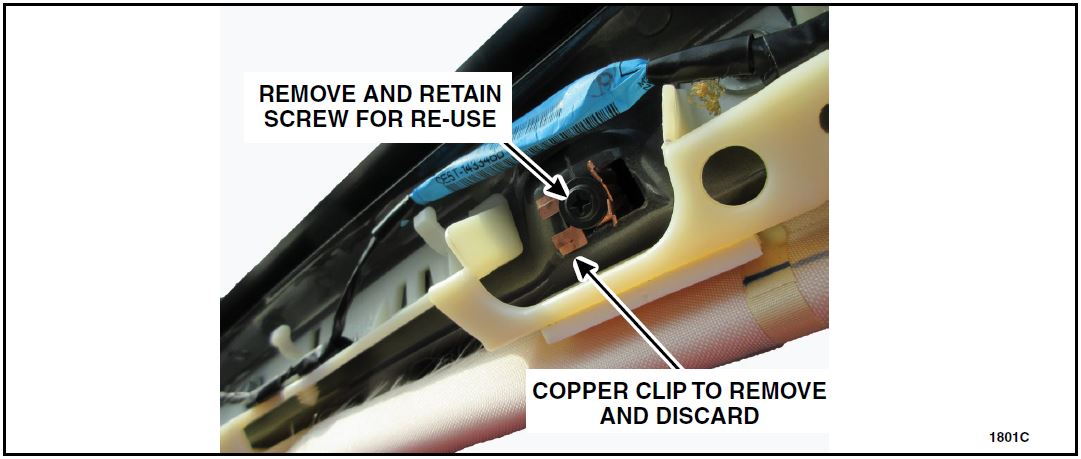
FIGURE 3
- Remove the passenger airbag module. Please refer to Workshop Manual (WSM) procedures in section 501-20B.
- Remove the instrument panel crossmember-to-airbag module bracket. See Figure 4.
- Torque to 80 lb. in.
WARNING: Do not allow any debris on or around the instrument panel once the airbag is removed.
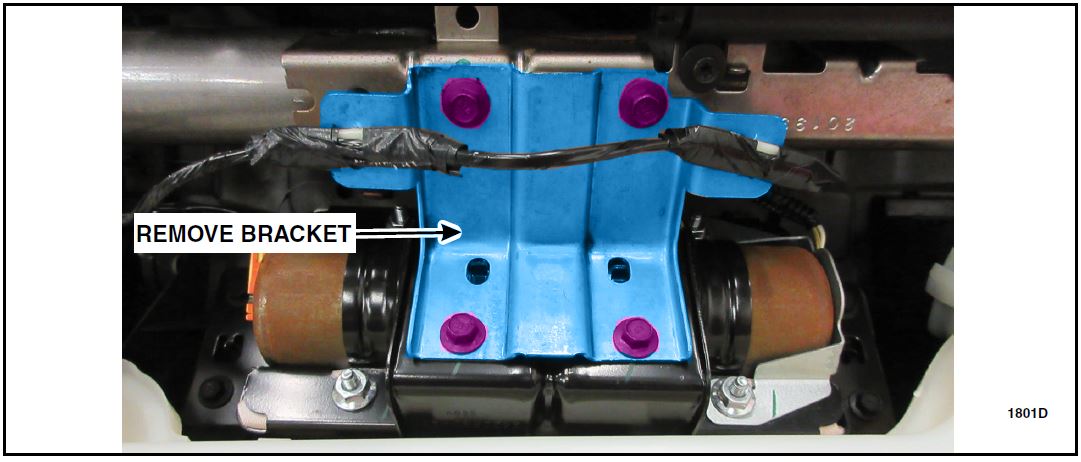
FIGURE 4
- Install the new airbag module and instrument panel. Please follow WSM procedures in section 501-20B.
- Install the instrument panel crossmember-to-airbag module bracket. See Figure 4.
- Install the new A-Pillar trim panel clip onto the trim panel. See Figure 5.
NOTE: If the new A-Pillar trim panel clips are not equipped with a screw installed, re-use the screw from the original clip from step 3. Install the screw into the new clip by hand.
- Torque to 9 Ib.in.
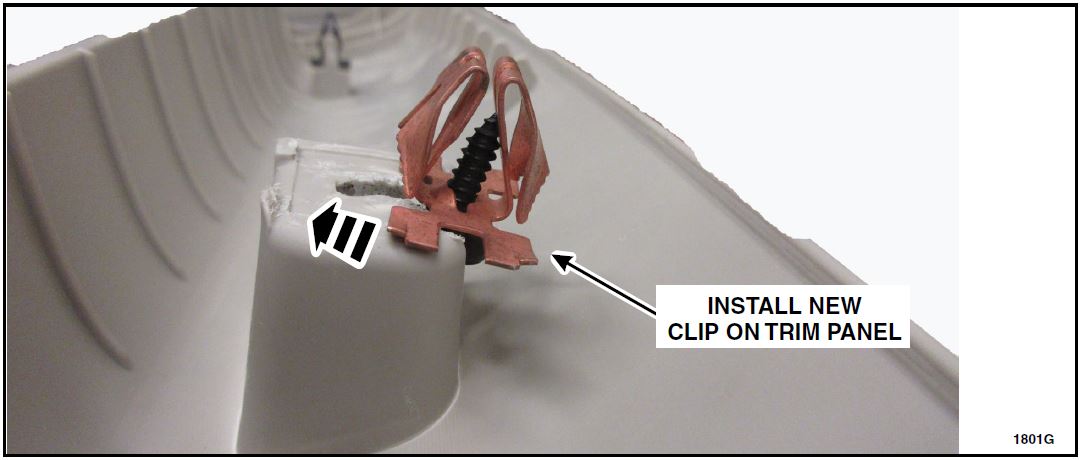
FIGURE 5
- Install the LH and RH A-Pillar trim panels by aligning the attachment clips to the holes and snapping the new trim panel in place.
- Package the replaced airbag module in the new part box and provide to the appropriate dealership personnel for part returns.
NOTE: The new passenger airbag module includes a white airbag cushion sheet in the packaging. This sheet is not used during this service procedure and can be discarded.
ATTACHMENT IV
CERTAIN 2010 — 2012 MKZ VEHICLES — PASSENGER AIRBAG MODULE REPLACEMENT
OVERVIEW
In all of the affected vehicles, a passenger airbag module was previously installed while completing FSA 16S26, 17S01, or 18S01. The inflator in the passenger airbag module may not remain fully supported during airbag deployment in the event of a crash. This could result in incomplete airbag inflation and may increase the risk of an injury. Dealers are to replace the passenger airbag module.
SERVICE PROCEDURE
NOTE: The following repair instructions only apply to 2010 – 2012 MKZ vehicles. Repair instructions are published in separate attachments for other vehicle lines included in this recall as parts become available for those vehicles.
NOTE: The parts used in this safety recall may physically appear to be identical, but they have differing operating characteristics. It is crucial that parts are not interchanged or substituted.
WARNING: Failure to follow the instructions and warnings in the Workshop Manual (WSM) may result in injury.
NOTE: If the Airbag Readiness light indicates no Supplemental Restraint System (SRS) faults are present, it is not necessary to follow the WSM SRS Depowering and Repowering steps. Turn the ignition to OFF and wait 1 minute, then it is safe to proceed with airbag inflator replacement.
NOTE: The ignition must remain OFF until this service procedure is completed.
- Record the 13 character serial number of the new airbag module on the repair order. See Figure 1.
FIGURE 1
- Remove the left hand and right hand A-Pillar trim panels. Reuse the LH and RH trim panels for this repair. See Figure 2.
- To prevent damage to the trim panel, grasp the trim panel approximately 5 inches from the top and pull downward toward the door, then rotate the panel inward toward the windshield to slide it off of the a-pillar clip.
NOTE: Do not bend or flex the trim panels during removal to avoid stress marks from occurring.
NOTE: MKZ A-Pillar trim is wrapped in fabric, be sure to protect the fabric from stains when removing.
NOTE: To view a video demonstration of this repair procedure, click the video icon.
FIGURE 2
- Remove and discard the top A-Pillar clip from the body. Retain the screw for re-use. See Figure 3.
FIGURE 3
- Remove the passenger airbag module. Please refer to Workshop Manual (WSM) procedures in section 501-20B.
- Remove the instrument panel crossmember-to-airbag module bracket. See Figure 4.
- Torque to 80 lb. in.
FIGURE 4
- If a white airbag cushion sheet has been installed previously, remove the bracket from the instrument
panel and discard the sheet. See Figure 5.- Torque to 80 Ib.in.
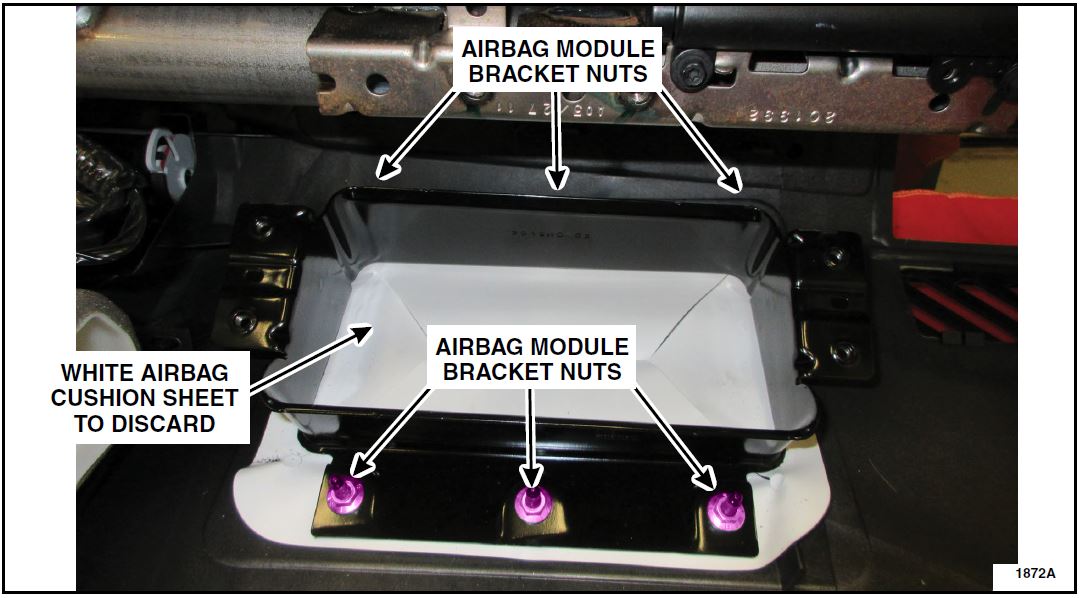
FIGURE 5
- Reinstall the airbag module bracket onto the instrument panel. See Figure 5.
- Install the new airbag module and instrument panel. Please follow WSM procedures in section 501-20B.
- Install the instrument panel crossmember-to-airbag module bracket. See Figure 4.
- Install the new A-Pillar trim panel clip onto the trim panel. See Figure 7.
NOTE: If the new A-Pillar trim panel clips are not equipped with a screw installed, re-use the screw from the original clip from step 3. Install the screw into the new clip by hand.
- Torque to 9 Ib.in.
FIGURE 7
- Install the LH and RH A-Pillar trim panels by aligning the attachment clips to the holes and snapping the new trim panel in place.
- Package the replaced airbag module in the new part box and provide to the appropriate dealership personnel for part returns.
ATTACHMENT V
18S34
November 2, 2018
Recall Acknowledgement
November 14, 2018
Latest Recalls Documents

- [Easy to Use—Work Out of the Box] + [FOXWELL 2026 New Version] FOXWELL NT604 Elite scan tool is the 2026 new version from FOXWELL, designed for car owners who want to figure out the cause of issues before fixing car problems by scanning common systems like ABS, SRS, engine, and transmission. The NT604 Elite obd2 scanner diagnostic tool comes with the latest software—no need to waste time downloading software first. Plug the scanner into the OBDII port with OBDII cable to start the diagnosis.
- [Affordable] + [Reliable Car Health Monitor] Will you be confused what happens when the warning light of ABS/SRS/transmission/check engine flashes? Instead of taking your cars to dealership, this FOXWELL scanner will help you do a thorough scanning and detection for your cars and pinpoint the root cause. Note:The device is a diagnostic tool, not a repair tool. To turn off a warning light, you must first physically repair the issue causing it. Only then can the scanner be used to clear the corresponding fault code.
- [5 in 1 Car Diagnostic Scanner] Compared with obd scanners (50-100), NT604 Elite code scanner not only includes their OBDII diagnosis but also serves as ABS/SRS scanner, transmission and check engine code reader. When it’s an odb2 scanner, you can use it to check if your car is ready for annual test through I/M readiness menu. In addition, live data stream, built-in DTC library, data play back and print, all these features are a big plus for it. Note: doesn't support maintenance functions like reset or relearn. For the SRS system, NT604 Elite can read and clear common fault codes not caused by a crash, but crash/collision data cannot be cleared.
- [Fantastic AUTOVIN] + [No extra software fee] Through the AUTOVIN menu, this NT604 Elite car scanner allows you to get your V-IN and vehicle info rapidly, no need to take time to find your V-IN and input one by one. What's more, the NT604 Elite ABS SRS scanner supports 60+ car brands from worldwide (America/Asia/Europe). You don’t need to pay extra software fee. AUTOVIN may not work on some older vehicles or certain vehicle brands. If AUTOVIN fails, please input the vin code manually or go to the Diagnostic Menu to select your vehicle model.
- [Solid protective case KO plastic carrying bag] + [Lifetime update] Almost all same price-level car scanner diagnostic tool only offers plastic bag to hold the scanner.However, NT604 Elite automotive scanner is equipped with solid protective case, preventing your obd2 scanner from damage. Then you don’t need to pay extra money to buy a solid toolbox.

- 【Reset ABS/SRS/Transmission/Engine Lights】 More than an check engine code reader, OBDMATE OM901 obd2 scanner performs comprehensive diagnostics for the 4 most-used systems (ABS/SRS/Engine/Transmission). It quickly clears fault codes, turns off warning lights, read data stream and auto VIN.
- 【3.5" Handheld Scanner with 4 System Diagnose】 3.5" Super large TFT screen equipped displays an intuitive menu and clear readings of various sensors from ABS, SRS, ECM and TCM
 systems. It arrived with a silicone protective case and hard-shell carrying case, ensuring long-lived durability and drop resistance. The car diagnostic tool is plug-to-play designed, plug it and get diagnosis started without any batteries or updates required.
 - 【One-Click I/M Readines&Full OBD2 Functions】 Press F1 to get an intuitive corloured form about whether various emissions-related systems on the vehicle are operating properly. Help you get smog-check ready quickly. OM901 car scanner supports all essential OBD2 functions you need: read & clear codes, view freeze frame, read I/M readiness, retrieve VIN, live data stream (with graphing display), O2 sensor test, onboard monitoring mode, and EVAP leak test.
- 【Battery Voltage Check&DLC Pin Test】 It allows you to monitor battery health by testing current battery voltage. Plus, this obd2 diagnostic tool features DLC 16-PIN test to check current voltage of every pin.
- 【Automotive Scanner Diagnostic Kit】 The package comes with 1 car scanner, 1 USB-type c cable, 1 hard storage bag and 1 user manual(en). Free to update without any hidden fees. 5 languanges available in setting including English, French, Italian, German and Espanish. Valuable and Portable, making it a great tool kit for car owners, DIY enthusiasts, and professional mechanics.
 systems. It arrived with a silicone protective case and hard-shell carrying case, ensuring long-lived durability and drop resistance. The car diagnostic tool is plug-to-play designed, plug it and get diagnosis started without any batteries or updates required.
- [Diagnose Like a Pro] BlueDriver Pro is a professional OBD2 scanner and diagnostic tool that helps you scan, understand, and clear vehicle trouble codes with confidence. Turn your phone into a powerful car diagnostic scanner—no guesswork, no unnecessary repairs.
- [Read and Clear More Codes Than Ever] Read and clear more codes than basic car code readers. Access enhanced diagnostics for Check Engine, ABS, SRS, Airbag, TPMS, Transmission.
- [Verified Fixes and Real-Time Data] Get unlimited, technician-verified repair reports matched to your VIN, with definitions, causes, and confirmed fixes. Monitor live vehicle data as you drive, view freeze frames, check smog readiness, and analyze Mode 6 test results.
- [Wireless & Bluetooth Enabled] - Say goodbye to wires. BlueDriver connects with Bluetooth via your phone/tablet to a sensor that plugs into your car's OBDII port. Get all of the capabilities of an expensive code reader & scan tool without any annoying wires.
- [Broad Make & Model Coverage] Strong support for GM, Ford, Stellantis (RAM, Jeep, Chrysler), Toyota, Honda, Nissan, Mazda, Subaru, Hyundai, Mercedes-Benz, BMW, and VW.
- ✔️【Professional SRS Reset for 1994-2003 BMW】 Designed specifically for classic BMW models (1994-2003). This B800 scanner reads & clears SRS airbag fault codes, turns off the warning light, and saves you a costly dealer visit. Confirmed compatible with: E36, E46 (EXCEPT 2001 330i), E34, E38, E39, Z3, and X5 (E53). NOT compatible with any BMW built before 1994 or after 2003.
- ✔️【Important: Two Different Connection Ports – Read Before Use】 To avoid “not working” issues, please note: For 1994–2000 BMWs (most E36, E34, Z3, early E39), the SRS diagnostic port is a round 20-pin connector under the hood. You MUST use the included 16-pin to 20-pin adapter cable. For 2000–2003 models (late E46, E39, X5), use the standard OBD-II port inside the cabin. Incorrect connection is the #1 reason for “incompatibility” reports.
- ✔️【Read & Clear Fault Codes in Minutes】 Quickly diagnose why your SRS light is on. The scanner accurately reads fault codes from airbag and seatbelt pretensioner systems. With one button press, clear the codes and reset the SRS warning light in seconds. No expensive dealer tools needed.
- ✔️【User-Friendly for DIYers – No Mechanic Required】 Easy operation with an intuitive button layout: ‘Enter’ to confirm, ‘Scroll’ to navigate. The clear LCD screen shows results instantly. Includes a step-by-step manual (revised for clarity) to guide you through the entire reset process.
- ✔️【Reliable Support with 1-Year Warranty】 We stand behind the quality of our B800 scanner. It comes with a 1-Year Hassle-Free Warranty. If you have any questions or need support, please contact us with your Order ID, and our dedicated team will assist you promptly.
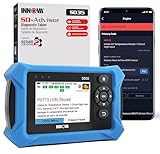
- OBD2 SCANNER FOR ALL SYSTEMS – The INNOVA SD35 is a tablet-based OBD2 scanner designed for advanced diagnostics. Read and clear check engine light, ABS, SRS, and TPMS codes, plus test your car battery and alternator to prevent unexpected failures. Vehicle coverage may vary. Please use Innova’s Coverage Checker to verify compatibility.
- ALL-SYSTEM DIAGNOSTICS & LIVE DATA – Unlike basic code readers, this OBD2 scanner for all vehicles scans engine, transmission, ABS, SRS, and more. Get real-time live data, including RPM, fuel trims, temperature readings, and oxygen sensor performance.
- OBD2 TABLET WITH USER-FRIENDLY INTERFACE – This automotive scan tool features a high-resolution display, making vehicle diagnostics faster and easier.
- ADVANCED TPMS, OIL RESET & SERVICE FUNCTIONS – Perform TPMS sensor checks, oil light reset, and other service resets with ease This professional diagnostic tool provides comprehensive vehicle maintenance capabilities in one device.
- WIDE VEHICLE COVERAGE (1996 & NEWER CARS & TRUCKS) – This OBD2 scanner Bluetooth tablet is compatible with Toyota, Ford, Honda, Chevrolet, Nissan, Dodge, and more. However, feature coverage may vary. Please use Innova's Coverage Checker to verify coverage.
This product presentation was made with AAWP plugin.