NHTSA ID Number: 10162087
Manufacturer Communication Number: SSM 48053
Summary
Some 2016-2019 Ford and Lincoln vehicles equipped with SYNC 3 not at the latest software level may exhibit Various Performance Related concerns such as Display Operation, Navigation, Voice Recognition, Phone Pairing, Applink, Travel Link, Slow System Response, etc. Check for SYNC software update under the OASIS Tab SYNC selection. If an update is available refer to WSM, Section 415-00 and update the APIM software. After Installation, complete pop-up appears, remove USB flash drive and install into IDS tool to update Ford database. Perform a complete ignition cycle by turning the key off for 5 minutes which is critical for a successful installation. If no updates are available or a blue or black screen is present after an update refer to WSM, Section 415-00 for diagnosis or SYNC 3 intermittent blank screen GSB for tips. For claiming, use causal part 14G371 and applicable labor operations in section 10 of the SLTS manual. Section
80 Affected Products
Vehicles
| FORD | C-MAX | 2016-2018 |
| FORD | ECOSPORT | 2018-2019 |
| FORD | EDGE | 2016-2018 |
| FORD | ESCAPE | 2016-2019 |
| FORD | EXPEDITION | 2016-2017 |
| FORD | EXPLORER | 2017-2019 |
| FORD | F-150 | 2016-2018 |
| FORD | F-250 SD | 2016-2019 |
| FORD | F-350 SD | 2016-2019 |
| FORD | F-450 SD | 2016-2019 |
| FORD | F-550 SD | 2016-2019 |
| FORD | FIESTA | 2016-2018 |
| FORD | FLEX | 2016-2019 |
| FORD | FOCUS | 2016-2018 |
| FORD | FUSION | 2017-2018 |
| FORD | MUSTANG | 2016-2018 |
| FORD | TAURUS | 2016-2019 |
| FORD | TRANSIT | 2016-2019 |
| FORD | TRANSIT CONNECT | 2016-2018 |
| LINCOLN | CONTINENTAL | 2017-2018 |
| LINCOLN | MKC | 2016-2019 |
| LINCOLN | MKS | 2016 |
| LINCOLN | MKT | 2016-2019 |
| LINCOLN | MKX | 2016-2018 |
| LINCOLN | MKZ | 2017-2018 |
| LINCOLN | NAVIGATOR | 2016-2017 |
SSM 48053 – 2016-2019 Various Vehicles Equipped With SYNC 3 – Various SYNC Performance Related Concerns
Some 2016-2019 Ford and Lincoln vehicles equipped with SYNC 3 not at the latest software level may exhibit Various Performance Related concerns such as Display Operation, Navigation, Voice Recognition, Phone Pairing, Applink, Travel Link, Slow System Response, etc. Check for SYNC software update under the OASIS Tab SYNC selection. If an update is available refer to WSM,Section 415-00 and update the APIM software. After Installation, complete pop-up appears, remove USB flash drive and install into IDS tool to update Ford database. Perform a complete ignition cycle by turning the key off for 5 minutes which is critical for a successful installation. If no updates are available or a blue or black screen is present after an update refer to WSM, Section 415-00 for diagnosis or SYNC 3 intermittent blank screen GSB for tips. For claiming, use causal part 14G371 and applicable labor operations in section 10 of the SLTS manual. Section
APPLICABLE VEHICLES
2016 – 2018 CAR -MAX
2017 – 2018 CAR: CONTINENTAL
2016 – 2018 CAR: EDGE
2016 – 2018 TRUCK: F-150
2016 – 2018 CAR: FIESTA
2016 – 2018 CAR: FOCUS
2016 TRUCK: F-SUPER DUTY
2016 CAR: MKS
2016 – 2018 CAR: MKX
2016 – 2018 CAR: MUSTANG
2016 – 2017 TRUCK: NAVIGATOR
2016 – 2018 CAR: TRANSIT CONNECT
2016 – 2019 TRUCK: ESCAPE
2016 – 2019 TRUCK: FLEX
2016 – TRUCK: SUPER DUTY
2017 – 2019 TRUCK: SUPER DUTY
2016 – 2019 TRUCK: MKC
2016 – 2019 TRUCK: MKT
2016 – 2019 CAR: TAURUS
2016 – 2019 TRUCK: TRANSIT
2017 – 2019 TRUCK: EXPLORER
2017 – 2019 TRUCK: EXPLORER
2016 – 2019 TRUCK: ESCAPE
2016 – 2019 TRUCK: MKC
2019 – 2019 CAR: BW ECOSPORT
2016 – 2017 TRUCK: EXPEDITION
2018 – 2019 TRUCK: EXPEDITION
2017 – 2019 TRUCK: SUPER DUTY
2017 – 2018 CAR: FUSION
2017 – 2018 CAR: MKZ
2016 – 2018 CAR: TRANSIT CONNECT
SSM 48053
SSM 47444

- 【LATEST A15 NAVIGATION SD CARD UPDATE】Stay ahead with the newest 2026 A15 navigation SD card that updates all previous versions including A14 and earlier, providing the most comprehensive map coverage for the entire United States and Canada with millions of updated points of interest such as gas stations, hotels, restaurants and newly added highways, ensuring reliable guidance for both city driving and cross-country adventures.
- 【WIDE COMPATIBILITY WITH FORD MODELS】This navigation SD card part number GM5T-19H449-AJ is designed to fit Ford vehicles including F-150 2013-2015, Explorer 2011-2016, Fusion 2013-2016, Expedition 2015, Escape 2013-2015, Edge 2011-2015, Focus 2012-2015, C-MAX 2013-2015, Escape Hybrid 2013-2015, Expedition XT 2015, Fiesta 2014-2015, Flex 2013-2015, Mustang 2015, Super Duty F-250/F-350/F-450 2013-2016, Taurus 2013-2015, Transit 2013-2015, Transit Connect 2014-2016.
- 【WIDE COMPATIBILITY WITH LINCOLN MODELS】 This navigation SD card compatible with Lincoln Accessories Fits Lincoln MKZ (2013 - 2016), MKX (2011 - 2016), MKC (2015), MKS (2013 - 2015), MKT (2013 - 2015), NAVIGATOR (2015). Reliable Lincoln navigation accessories that update your vehicle’s SYNC 2 system for accurate routing across USA & Canada.
- 【EASY PLUG AND PLAY INSTALLATION】You need to check if the CCPU of Ford/Lincoln SYNC system is compatible or needs to be updated first, check the product image corresponding to the CCPU version. To install: 1. Turn engine OFF 20+ mins. 2. Locate the SD card slot and remove the old navigation card. 3. Insert the new Navigation SD Card untll it clicks. 4.Start the engine to ensure, the “Navigation” icon should appear in the top-right corner (Auto-updates in 10-20 mins Never interrupt the process!).
- 【RELIABLE OFFLINE GPS NAVIGATION】Unlike smartphone navigation apps that depend on cellular data signals this Lincoln/Ford navigation SD card stores all map data directly on the card providing uninterrupted turn-by-turn directions even in remote areas mountains or deserts with no internet connection, perfect for long road trips across the United States and Canada with no data usage no signal issues and no roaming charges ensuring you always find your way regardless of your location.

- 2026 Latest Navigation GPS Maps sd Card A15 newest updated includes New Roads USA and Canada
- Compatible with Ford Navigation: f150 (2013-2015), Super Duty f250/350/450 (2013-2016), Explorer (2011-2016), Escape (2013-2015),FOCUS 2012 - 2015,FUSION 2013 - 2016
- Compatible with Ford Navigation: Expedition (2015), Mustang (2015), Transit (2013-2015), TRANSIT CONNECT (2014 - 2016),Taurus (2013-2015)
- Compatible with Lincoln Navigation MKC 2015, MKS (2013-2015), MKT (2013-2015), MKX (2011-2016,) MKZ (2013-2016),NAVIGATOR (2015)
- Compatible with C-MAX 2013 - 2015, EDGE 2011 - 2015,ESCAPE 2013 - 2015,ESCAPE HYBRID 2013 - 2015,EXPEDITION XT 2015,FIESTA 2014 - 2015,FLEX 2013 - 2015

- Note: Navigation sd card for database version A15 map library coverage for the United States and Canada. Note, please refer to the system version description in the attached picture to confirm that your car with Sync2 systems that use the embedded SD card
- Suitable Vehicles: The GPS navigation SD card is OEM GM5T-19H449-AJ, compatible with Ford 2013-2015 C-Max, 2013-2016 Fusion, compatible with Lincoln 2013-2015 MKS, and more. Please refer to the details page for more specific information on the fit models
- Clear Navigation: Our truck gps navigation SD card encompassing detailed map data and comprehensive road information, has undergone recent updates to incorporate the most current map database, enables you to arrive at your destination swiftly
- Easy to Install: Simply turn off the vehicle power, identify the SD card slot, typically positioned in the central console or concealed behind a dashboard access panel, eject the existing SD card and insert the new SD card until you hear the slot clic
- Usage Guidelines: When the latest version navigation SD card fault message is displayed, firstly eject the SD card and inspect it for breakage, if not perform a system factory reset or master reset according to the instructions in the detailed description
- [Precautions purchase]:Please contact and tell us your car's model, year and VIN number before or after you place order, and we will provide "free pre-programming" based on your vehicle's VIN.
- [Fitment]:Sync 3 Upgrade Kit Fits for Ford 2011-2016 F150, F250, F350, F450, F550, Edge, C-MAX, Escape, Expedition, Flex, Explorers, Focus, Fusion, Mustang, Super Duty, Taurus, Transit, Transit Connect; Fits for Lincoln MKC, MKS, MKT, MKX, MKZ, Navigator. (Specifically judged by VIN)
- [Retain all]:Sync 2 to sync 3 upgrade kit retaining all factory features (audio radio, rear camera, climate control, steering wheel controls, heated and cooled seats, etc.) With the latest map version na220.Support Wireless CarPlay.
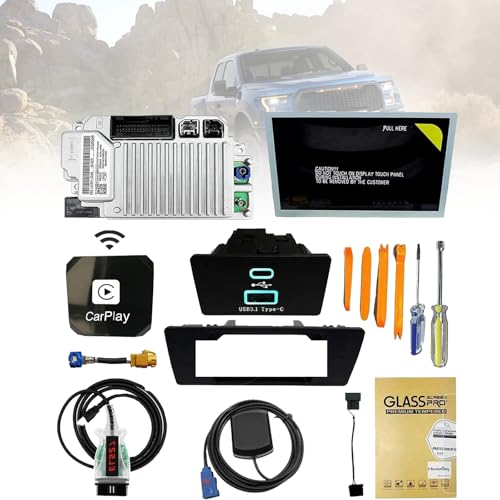
- [Kit Includes]:1.Ford SYNC3 APIM module 2.Genuine Ford 8" Capacitive Touchscreen 3.Screen to module cable 4.GPS antenna 5.USB-A HUB 6.USB power harness 7.USB bracket 8.ELM27 blinker 9.Replacement tools
- [Easy Installation]:The perfect design of SYNC 2 to SYNC 3 is rigorously tested before leaving the factory to ensure that there are no product defects and to provide you with better service.
- OEM Genuine Ford Parts only at Rod Baker Ford!
- Requires Updating Sync 3 to the Latest Compatible Version!
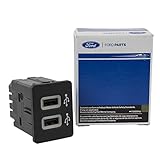
- Required for Upgrading Sync 3 to unlock Carplay Feature
- SEE Description for Compatible Models!!!
- If you are unsure about fitment, please contact us with your VIN to confirm!
This product presentation was made with AAWP plugin.