| SIRIUS SATELLITE RADIO – AUDIO CUTS OUT/NO SIGNAL – BUILT ON OR BEFORE 31-AUG-2016 | |
| Publication Date: September 29, 2016 | |
 :
:
ISSUE:
Some 2017 Fusion and MKZ vehicles equipped with Sirius satellite radio and built on or before 31-Aug-2016 may exhibit an intermittent concern where the audio cuts out and the radio displays a No Signal or Acquiring message while driving in open sky conditions.
ACTION:
Follow the Service Procedure steps to correct the condition.
SERVICE PROCEDURE
- Does the Sirius satellite radio audio cut out and display a No Signal or Acquiring message on the radio display?
- Yes – replace the antenna.
- MKZ – replace the satellite radio antenna. Refer to Workshop Manual (WSM), Section 415-00.
- Fusion – replace the audio unit antenna. Proceed to Step 2.
- No – this article does not apply. Refer to WSM, Section 415-00 for normal diagnosis.
- Yes – replace the antenna.
- Lower the rear of the headliner to access the antenna.
- Remove both C-pillar upper trim panels. Refer to WSM, Section 501-05.
- Remove the retainer covers, the retainers and the assist handles.
- Starting from the rear of the headliner release the locator pins and magnets to lower the rear of the headliner to gain access to the antenna.
- Replace the audio unit antenna. Refer to WSM, Section 415-00.
- To install, reverse the removal procedure.
| HP5Z-10E893-B | Satellite Radio Antenna – MKZ |
| HJ5Z-18936-BA | Audio Unit Antenna – Fusion |
| W710338-S424 | Clip |
| OPERATION | DESCRIPTION | TIME |
| 160131A | 2017 MKZ: Verify Message And Replace The Satellite Radio Antenna (Do Not Use With Any Other Labor Operations) | 0.3 Hr. |
| 160131B | 2017 Fusion: Verify Message And Replace The Audio Unit Antenna Includes Time To Lower The Rear Of the Headliner (Do Not Use With Any Other Labor Operations) | 0.6 Hr. |
WARRANTY STATUS
Eligible Under Provisions Of New Vehicle Limited Warranty Coverage.
Warranty/ESP coverage limits/policies/prior approvals are not altered by a TSB. Warranty/ESP coverage limits are determined by the identified causal part and verified using the OASIS part coverage tool.
DEALER CODING
| BASIC PART NO. | CONDITION CODE |
| 10E893 | 42 |

SiriusXM SXPL1V1 Onyx Plus Satellite Radio with Vehicle Kit – Easy to Install, Enjoy SiriusXM on Your Existing Car Stereo with This Dock and Play Radio
- Plays Siriusxm Through Existing Vehicle Stereo With Easy Diy Installation
- Full Color Display Shows Program & Channel Information, Album Art, Channel Logos & Graphics
- Plays At Home, Office, Outdoors Or In Additional Vehicles With Just 1 Subscription
- Allows Browsing Other Channels While Listening To Current One
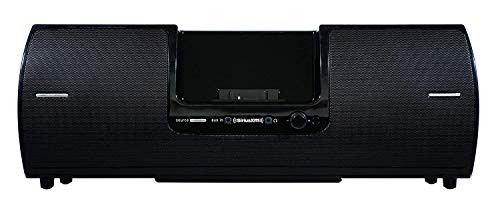
Portable Speaker Dock (SXSD2) | SiriusXM
- SPEAKER ARRAY - 2.1 system with separate tweeters, midrange speakers and a powerful subwoofer
- PORTABILITY - A fold away handle and an antenna cradle make it easy to take anywhere
- REMOTE CONTROL - Control your radio and docking station with the included remote
- INPUTS - Headphone jack for private listening and a aux in jack to allow for other MP3 players to be used
- COMPATIBILITY - SiriusXM Onyx Plus, SiriusXM Edge, XM Onyx, XM Onyx EZ, XM XpressRCI, XpressRC, Xpress R, Xpress, XpressEZ, Sirius Sporster 5, Sirius Starmate 8, Starmate 5, Starmate 4, Starmate 3, Sirius Stratus 7, Stratus 6, Stratus 5, Stratus 4, & Stratus 3
Sale


SiriusXM- XEZ1V1 Onyx EZ Satellite Radio with Vehicle Kit- Black
- Hear SiriusXM through your existing vehicle stereo with easy, do-it-yourself installation. Includes PowerConnect Vehicle Kit.
- Easy-to-read blue display allows you to view artist name, song or program title and channel information at the same time.
- Browse what's playing on other channels while listening to the current one, Store up to 10 of your favorite channels for one-touch access.
- Easily lock and unlock channels with mature content.
- One-Touch Jump to traffic and weather for the city of your choice, or back to your previous channel.
This product presentation was made with AAWP plugin.