June 13, 2012
TO: All U.S. Ford and Lincoln Dealers
SUBJECT: DEMONSTRATION / DELIVERY HOLD – Customer Satisfaction Program 12B36 Supplement #2
Certain 2011-2012 Model Year Explorer, Taurus, Flex, MKS, and MKT Vehicles
PCM Reprogram – Cooling Fan Strategy
REF: DEMONSTRATION / DELIVERY HOLD – Customer Satisfaction Program 12B36 Supplement #1 – Dated May 3, 2012
New! REASON FOR THIS SUPPLEMENT
- Announce that a new Engine Cooling Fan service part is now available for some applications that will require the transfer of the Engine Cooling Fan Electronic Module.
- Inform dealers of revised technical instructions and labor operations.
PROGRAM TERMS
This program will be in effect through May 1, 2013. There is no mileage limit for this program.
NOTE: To ensure proper cooling fan performance during the 11A02 MyFord/MyLincoln Touch Performance Upgrade software download procedure, FSA 12B36 should be performed prior to performing FSA 11A02.
AFFECTED VEHICLES
Certain 2011-2012 model year Explorer vehicles equipped with a 3.5L TIVCT or a 2.0L EcoBoost™ engine, Taurus and MKS vehicles equipped with a 3.5L EcoBoost™ engine, Flex and MKT vehicles equipped with a 3.5L DOHC or a 3.5L EcoBoost™ engine. Affected vehicles are identified in OASIS. In addition, for a list of vehicles assigned to your dealership, visit https://web.fsavinlists.dealerconnection.com. This information will be available on May 3, 2012.
REASON FOR THIS PROGRAM
In some of the affected vehicles, contamination build-up on the internal electrical contacts of the engine cooling fans may cause the fans to be inoperative. An inoperative engine cooling fan could lead to high engine temperature gauge readings and reduced air conditioning performance. Continued operation of the vehicle could result in illumination of the Malfunction Indicator Light (MIL) and eventually cause the engine to automatically enter derate (reduced power) mode.
Reprogramming the PCM using IDS version 78.04 or higher will incorporate a revised cooling fan strategy that periodically cycles the fans at high speed to clean the contamination from the contacts and prevent future contamination build-up.
SERVICE ACTION
Before demonstrating or delivering any of the vehicles involved in this program, dealers are to verify operation of the cooling fans by commanding them On using IDS.
- If the cooling fans operate when commanded On, reprogram the PCM using IDS version 78.04 or higher.
- If the cooling fans are inoperative when commanded On by IDS, replace the cooling fan and reprogram the PCM using IDS version 78.04 or higher.
This service must be performed on all affected vehicles at no charge to the vehicle owner.
OWNER NOTIFICATION MAILING SCHEDULE
Owner Letters are expected to be mailed the week of May 7, 2012. Dealers should repair any affected vehicles that arrive at their dealerships, whether or not the customer has received a letter.
New! ATTACHMENTS
Attachment I: Administrative Information
Attachment II: Labor Allowances and Parts Ordering Information
Attachment III: Technical Information
Owner Notification Letter
QUESTIONS & ASSISTANCE
Special Service Support Center (Dealer Assistance Only)…..1-800-325-5621
Special Service Support Center (Parts Ordering)…..1-800-207-2444
Sincerely,
Michael A. Berardi
ATTACHMENT I
DEMONSTRATION / DELIVERY HOLD –
Customer Satisfaction Program 12B36 – Supplement #2
Certain 2011-2012 Model Year Explorer, Taurus, Flex, MKS, and MKT Vehicles
PCM Reprogram – Cooling Fan Strategy
OASIS ACTIVATED?
Yes, OASIS was activated on April 9, 2012 for the original population. OASIS will be activated for the Supplement #1 population on May 3, 2012.
FSA VIN LIST ACTIVATED?
Yes, FSA VIN list will be available through https://web.fsavinlists.dealerconnection.com on May 3, 2012. Owner names and addresses will be available by May 15, 2012.
NOTE: Your FSA VIN list may contain owner names and addresses obtained from motor vehicle registration records. The use of such motor vehicle registration data for any purpose other than in connection with this program is a violation of law in several states, provinces, and countries. Accordingly, you must limit the use of this listing to the follow-up necessary to complete this service action.
STOCK VEHICLES
- Correct all affected units in your new vehicle inventory before delivery.
- Use OASIS to identify any affected vehicles in your used vehicle inventory.
SOLD VEHICLES
- Owners of affected vehicles will be directed to dealers for repairs.
- Immediately contact any of your affected customers whose vehicles are not on your VIN list but are identified in OASIS. Give the customer a copy of the Owner Notification Letter (when available) and schedule a service date.
- Correct other affected vehicles identified in OASIS which are brought to your dealership.
TITLE BRANDED / SALVAGED VEHICLES
Affected title branded and salvaged vehicles are eligible for this service action.
RELATED DAMAGE
If a related damage condition exists that you believe to be caused by the covered condition, call the Special Service Support Center to request approval prior to the repair of any related damage. Requests for approval after completion of the repair will not be granted. Ford Motor Company reserves the right to deny coverage for related damage in cases where the vehicle owner has not had this service action performed on a timely basis.
ADDITIONAL LABOR TIME
- If a condition exists that requires additional labor to complete the repair, call the Special Service Support Center to request approval prior to performing any additional labor. Requests for approval after completion of the repair will not be granted.
- If you encounter aftermarket equipment or modifications to the vehicle which might prevent the repair of the covered condition, call the Special Service Support Center.
OWNER REFUNDS
- Ford Motor Company is offering a refund for owner-paid repairs covered by this program if the repair was performed before the date of the Owner Notification Letter. This refund offer expires July 31, 2012.
- Dealers are also authorized to refund owner-paid emergency repairs that were performed away from an authorized servicing dealer after the date of the Owner Notification Letter. There is no expiration date for emergency repair refunds. Non-covered repairs, or those judged by Ford to be excessive, will not be reimbursed.
- Refunds will only be provided for the cost associated with engine cooling fan replacement.
New! RENTAL VEHICLES
With proper parts ordering and service appointment scheduling, rental vehicles should not be required. However, if you have a unique circumstance which may require a rental vehicle, please contact the Special Service Support Center at 1-800-325-5621.
CLAIMS PREPARATION AND SUBMISSION
- Enter claims using Direct Warranty Entry (DWE).
- Refer to ACESII manual for claims preparation and submission information.
- Related damage must be claimed on a repair line that is separate from the repair line on which the FSA is claimed. Related damage requires prior approval from the Special Service Support Center.
- “MT” labor should be submitted on a separate repair line with the related damage flag checked. “MT” labor requires prior approval from the Special Service Support Center.
- Submit refunds on a separate repair line.
- Program Code: 12B36 – Expense: ADMIN
- Expense: REFUND – Misc. Expense: 0.2 Hrs.
CLAIMS PREPARATION AND SUBMISSION (cont.)
- Multiple refunds should be submitted on one repair line and the invoice details for each repair should be detailed in the comments section of the claim.
- For rental vehicle claiming, follow Extended Service Plan (ESP) guidelines for dollar amounts. Enter the total amount of the rental expense under Miscellaneous Expense code “Rental”.
- PROGRAM TERMS: This program will be in effect through May 1, 2013. There is no mileage limit for this program.
ATTACHMENT II
DEMONSTRATION / DELIVERY HOLD –
Customer Satisfaction Program 12B36 – Supplement #2
Certain 2011-2012 Model Year Explorer, Taurus, Flex, MKS, and MKT Vehicles
PCM Reprogram – Cooling Fan Strategy
New! LABOR ALLOWANCES
| Description | Labor Operation | Labor Time |
| Cooling Fan Passes Inspection
Inspect Cooling Fan Operation and Reprogram the PCM | 12B36A | 0.4 Hour(s) |
Cooling Fan Fails Inspection: Explorer, Flex,& MKT
(Requires Electronic Module Transfer)
| Explorer 3.5LTIVCT
Inspect Cooling Fan Operation, Replace Cooling Fan, Transfer Electronic Module, and Reprogram the PCM | 12B36F | 0.8 Hour(s) | |||
| Explorer 2.0L EcoBoost
Inspect Cooling Fan Operation, Replace Cooling Fan, Transfer Electronic Module, and Reprogram the PCM | 12B36G | 0.8 Hour(s) | |||
| 2011-2012 MKT 3.7L DOHC and Flex 3.5L DOHC
Inspect Cooling Fan Operation, Replace Cooling Fan, Transfer Electronic Module, and Reprogram the PCM | 12B36H | 0.7 Hour(s) | |||
| 2011-2012 MKT and Flex 3.5L EcoBoost
Inspect Cooling Fan Operation, Replace Cooling Fan, Transfer Electronic Module, and Reprogram the PCM | 12B36J | 1.4 Hour(s) |
Cooling Fan Fails Inspection: Taurus & MKS
(Electronic Module Transfer NOT required)
| 2011-2012 Taurus and MKS 3.5L EcoBoost
Inspect Cooling Fan Operation, Replace Cooling Fan, and Reprogram the PCM | 12B36K | 1.3 Hour(s) |
New! PARTS REQUIREMENTS / ORDERING INFORMATION
To manage part availability, dealers must contact the Special Service Support Center parts order line at 1-800-207-2444. Dealers will receive a DOES II message when part requirements can be ordered through normal order processing channels.
When calling to place an order for a cooling fan, please be prepared to provide dealer P&A code, VIN, and RO #.
| Part Number | Description | Quantity |
| BA8Z-8C607-D | Cooling Fan (Explorer, Flex & MKT) | 1 |
| BA5Z-8C607-C | Cooling Fan (Taurus & MKS) | 1 |
The DOR/COR number for this service action is 50464.
Less than 5% of the affected vehicle population is expected to require a cooling fan replacement.
DEALER PRICE
For latest prices, refer to DOES II.
PARTS RETENTION AND RETURN
Affected cooling fans are subject to random selection for return to the Ford Warranty Parts Analysis Center (WPAC). Refer to your daily PEARS (Parts Entry and Return System) register for part disposition and return instructions.
Follow the provisions of the Warranty and Policy Manual for “Parts Retention and Return Procedures.”
EXCESS STOCK RETURN
Excess stock returned for credit must have been purchased from Ford Customer Service Division in accordance with Policy Procedure Bulletin 4000.
ATTACHMENT III
CERTAIN 2011-2012 MODEL YEAR EXPLORER, TAURUS, FLEX, MKS, AND MKT VEHICLES — PCM REPROGRAM – COOLING FAN STRATEGY
OVERVIEW
Contamination build up on the internal electrical contacts of the engine cooling fans may cause the fans to be inoperative. Dealers are to verify the engine cooling fan operation, replace if necessary, and reprogram the PCM using IDS version 78.04 or higher. A revised cooling fan strategy will periodically cycle the fans at high speed to clean the contamination from the contacts and prevent future contamination build-up.
NOTE: This FSA must be performed prior to performing FSA 11A02 (MyFord Touch Performance Upgrade) on affected Explorer vehicles to ensure proper cooling fan performance during the 11A02 software download procedure.
COOLING FAN INSPECTION
NOTE: Maximum fan speed is required to ensure sufficient cleaning of the internal electrical contacts.
- Using IDS, start a new session and select Data Logger. Using the Output State Control, command the Cooling Fan Speed Desired (FAN_CTRL# or FAN_DSD# – above 90%) PID to High speed for 2 minutes and verify cooling fan operation.
NOTE: For Flex, MKS, MKT, Taurus equipped with a 3.5L Ecoboost engine and all Explorer vehicles, use PID “FAN_DSD”.
For Flex 3.5L DOHC and MKT 3.7L vehicles, use PID “FAN_CTRL”.
- Cooling fan operates properly: Proceed to “PCM Reprogramming” on Page 3.
- Cooling fan does not operate properly: Proceed to “Cooling Fan Replacement” on Page 2
- After the cooling fan is replaced, proceed to “PCM Reprogramming” on Page 3.
COOLING FAN REPLACEMENT
All Vehicles
- Remove the cooling fan assembly. Refer to Workshop Manual (WSM), Section 303-03.
Explorer, Flex, and MKT Vehicles Only
- Disconnect the cooling fan electronic module electrical connectors. See Figure 1.
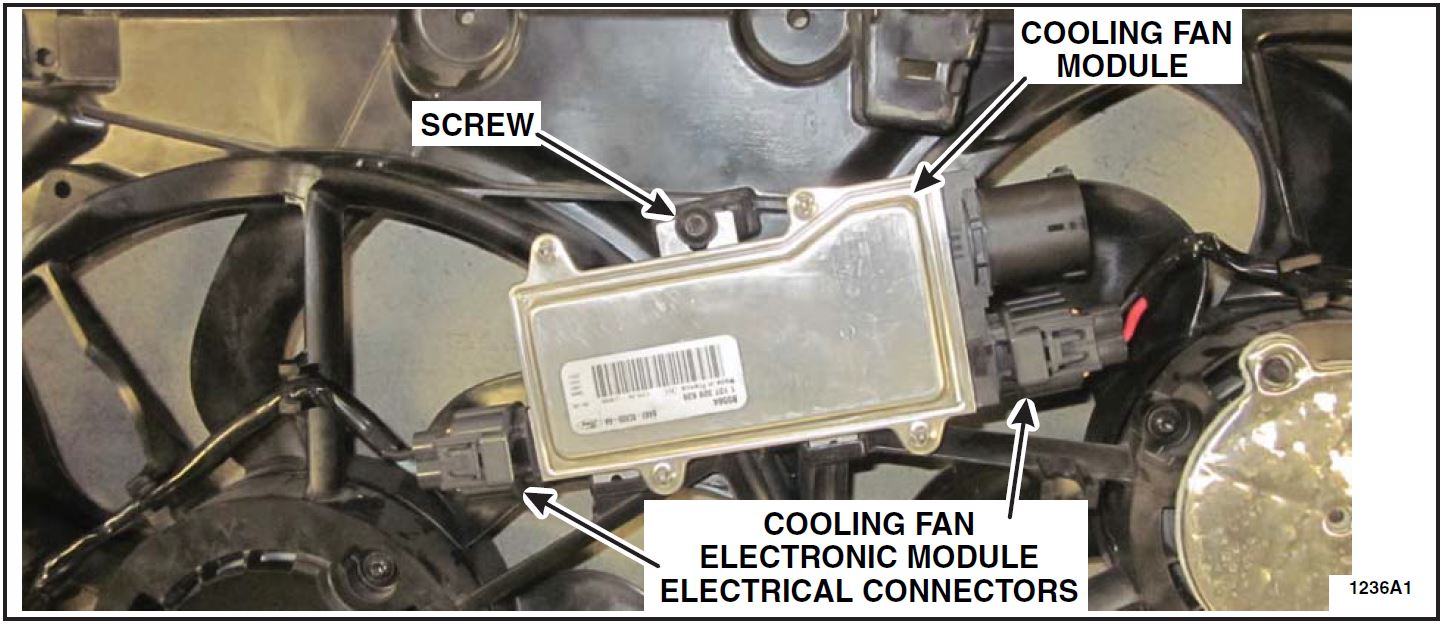 FIGURE 1
- Remove the screw and detach the cooling fan electronic module from the cooling fan. See Figure 1.
- Install the cooling fan electronic module by inserting both bottom tabs into the new cooling fan assembly shroud pockets and install the screw.
- Tighten the screw to 7 Nm (60 lb-in).
- Connect the cooling fan electronic module electrical connectors.
All Vehicles
- Install the new cooling fan assembly. Refer to WSM, section 303-03.
- Proceed to “PCM Reprogramming” on Page 3.
PCM Reprogramming
Important Information For Module Programming
NOTE: When programming or reprogramming a module, use the following basic checks to ensure programming completes without errors.
- Make sure the battery is fully charged before carrying out the programming steps and connect IDS/scan tool to a power source.
- Inspect Vehicle Communication Module (VCM) and cables for any damage. Make sure scan tool connections are not interrupted during programming.
- A hardwired internet connection is strongly recommended.
- Turn off all unnecessary accessories (radio, heated/cooled seats, head lamps, interior lamps, HVAC system, etc.), close doors.
- Disconnect/depower any aftermarket accessories (remote start, alarm, power inverter, CB radio, etc.).
- Follow all scan tool on-screen instructions carefully.
- Disable IDS/scan tool sleep mode, screensaver, hibernation modes.
- Create all sessions Key On Engine Off (KOEO). Starting the vehicle before creating a session will cause errors within the programming inhale process.
Module Reprogramming
NOTE: Reprogram appropriate vehicle modules before performing diagnostics and clear all Diagnostic Trouble Codes (DTCs) after programming. For DTCs generated after reprogramming, follow normal diagnostic service procedures.
- Reprogram the PCM to the latest calibration using IDS release 78.04 or higher. Calibration files may also be obtained at www.motorcraft.com.
Recovering a PCM/Body Control Module (BCM) when programming has resulted in a blank module:
NEVER DELETE THE ORIGINAL SESSION!
- Obtain the original IDS that was used when the programming error occurred during Module Reprogramming (MR) or Programmable Module Installation (PMI).
- Disconnect the VCM from the data link connector (DLC) and the IDS.
- Reconnect the VCM to IDS and then connect to the DLC. Once reconnected, the VCM icon should appear in the corner of the IDS screen. If it does not, troubleshoot the IDS to VCM connection.
- Locate the ORIGINAL vehicle session when programming failed. This should be the last session used in most cases. If not, use the session created on the date that the programming failed.
NOTE: If the original session is not listed in the previous session list, click the ”Recycle bin” icon at the lower right of the previous session screen. This will load any deleted sessions and allow you to look through them. Double-click the session to restore it.
- Once the session is loaded, the failed process should resume automatically.
- If programming does not resume automatically, proceed to the Module Programming menu and select the previously attempted process, Programmable Module Installation (PMI) or Module Reprogramming.
- Follow all on-screen prompts/instructions.
- Near the end of programming, the IDS will prompt you to select certain parameters. It is important to make a selection for ALL parameters listed. If the correct selection is already highlighted, you must still choose that selection before clicking the “Tick” mark to complete the configuration.
- The last screen on the IDS may list additional steps required to complete the programming process.
Make sure all applicable steps listed on the screen are followed in order.
April 2012
Customer Satisfaction Program 12B36
Mr. John Sample
123 Main Street
Anywhere, USA 12345
Your Vehicle Identification Number: 12345678901234567
At Ford Motor Company, it has been our goal for more than 100 years to provide customers with high-quality, dependable products. In order to maintain these standards, Ford Motor Company is providing a no-charge Customer Satisfaction Program (Program Number 12B36) for your vehicle, with the Vehicle Identification Number shown above.
| What is the issue? | On your vehicle, contamination can build up on the internal electrical contacts of the engine cooling fan motors, causing the fans to be inoperative. Inoperative engine cooling fans could lead to high engine temperature gauge readings and reduced air conditioning performance.
Continued operation of the vehicle could result in illumination of the Malfunction Indicator Light (MIL) and eventually cause the engine to automatically enter derate (reduced power) mode. |
| What will Ford and your dealer do? | In the interest of customer satisfaction, Ford Motor Company has authorized your dealer to inspect the operation of the engine cooling fans on your vehicle, and replace them if necessary. In addition, your dealer will reprogram your vehicle’s Powertrain Control Module (PCM) to prevent contamination from accumulating in the future.
This service will be performed free of charge (parts and labor) under the terms of this program. This Customer Satisfaction Program will be in effect until May 1, 2013 regardless of mileage. Coverage is automatically transferred to subsequent owners. |
| How long will it take? | The time needed for this repair is less than one-half day. However, due to service scheduling requirements, your dealer may need your vehicle for a longer period of time. |
| What should you do? | Please call your dealer without delay and request a service date for Customer Satisfaction Program 12B36. Provide the dealer with the Vehicle Identification Number (VIN) of your vehicle. The VIN is printed near your name at the beginning of this letter.
If you do not already have a servicing dealer, you can access www.Fordowner.com for dealer addresses, maps, and driving instructions. Ford Motor Company wants you to have this service action completed on your vehicle. The vehicle owner is responsible for making arrangements to have the work completed. Ford Motor Company can deny coverage for any vehicle damage that may result from the failure to have this service action performed on a timely basis. Therefore, please have this service action performed as soon as possible. |
| Do you need a rental vehicle? | If your dealer determines that the cooling fans on your vehicle require replacement, your dealer is authorized to provide a rental vehicle for your personal transportation at no charge (except for fuel, insurance, and tax) while parts are on order. Please see your dealer for guidelines and limitations. |
| Have you previously paid for this repair? | If you have previously paid for a repair that addresses the issue described in this letter, you still need to have this service action performed to ensure the correct PCM calibration has been installed on your vehicle.
If the previously paid for repair was performed before the date of this letter, you may be eligible for a refund. Refunds will only be provided for service related to engine cooling fan operation. To verify eligibility and expedite reimbursement, give your paid original receipt to your dealer before July 31, 2012. To avoid delays, do not send receipts to Ford Motor Company. |
| What if you no longer own this vehicle? | If you no longer own this vehicle, and have an address for the current owner, please forward this letter to the new owner.
You received this notice because our records, which are based primarily on state registration and title data, indicate that you are the current owner. |
| Can we assist you further? | If you have difficulties getting your vehicle repaired promptly and without charge, please contact your dealership’s Service Manager for assistance.
RETAIL OWNERS: If you still have concerns, please contact the Ford Motor Company Customer Relationship Center at 1-866-436-7332 and one of our representatives will be happy to assist you. For the hearing impaired call 1-800-232-5952 (TDD). Representatives are available Monday through Friday: 8:00AM – 5:00PM (Your Local Time). If you wish to contact us through the Internet, our address is: www.Fordowner.com. FLEET OWNERS: If you still have concerns, please contact the Fleet Customer Information Center at 1-800-34-FLEET, Option #3 and one of our representatives will be happy to assist you. Representatives are available Monday through Friday: 8:00AM – 5:00PM (Your Local Time). Or you may contact us through the Internet at www.fleet.ford.com. |
Thank you for your attention to this important matter.
Ford Customer Service Division
Service Information & Reprogramming
Software necessary to program electronic modules to the latest calibration level, perform module initialization (PATS), and set Programmable Parameters on Ford, Lincoln and Mercury vehicles.
Ford Module Programming (FMP) is a software application that allows subscribers to program electronic modules on Ford, Lincoln and Mercury vehicles. It can be used for:
- Reprogramming emission-related (OBDII) modules on some vehicles manufactured in 1995 and all vehicles manufactured from 1996 to the present
- Reprogramming or reconfiguring non-emission-related modules on many vehicles (UBP and MS-CAN not supported)
In addition, module initialization (PATS) functions such as Keycode Erase/Reprogram and PCM Parameter Reset can be done using this application.
No products found.


- ALL OF THE J2534 PROTOCOLS - This single unit has all of the protocols you need for your OEM J2534 reprogramming and diagnostics including the latest in DoIP and CanFD
- J2534 TECHNICAL SUPPORT - FREE for the life of the tool. Staffed by technicians who understand vehicle repair and J2534 Pass‑thru
- TOOLBOX WITH OEM APPLICATION DESCRIPTIONS - educational video tutorials and real-time news – Giving you the confidence and up-to-date knowledge to get the job done
- J2534 v05.00 API - The newest version of J2534 to give you the latest in pass-thru technology
- FUTURE PROOF WITH 4 CAN CHANNELS - Going beyond the 3 required by select Chrysler/FCA models, CarDAQ-Plus 3 also provides a 4th to meet the needs of future OEM applications
No products found.
No products found.
using Ford Module Programming (FMP) can Reprogram and Configure most Modules.Latest Calibration Information
Module Build Data (As-Built)
Use VIN to obtain As-Built data

No products found.

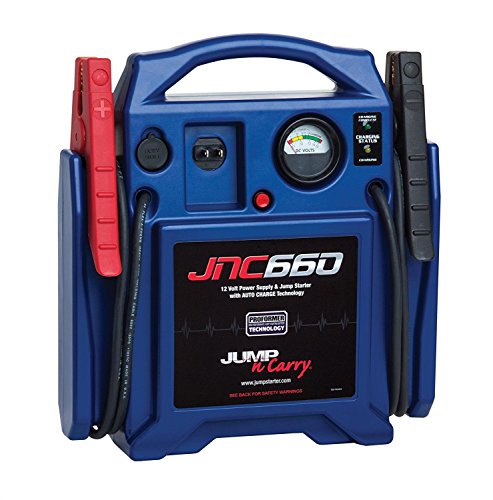
- Delivers serious jump-starting power with 1000 peak amps and 500 instant starting amps
- Reverse polarity alarm alerts when there is an improper connection; Connect the clamps to the battery, turn on the switch and start your vehicle. All Metal Powder Coated Clamps
- Features a 120 PSI air compressor to help inflate tires with low pressure; High-powered LED light rotates 270 degrees to help you work in the dark
- Built-in 12V DC outlet and USB port provide portable power for electronic devices; Includes a limited 1 year manufacturer warranty
- Jump starter should be charged every 30 days when not in use; Charges using a standard household extension cord (sold separately)
This product presentation was made with AAWP plugin.
I’ve had this issue fixed at the dealer but it is still overheating. Will they go through all of this again and fix free under this recall a second time or will they make me pay for it this time?
Reprogramming is done once. If it’s overheating you have another issue.
Well I have a Explorer 2011 in Germany with the cooling fan problem like 12B36. Ford Germany has no Idear about that Program, so how we cab handel it her in Germany ?? It a real US Explorer exportet private to Germany .
You will have to fix it your self. This is covered in US only.