
NHTSA ID Number: 10198605
Manufacturer Communication Number: TSB 21-2175
Summary
Some 2016 MKS, 2016-2017 Navigator, 2016-2018 F-150/Focus/C-MAX/Edge/Fiesta/MKX/Transit Connect/Mustang, 2017-2018 Continental/Fusion/MKZ, 2017-2019 Explorer, 2016-2019 Escape/MKC/Flex/MKT/Taurus/Transit/Expedition/F-Super Duty, and 2018-2019 EcoSport vehicles equipped with SYNC 3 may experience various SYNC performance related concerns.

This bulletin supersedes 20-2255. Reason for update: Replace Awareness/Interim Message
Model:
Ford
2016-2018 C-MAX Hybrid
2018-2019 EcoSport
2016-2018 Edge
2016-2019 Escape
2016-2019 Expedition
2017-2019 Explorer
2016-2018 F-150
2016-2019 F-Super Duty
2016-2018 Fiesta
2016-2019 Flex
2016-2018 Focus
2017-2018 Fusion
2016-2018 Mustang
2016-2019 Taurus
2016-2019 Transit
2016-2018 Transit Connect
2017-2018 Continental
2016-2019 MKC
2016 MKS
2016-2019 MKT
2016-2018 MKX
2017-2018 MKZ
2016-2017 Navigator
Summary
This article supersedes TSB 20-2255 to update the TSB Service Procedure.
Issue: Some 2016 MKS, 2016-2017 Navigator, 2016-2018 F-150/Focus/C-MAX/Edge/Fiesta/MKX/Transit Connect/Mustang, 2017-2018 Continental/Fusion/MKZ, 2017-2019 Explorer, 2016-2019 Escape/MKC/Flex/MKT/Taurus/Transit/Expedition/F-Super Duty, and 2018-2019 EcoSport vehicles equipped with SYNC 3 may experience various SYNC performance related concerns including but not limited to:
- Display operation concerns
- Navigation inoperative
- Voice recognition concerns
- Phone connection issues
- Dropped phone connections
- Applink related performance
- Travel Link not present or showing incorrect traffic
- Slow system response
This may be due to the SYNC software. To correct the condition, follow the Service Procedure to update the accessory protocol interface module (APIM) software.
NOTE: Ford has found some of the APIMs replaced and returned for inspection contained an outdated software level and the APIM did not require replacement. The customer concern may have been resolved by updating the APIM with latest level of software. The SYNC 3 universal thumb drive will be able to update the APIM software without the use of a scan tool and does not require the process to be monitored. Ford will be monitoring APIM replacements to confirm TSB directed software updates have been performed.
Action: Follow the Service Procedure to correct the condition on vehicles that meet all the following criteria:
- One of the following vehicles:
- 2016 MKS
- 2016-2017 Navigator
- 2016-2018 F-150/Focus/C-MAX/Edge/Fiesta/MKX/Transit Connect/Mustang

- 2016-2019 Escape/MKC/Flex/MKT/Taurus/Transit/Expedition/F-Super Duty
- 2017-2018 Continental/Fusion/MKZ
- 2017-2019 Explorer
- 2018-2019 EcoSport
- Customer complaint of one or more of the following symptoms:
- Display operation concerns
- Navigation inoperative
- Voice recognition concerns
- Phone connection issues
- Dropped phone connections
- Applink related performance
- Travel Link not present or showing incorrect traffic
- Slow system response
Service Procedure
1. Verify that the SYNC 3 universal thumb drive is titled SG3v202102 or later (later software levels will have a higher numerical value). Is the SYNC 3 universal thumb drive title SG3v202102 or later?
(1). Yes – proceed to Step 2.
(2). No – download the SYNC 3 Universal USB Updater Application under the Service Tips section of Professional Technician System (PTS). Review the instructions and use Scan for Updates and Update USB. Proceed to Step 2.
- NOTE: If needed, this is a one time upload to the thumb drive. Downloading the files to laptop and updating the thumb drive could take up to 2 1/2 hours depending on internet speed. Once the thumb drive is updated, it can be used repeatedly to update all vehicles in this article.
2. Disconnect all customer connected universal serial bus (USB) items from all media hub locations in the vehicle.
3. Start the vehicle.
4. Insert the SYNC 3 universal thumb drive into the USB port on the media hub.
5. The module automatically updates with no user input required.
(1). Modules already at the latest software level will indicate this after approximately 30 seconds.
(2). Module programming for a non-updated module does not need to be monitored and can take approximately 20-30 minutes.
(3). Once the reprograming has completed, the screen will display a message indicating the module is up to date.
6. Remove the SYNC 3 universal thumb drive when complete. The screen returns to the SYNC 3 home screen. Reconnect any of the customer USB items. No vehicle or system restarts are required.
89 Affected Products
Vehicles
| MAKE | MODEL | YEAR |
| FORD | E-150 | 2017 |
| FORD | ECOSPORT | 2018-2019 |
| FORD | EDGE | 2016-2018 |
| FORD | ESCAPE | 2016-2019 |
| FORD | EXPEDITION | 2016-2019 |
| FORD | EXPLORER | 2017-2019 |
| FORD | EXPLORER POLICE INTERCEPT | 2017-2019 |
| FORD | F-150 | 2016-2018 |
| FORD | F-250 SD | 2016-2019 |
| FORD | F-350 SD | 2016-2019 |
| FORD | F-450 SD | 2016-2019 |
| FORD | F-550 SD | 2016-2019 |
| FORD | FIESTA | 2016-2018 |
| FORD | FLEX | 2016-2019 |
| FORD | FOCUS | 2016-2018 |
| FORD | FUSION | 2017-2018 |
| FORD | FUSION ENERGI | 2017-2018 |
| FORD | FUSION HYBRID | 2017-2018 |
| FORD | MUSTANG | 2016-2018 |
| FORD | POLICE INTERCEPTOR SEDAN | 2016-2019 |
| FORD | TAURUS | 2016-2019 |
| FORD | TRANSIT | 2016-2019 |
| FORD | TRANSIT CONNECT | 2016-2018 |
| LINCOLN | CONTINENTAL | 2017-2018 |
| LINCOLN | MKC | 2016 |
| LINCOLN | MKS | 2016 |
| LINCOLN | MKT | 2016-2018 |
| LINCOLN | MKX | 2016-2018 |
| LINCOLN | MKZ | 2017-2018 |
| LINCOLN | MKZ HYBRID | 2017-2018 |
| LINCOLN | NAVIGATOR | 2016-2017 |
1 Associated Document
Manufacturer Communications
21-2175
01 June 2021
NHTSA ID Number: 10179117
Manufacturer Communication Number: TSB 20-2255
Summary
Some 2016 MKS, 2016-2017 Navigator, 2016-2018 F-150/Focus/C-MAX/Edge/Fiesta/MKX/ Transit Connect/Mustang, 2017-2018 Continental/Fusion/MKZ, 2017-2019 Explorer, 2016-2019 Escape/MKC/Flex/MKT/Taurus/Transit/Expedition/F-Super Duty, and 2018-2019 EcoSport vehicles equipped with SYNC 3 may experience various SYNC performance related concerns. To correct the condition, follow the Service Procedure.
1 Associated Document
Manufacturer Communications
20-2255
05 August 2020
MC-10179117-0001.pdf 208.128KB
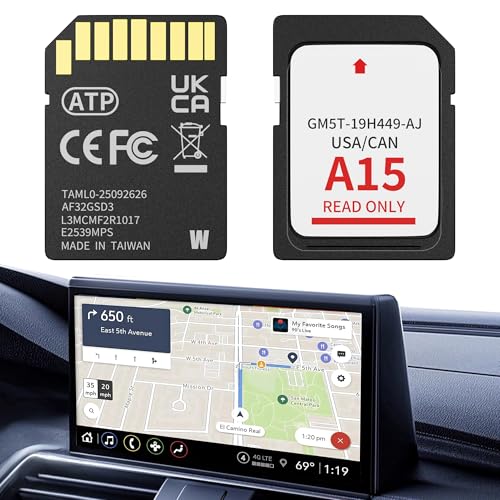
- 【LATEST A15 NAVIGATION SD CARD UPDATE】Stay ahead with the newest 2026 A15 navigation SD card that updates all previous versions including A14 and earlier, providing the most comprehensive map coverage for the entire United States and Canada with millions of updated points of interest such as gas stations, hotels, restaurants and newly added highways, ensuring reliable guidance for both city driving and cross-country adventures.
- 【WIDE COMPATIBILITY WITH FORD MODELS】This navigation SD card part number GM5T-19H449-AJ is designed to fit Ford vehicles including F-150 2013-2015, Explorer 2011-2016, Fusion 2013-2016, Expedition 2015, Escape 2013-2015, Edge 2011-2015, Focus 2012-2015, C-MAX 2013-2015, Escape Hybrid 2013-2015, Expedition XT 2015, Fiesta 2014-2015, Flex 2013-2015, Mustang 2015, Super Duty F-250/F-350/F-450 2013-2016, Taurus 2013-2015, Transit 2013-2015, Transit Connect 2014-2016.
- 【WIDE COMPATIBILITY WITH LINCOLN MODELS】 This navigation SD card compatible with Lincoln Accessories Fits Lincoln MKZ (2013 - 2016), MKX (2011 - 2016), MKC (2015), MKS (2013 - 2015), MKT (2013 - 2015), NAVIGATOR (2015). Reliable Lincoln navigation accessories that update your vehicle’s SYNC 2 system for accurate routing across USA & Canada.
- 【EASY PLUG AND PLAY INSTALLATION】You need to check if the CCPU of Ford/Lincoln SYNC system is compatible or needs to be updated first, check the product image corresponding to the CCPU version. To install: 1. Turn engine OFF 20+ mins. 2. Locate the SD card slot and remove the old navigation card. 3. Insert the new Navigation SD Card untll it clicks. 4.Start the engine to ensure, the “Navigation” icon should appear in the top-right corner (Auto-updates in 10-20 mins Never interrupt the process!).
- 【RELIABLE OFFLINE GPS NAVIGATION】Unlike smartphone navigation apps that depend on cellular data signals this Lincoln/Ford navigation SD card stores all map data directly on the card providing uninterrupted turn-by-turn directions even in remote areas mountains or deserts with no internet connection, perfect for long road trips across the United States and Canada with no data usage no signal issues and no roaming charges ensuring you always find your way regardless of your location.

- 【Compatible with Ford models】F-150 2013-2015, Explorer 2011-2016, Fusion 2013-2016, Escape, Escape Hybrid 2013-2015, Super Duty (F-250/F-350/F-450) 2013-2016, Edge 2011-2015, Focus 2012-2015, Flex 2013-2015, Fiesta 2014-2015, C-Max 2013-2015, Mustang 2015, Taurus 2013-2015, Expedition 2015, Transit 2014-2015
- 【Compatible with Lincoln Models】MKC 2015, MKS 2013-2015, MKT 2013-2015, MKX 2011-2016, MKZ 2014-2016, Navigator 2015
- 【A15 Navigation SD Card】This SD card updates previous versions such as A14, A13, A12, and so on, providing expanded coverage of hundreds of cities, counties and metropolitan areas in all 50 U.S. states, Puerto Rico, and Canada. For Ford navigation SD card update ensures that users have access to the newest map data, allowing for accurate and up-to-date navigation information.
- 【Easy to Use】Before replacing the SD card, ensure the engine is OFF at least 10 mintes. Insert the new card (label side up), then turn ON the vehicle. The system will update automatically—DO NOT turn off the engine until it’s complete. The update takes about 10-20 minutes, with no additional programming required.
- 【Navigation SD Card Warning】Do not insert the A15 navigation SD card into non-vehicle devices, as this may damage the map data. Additionally, A15 Navigation SD cards are locked to the first vehicle once inserted and cannot be switched to another vehicle

- OEM Genuine Ford Parts only at Rod Baker Ford!
- Requires Updating Sync 3 to the Latest Compatible Version!
- Required for Upgrading Sync 3 to unlock Carplay Feature
- SEE Description for Compatible Models!!!
- If you are unsure about fitment, please contact us with your VIN to confirm!
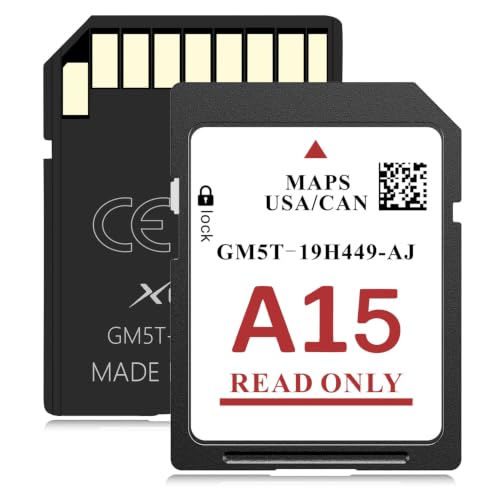
- SYNC 2 Navigation System Map Update: Get directions to wherever you travel with this map update that identifies roads, subdivisions, business and points of interest for the United States and Canada. Drive confidently through unfamiliar or recently changed areas and arrive at your destination quickly and efficiently
- Upgrade to 2026 XGEEK A15 SD Card: Replaces A14 and older versions with full updated US and Canada maps, fresh POIs and new highways for reliable daily and long-distance navigation
- Compatible Ford Navigation Models: Edge (2011-2015), Expedition XT (2015), Expedition (2015), Explorer (2011-2016), Escape / Escape Hybrid (2013-2015), Taurus (2013-2015), Transit (2014-2015), Transit Connect (2014-2015), F-150 (2013-2015), Flex (2013-2015), Fiesta (2014-2015), Focus (2012-2015), Fusion (2013-2016), Mustang (2015), C-Max (2013-2015), Super Duty F250 / F350 / F450 (2013-2016)
- Compatible Lincoln Navigation Models: MKC (2015), MKS (2013-2015), MKT (2013-2015), MKX (2011-2016), MKZ (2014-2016), Navigator (2015)
- Installation Instructions: Before installation, check whether the Ford/Lincoln SYNC system's central processor (CCPU) is compatible or requires an upgrade; for detailed steps, refer to main image 7. Turn off the vehicle and remove the old navigation card. Insert the new Navigation SD Card and start the engine, the Navigation icon should appear in the top-right corner

- OEM Genuine Ford Parts only at Rod Baker Ford!
- SEE LISTING DESCRIPTION FOR COMPATIBLE MODELS!!!
- Upgrade for Sync 3 Carplay and AndroidAuto
- Installing This Item DOES NOT Unlock Carplay, proper Sync 3 Software is Needed!
- If you are unsure about fitment, please contact us with your VIN to confirm!
SEOCONTENT-START
Warranty Status: Eligible under provisions of New Vehicle Limited Warranty (NVLW)/Service Part Warranty (SPW)/Special Service Part (SSP)/Extended Service Plan (ESP) coverage. Limits/policies/prior approvals are not altered by a TSB. NVLW/SPW/SSP/ESP coverage limits are determined by the identified causal part and verified using the OASIS part coverage tool. Labor Times Description Operation No. Time Reprogram The APIM Following The Service Procedure (Do Not Use With Any Other Labor Operations) 212175A 0.3 Hrs. Repair/Claim Coding Causal Part: 14G371 Condition Code: 04
**************************************************************************************************************
SEOCONTENT-END
This product presentation was made with AAWP plugin.